EN
EN PL
PL ES
ES


Publication date: 09-07-2025 | Update date: 09-07-2025 | Author: Mateusz Ciećwierz

-
Online courses
- All
 3ds Max
 AI - Artificial Intelligence
 Blender
 Corona renderer
 GstarCAD
 LayOut
 Photoshop
 Interior Design
 Revit
Revit Sketchup
 Stable Diffusion
 V-ray
V-ray
"Online courses" are comprehensive online training programs that will help you quickly master the software you are interested in.
- Plugins
- 3D Models
- Help
- Articles
How to use Chat GPT? A simple step-by-step guide
Artificial intelligence is no longer a technology of the future – it's our everyday reality. More and more people are turning to AI tools in work, study, or design. One of the most popular and powerful tools of this kind is Chat GPT. In this guide, we'll show you step by step how to use it – without unnecessary jargon, in a simple and practical way.

Index
What is Chat GPT?
Chat GPT is an advanced language model created by OpenAI that can understand and generate human speech. In practice, this means we can have a conversation with it, and it responds—providing information, creating texts, translating, helping to program, suggesting ideas, and much more.
It's like a combination of an encyclopedia, an assistant, and a creative partner—all in one.
How can you use Chat GPT for free?
There are several ways to use Chat GPT, also completely free of charge:
- No login – just go to chat.openai.com and start chatting. This is the quickest way, but you won't have access to chat history, can't generate images, use GPTs, voice mode, attach documents, or use many other additional features.
- With a user account – creating a free account allows you to save conversation history, access settings and sync across devices, and use many additional features.
- Via the mobile app – available on iOS and Android. To use it, you need to log in to your OpenAI account.
For more on how and where to use Chat GPT, see the article: Chat GPT – where to find it and how to use it? Free access, apps, and more
First steps – how to start?
Using Chat GPT is really intuitive. Here's how to start:
- Go to chat.openai.com
- Enter your question, e.g., "Who created Chat GPT?".
- Use the answer or continue the conversation by asking follow-up questions.
- Copy, edit, and use the responses in your projects.
Remember that by creating a free account you gain access to many additional features!

What can you do with Chat GPT's help?
The possibilities with Chat GPT are truly wide – both for creative professionals and for those who simply want to streamline everyday tasks. Here are some examples of how we can use this tool in practice:
- Writing content – blog articles, product descriptions, social media posts, video scripts, advertising copy, or promotional slogans.
- Communication automation – generating ready-made email replies, partnership proposals, contracts, or messages to clients.
- Translations and language editing – translating content into various languages, improving grammar, style, and tone.
- Educational support – creating notes, summaries, training materials, quizzes, and helping to understand complex concepts.
- Code generation – assisting with writing scripts, simple automations, HTML, CSS, or even functions in CAD programs and 3D tools.
- Visual and conceptual inspiration – suggestions for graphic compositions, color palettes, campaign slogans, or storyboards.
- Creating AI images – thanks to the improved 4.0 image generator.
- Work organization – creating task lists, project schedules, weekly plans, or step-by-step instructions.
Whether we are designers, graphic artists, marketers, or educators – Chat GPT can be our daily support, allowing us to focus on what really matters: creativity and delivering value to the audience. The possibilities are limitless.
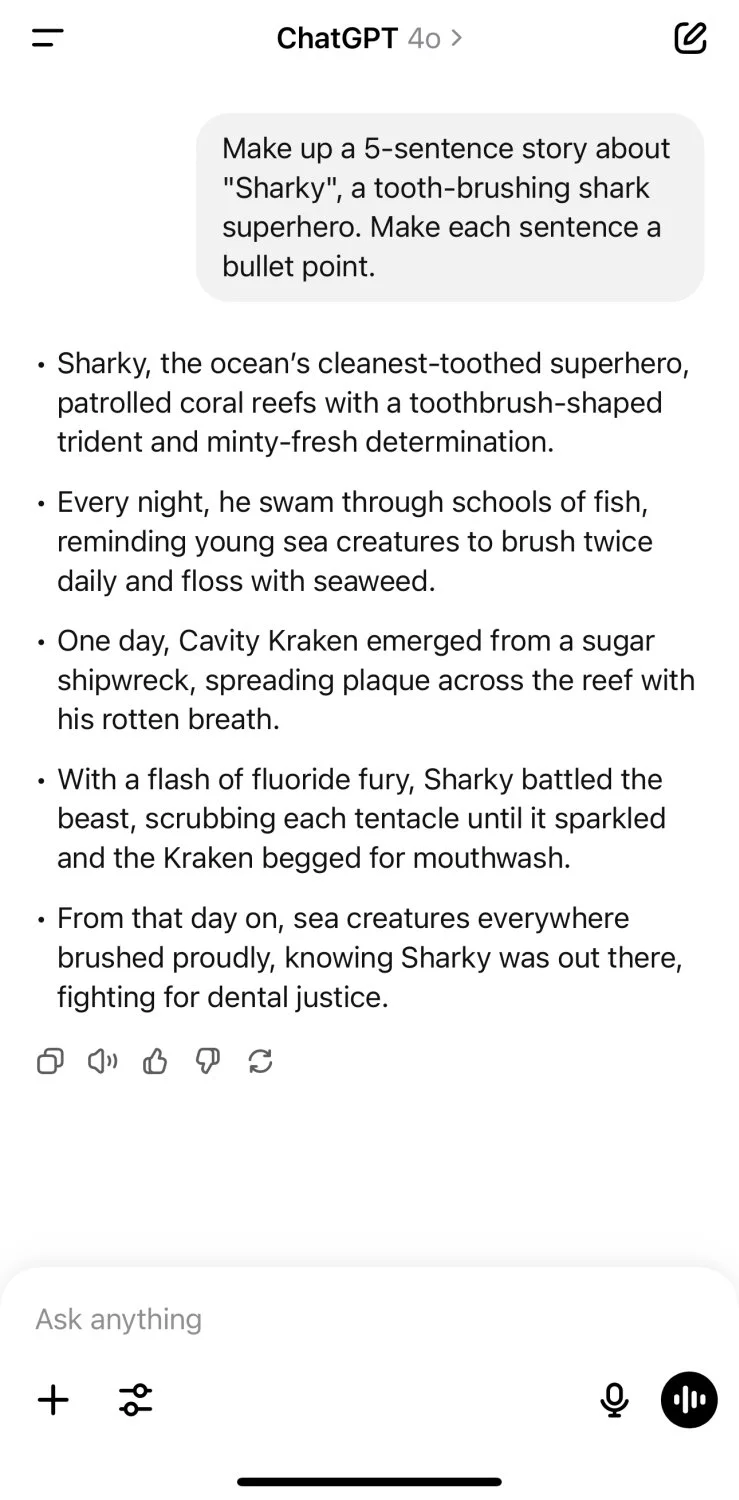
Is Chat GPT free?
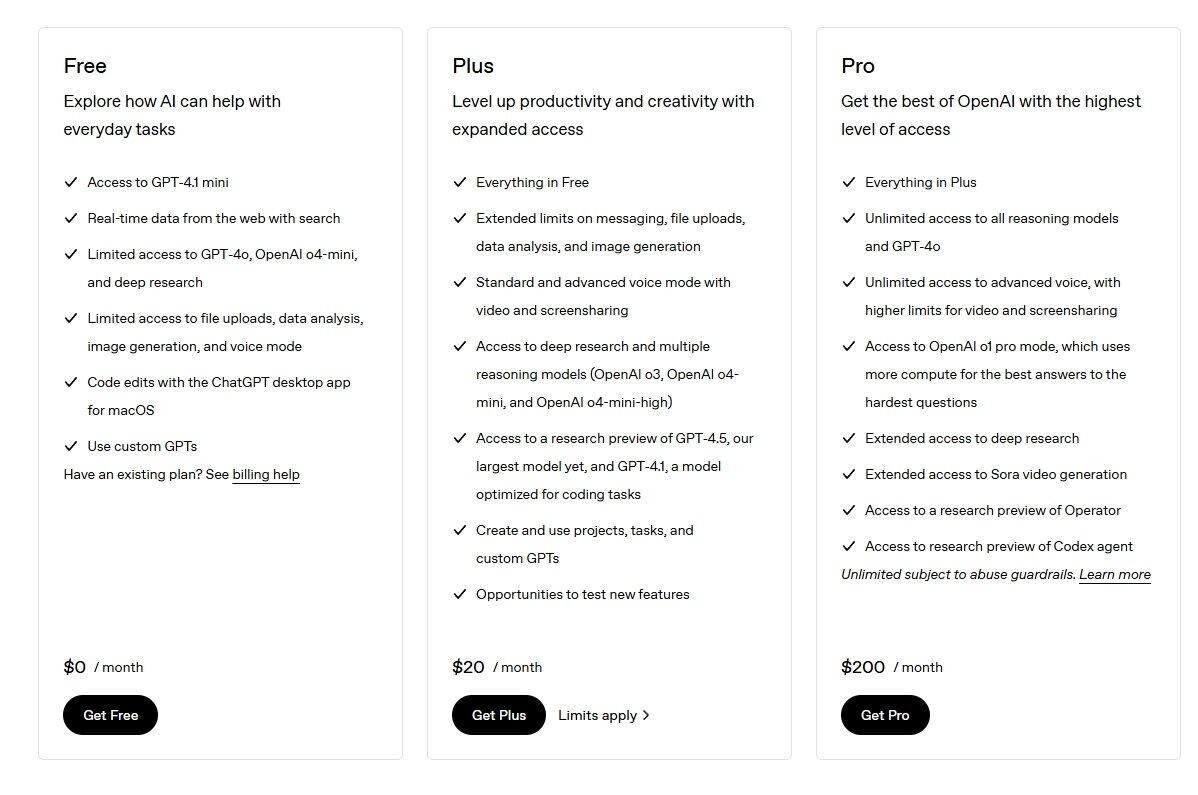
Yes, you can use Chat GPT completely free of charge – especially via the web browser or the mobile app. In the free version, you cannot choose the specific model you use. At the moment, the free version uses GPT-4o mini.
However, it's worth remembering that free access comes with certain limitations:
- Less advanced model and no choice of a specific GPT model – with the Plus version, you get access to models such as: GPT-4o, o3, o4-mini, o4-mini-high, GPT-4.1, GPT-4-1. Chat GPT is constantly evolving, so the model list changes over time.
- Longer waiting times – during peak hours, free version responses may appear more slowly. It also sometimes happens that the number of queries you can send in a short time is limited.
- No access to advanced features – such as Codex.
- No “Deep Dive” feature – in the free version, you can use the Deep Dive option only 5 times per month. With the Plus version, you can use it up to 25 times.
- No project creation – free users do not have the option to create so-called workspaces that allow GPT to access uploaded files and customized instructions.
Responding to frequently asked questions like “unlimited chat gpt” – it's important to note that free access involves some trade-offs. Nevertheless, for many users, it will be sufficient for everyday, light use.
Learn more about the Plus version and plan differences in the article: How much does Chat GPT cost? Check if GPT is free and what the Plus version offers
How to write effective queries (prompts)?
The key to getting valuable responses from Chat GPT is the ability to formulate precise queries – so-called prompts. The more accurately we specify what we expect, the more relevant and tailored the answer will be. It's not magic – it's skillful communication with AI.
Here are some practical rules to help you write effective prompts:
- Be specific – instead of asking generally “write something about health,” it's better to specify “write a healthy eating guide for a desk worker, in a light style with meal examples.”
- Specify the format and length – do you need a description, bullet points, a summary, an essay, a social media post, or for example an email?
- Add context – mention who the response is for (e.g., student, client, teacher), what style it should have (formal, creative, humorous), and its purpose (to inform, encourage, persuade).
- Use a step-by-step approach – if the task is complex, it's better to break it into stages and lead the dialogue with AI gradually.
Example of an effective prompt:
"Create a training plan for a beginner who wants to lose 5 kg in 2 months. The plan should be for 3 days a week, without gym access. Include short cardio exercises and basic strength exercises. Style: motivating and approachable."
This level of detail allows Chat GPT to prepare content that truly meets our expectations – rather than just generally “answering the question.”
If you want to learn how to create even more effective prompts and how to talk with AI so that it truly understands you, read the article: 10 rules for writing effective prompts – how to talk to AI so it understands you
CHECK OUT THE ARTIFICIAL INTELLIGENCE COURSES
Summary
Chat GPT is a powerful tool available to everyone that can significantly accelerate and improve everyday work – not just in the creative industry. It's worth starting with simple use cases, experimenting with different prompts, and learning the possibilities of AI step by step.
If you want to fully harness the potential of this technology, we recommend checking out our AI courses, which will guide you through all the key features and tools – from the basics to advanced applications in design and visualization.
Author

Przeczytaj o programie AI - Artificial Intelligence na naszym blogu
-
![Virtual staging and AI photos in real estate listings - what does the AI Act change?]()
Virtual staging and AI photos in real estate listings - what does the AI Act change?
The AI Act vs real estate. Does virtual staging require an AI label? Find out how to avoid legal pitfalls and properly label photos. -
![How to Label AI Content According to the Law? Ready-Made Formulas for Designers and Archviz Studios.]()
How to Label AI Content According to the Law? Ready-Made Formulas for Designers and Archviz Studios.
How to Legally Label AI Visualizations? Check When a Label Is Mandatory and Copy Ready-Made Formulas for Your Projects. -
![Do you have to label visualizations as AI? What does the AI Act really say and what changes on August 2, 2026?]()
Do you have to label visualizations as AI? What does the AI Act really say and what changes on August 2, 2026?
AI Act from August 2! Do you have to label 3D visualizations as AI? Check where the legal boundary lies between concept and deepfake. -
![AI for furniture manufacturers - See how to create furniture packshots and catalog arrangements with raya.design]()
AI for furniture manufacturers - See how to create furniture packshots and catalog arrangements with raya.design
Packshots without time-consuming sessions? Discover Raya Design. Change upholstery and create arrangements with AI in moments. See how it works!