EN
EN PL
PL ES
ES


Publication date: 13-05-2026 | Update date: 18-06-2026 | Author: Piotr Kurpiewski

-
Online courses
- All
 3ds Max
 AI - Artificial Intelligence
 Blender
 Corona renderer
 GstarCAD
 LayOut
 Photoshop
 Interior Design
 Revit
Revit Sketchup
 Stable Diffusion
 V-ray
V-ray
"Online courses" are comprehensive online training programs that will help you quickly master the software you are interested in.
- Plugins
- 3D Models
- Help
- Articles
Raya - The simplest AI tool for designers: zero prompts, maximum control!
Want to turn a raw 3D model into a photorealistic render without hours of rendering and without writing prompts? Meet Raya – our new app created by designers for designers. Forget tedious parameter setup and complex text commands. Upload your project, choose a style with simple sliders and download the final render in moments. See how it works and claim your free starter credits!
Index
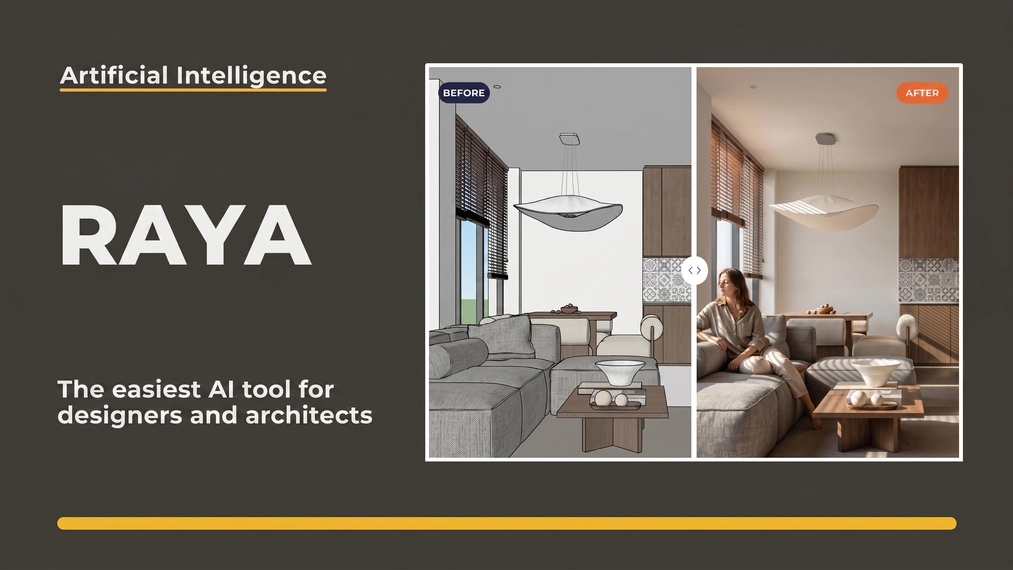
Artificial intelligence in architecture has reached a completely new level, seamlessly shortening the distance between the initial concept and the final render. Tools that only recently required hours of learning, tedious lighting parameter adjustments, and frustrating keyword selection now work in just a few clicks on a simple, raw 3D model. Below we show exactly what the platform raya.design offers and how you can integrate it into your daily project work to save time and convince clients of your visions much faster.
AI in design – do it without complicated commands
Many creators believe that artificial intelligence in architecture and interior design is a revolution, yet the biggest barrier to entry is usually having to precisely describe your vision in words. In Raya, our main advantage is the no-prompt approach. What does this mean in practice?
Instead of writing long text blocks, you use a simple visual interface. Just upload a raw model or 3D sketch (e.g. directly from SketchUp), then select the type of lighting, interior style, or time of day. The system knows what to do by itself. That's why our solution is probably the most intuitive AI-based visualization software on the market.
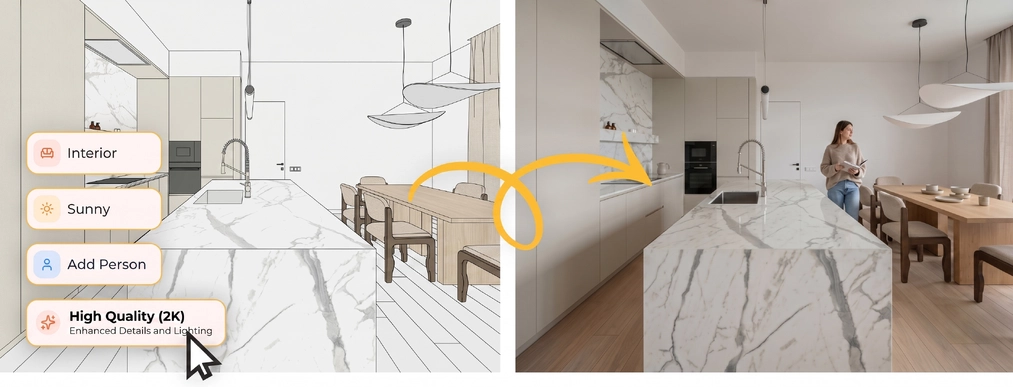
The entire process is completed in three steps: you upload the viewport from your 3D program, choose the style and mood using simple sliders, and after a few seconds you download the finished, photorealistic render. No mysterious text formulas, no repeated command tweaks.
AI interior visualizations – full control over materials and objects
One of the most important features of Raya is the ability to precisely edit materials and objects directly on the final render. This is something most AI tools simply don't offer at this level.
All you have to do is frame-select the desired part of the scene and upload a new texture or material – Raya handles the rest. The tool isolates the object, replaces the material, and adjusts lighting and shadows to match the rest of the scene, maintaining full image consistency. It even works without a cutout background – you don't need to prepare a file in Photoshop beforehand.
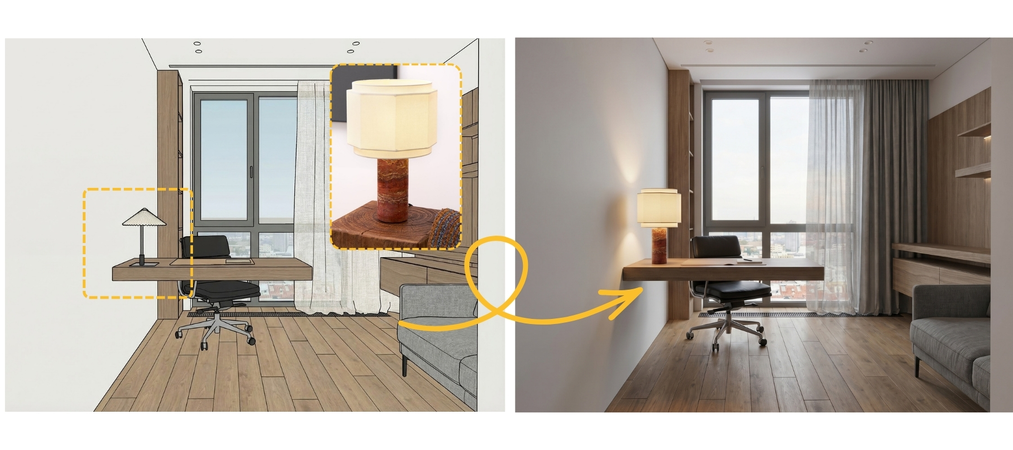
Moreover, you can upload a photo of a specific catalog product and ask Raya to place it in a chosen spot in the scene. This is especially useful when working with real estate clients and furniture manufacturers, where material iterations are a daily routine. A cycle that used to take hours is reduced to minutes.
Homestaging and moodboards – simple 3D visualizations from the first concept
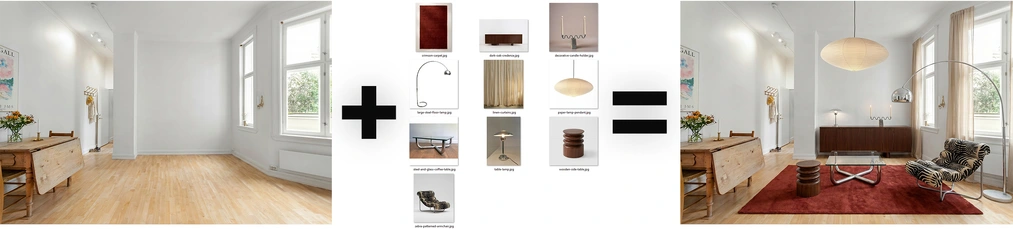
Raya is useful not only at the final stage of a project but also at its very beginning – during the first concept presentation for the client. The homestaging feature lets you upload a photo of an empty space, choose a style, and generate a fully furnished and lit interior in moments. There is also an option to create moodboards – quick 3D visualizations of mood and material palettes that work perfectly in concept meetings with clients.
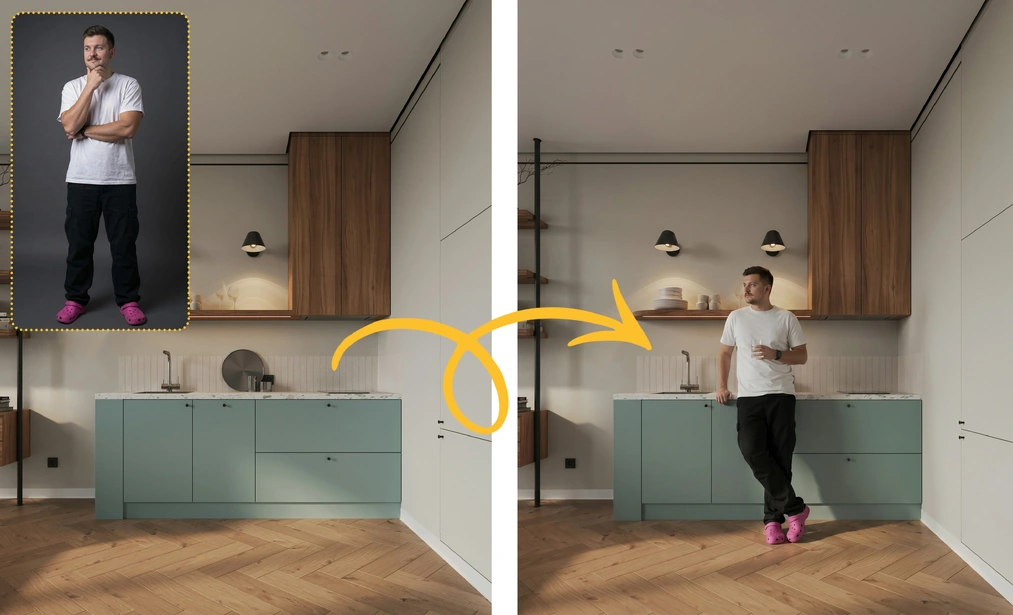
However, adding human figures to the scene makes the biggest impression on clients. A properly placed figure gives the interior scale, enlivens the frame, and makes the space tangible and imaginable. In Raya you can adjust the figure's lighting and perspective to match the rest of the scene so that it looks natural.
Fast 3D visualizations and video animations
Speed of generation does not mean a compromise on quality in raya.design. The default render comes out in 2K resolution – enough for client presentations, project documentation, and social media materials. When the project requires it, with one click you switch to 4K resolution, ready for print or large-format presentations.
A separate, particularly impressive feature is video animation generation from a static image. From a simple render, Raya creates a smooth, photorealistic animation – no separate software needed and no hours of work. A short interior video makes a much stronger impression on clients than a static render and sets your presentations apart from the competition.
Raya – simple credit-based pricing
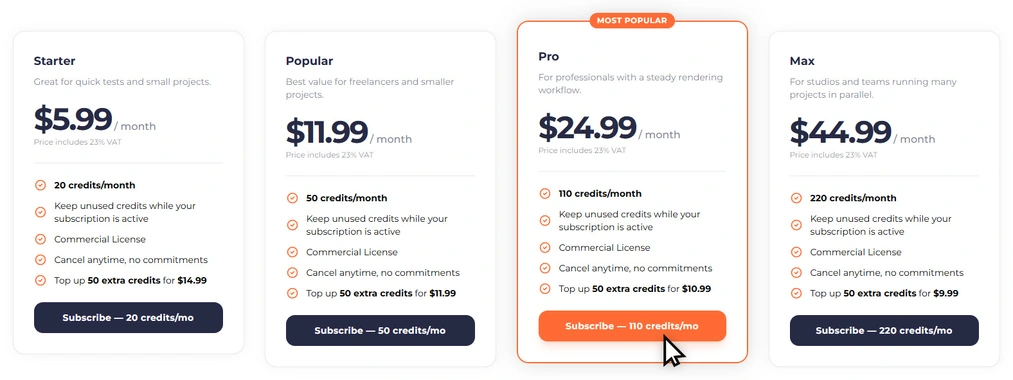
The pricing is based on a simple credit system, tailored both to designers who use the tool occasionally and to those working intensively on multiple projects at once.
A 2K quality render costs 2 credits, 4K – 4 credits, and video generation starts at 6 credits. Subscription packages offer from 20 to 220 credits per month. It's also worth mentioning that every new user receives 20 free starter credits – without the need to provide credit card information.
Who is Raya.design for?
The tool is aimed at architects, interior designers, home stagers, furniture manufacturers, and designers – the broad design industry that needs an efficient tool for creating high-quality visualizations.
Test AI in your projects – start today!
With Raya, we show that advanced artificial intelligence doesn't have to mean complicated operation. Instead of wasting energy battling settings and guessing how to phrase the perfect prompt, you gain room for what matters most – pure creativity. It's an environment that genuinely lightens daily tasks and allows you to present concepts to clients much faster. No matter what project you're working on right now, this tool will seamlessly fit into your existing workflow. But you don't have to take our word for it – it's best to see for yourself.
CLAIM 20 FREE CREDITS ON RAYA DESIGN!
Visit the site, create a free account, and claim your pool of free starter credits. See for yourself how quickly and stress-free you can take your visualizations to a whole new level today!
Author

Przeczytaj o programie AI - Artificial Intelligence na naszym blogu
-
![Virtual staging and AI photos in real estate listings - what does the AI Act change?]()
Virtual staging and AI photos in real estate listings - what does the AI Act change?
The AI Act vs real estate. Does virtual staging require an AI label? Find out how to avoid legal pitfalls and properly label photos. -
![How to Label AI Content According to the Law? Ready-Made Formulas for Designers and Archviz Studios.]()
How to Label AI Content According to the Law? Ready-Made Formulas for Designers and Archviz Studios.
How to Legally Label AI Visualizations? Check When a Label Is Mandatory and Copy Ready-Made Formulas for Your Projects. -
![Do you have to label visualizations as AI? What does the AI Act really say and what changes on August 2, 2026?]()
Do you have to label visualizations as AI? What does the AI Act really say and what changes on August 2, 2026?
AI Act from August 2! Do you have to label 3D visualizations as AI? Check where the legal boundary lies between concept and deepfake. -
![AI for furniture manufacturers - See how to create furniture packshots and catalog arrangements with raya.design]()
AI for furniture manufacturers - See how to create furniture packshots and catalog arrangements with raya.design
Packshots without time-consuming sessions? Discover Raya Design. Change upholstery and create arrangements with AI in moments. See how it works!