Course - Blender + Cycles - Creating a single-family home visualization from scratch

Create photorealistic architectural visualizations using 100% free Blender software!

Course rating: 4.9     (11 reviews)

Course - Blender + Cycles - Creating a single-family home visualization from scratch

What you will learn from this course?

  • Blender basics
  • Importing DXF templates
  • 3D modeling techniques
  • Importing models
  • Material creation
  • Scene lighting techniques
  • Overview of Cycles
  • Achieving depth of field
  • Preparing three lighting variants
  • Render time optimization

This course includes

  • 16 hours 12 minutes
  • 79 video lessons
  • Training materials
  • Level: basic
  • Programs used: Blender 3 + Cycles
Buy permanent access to this course for

74,50 USD
60,57 USD netto

Who is this course for?

The online Blender training for single-family house visualization from scratch is an excellent choice for anyone who wants to embark on a computer graphics adventure. In our course, you'll go from the first launch and configuration of Blender, through modeling a single-family house, creating visualizations under different lighting conditions, all the way to post-production.

Requirements

  • The course participant independently downloads the free Blender software from the program’s website program. Blender is open-source software, and its creators grant unlimited freedom to make changes and encourage collaborative enhancement of the software.

Course participant testimonials Blender + Cycles - Creating a single-family home visualization from scratch

  • Eirini Seleari 14-10-2025 Verified purchase review

    Great course! it teaches you basic elements from scratch in a very simple way.

  • Wojciech Franzblau 01-04-2025 Verified purchase review

    Great job. For someone completely new to the topic, this probably isn’t a good option, but for someone switching from other software and already familiar with the subject, this course will be a great step.

  • Mateusz 17-03-2025 Verified purchase review

    The course is professionally prepared. It allows you to take your first steps in the program and stand out among other people doing visualization right at the start of their journey. In short - to the point and concise, rating 5/5! Thanks!

  • monika bahonko 29-11-2024 Verified purchase review

    The Blender Cycles course was exactly what I needed to start my journey into architectural visualization. The instructor brilliantly explained every step of the process.

  • Paweł 25-11-2024 Verified purchase review

    The course is very good, everything is explained in an understandable way, even for a beginner. I recommend this course if someone wants to start their adventure with architectural visualizations in Blender. Definitely recommended.

  • Piotr Czernek 31-10-2024 Verified purchase review

    The course is okay.

  • Sara Kluba 08-02-2024 Verified purchase review

    A super and very useful course. I highly recommend it. Presented very thoroughly.

  • Aneta 19-08-2023 Verified purchase review

    The course met my expectations. I really found a lot of valuable information in it. After completing this course, you can create really good visualizations. I recommend it!

  • Karolina 18-05-2023 Verified purchase review

    The course is very useful, especially in the initial phase of learning the program; I recommend it.

  • Karol 19-01-2023 Verified purchase review

    A useful course delivered in an accessible way. Worth checking out for beginners as well, as it covers the basics of working in the program. I was pleasantly surprised that even with free software like Blender you can create very nice visualizations.

  • Marcin 27-12-2022 Verified purchase review

    Great course. Everything is explained step by step.

SEE MORE COLLAPSE


What is the course about?

Blender + Cycles Course: Single-Family House Visualization from Scratch - Scope and Course Description

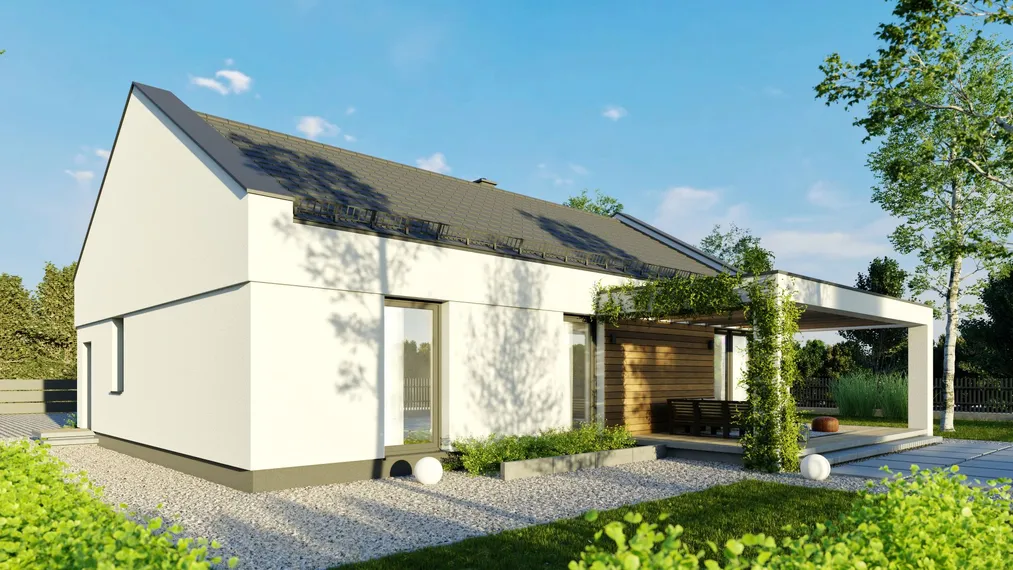
The “Blender + Cycles – single-family building visualization for beginners from scratch” course is dedicated to presenting the workflow for a single-family house project. In this course you will learn the essential basics of navigating the software and how to create a visualization from scratch.

What are the goals of the online Blender + Cycles course for beginners?

In the online Blender + Cycles from-scratch training you will learn to use the software for creating 3D visualizations. After completing the course, you will know the basic tools and functions of the program and be able to use them efficiently. The course was designed for beginners who have no prior experience with graphic software.

What will you learn during our Blender course?

The “Blender + Cycles single-family house visualization course for beginners from scratch” is a comprehensive online training in which we will teach you how to work in the software. Read the detailed course description for architects and designers and see that in our online Blender training we guide you from the first program launch to independently creating a visualization and post-production.

In the Blender + Cycles from-scratch course for beginners, you will learn 3D modeling techniques

Currently, a lot of free 3D models in really good quality are available on the Internet. However, some elements are unique and dependent on a specific project, so the ability to model quickly and correctly is still essential. We will start by modeling the building's mass with all its details, then model the surrounding elements. Most elements we will model based on DWG references. We will create, among others, models such as windows, doors, and chimneys. Using these objects as examples, I will show you useful techniques and explain the basic principles of correct modeling.
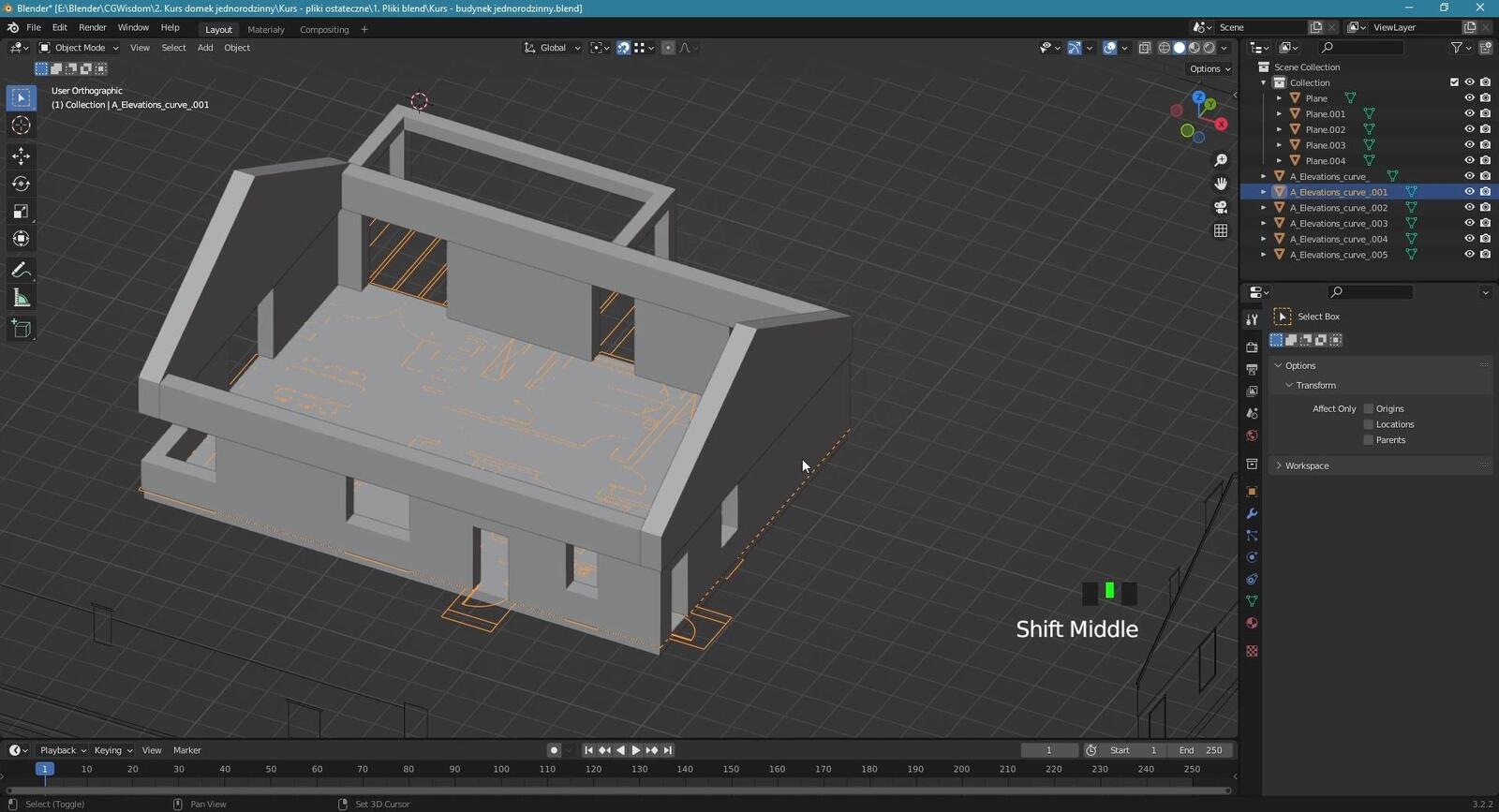
Blender + Cycles Single-Family House Visualization from Scratch - 01

In our Blender from-scratch online training you will learn to import models

From the course, you will learn how to import models into Blender in a very simple way. Many models already come in .blend format with ready-made materials, but sometimes you need to use universal formats such as .obj and .fbx. This, too, is not a problem for Blender.

During the online Blender for beginners from scratch course, you will gain knowledge about materials and their creation

I will discuss different types of materials and methods for creating them. You will learn what PBR materials are and how to create them, how to easily handle plastic, metal, and glass materials, as well as how to create materials using alpha textures, which allow you to quickly “cut out” various shapes, such as a leaf. You will also learn how to import and quickly set up a realistic plaster material. From the course, you will also learn where to find high-quality, free textures.

You will learn about lighting options in Blender

One of the most important, if not the most important aspects is scene lighting. Even the best models and materials will not produce a satisfying result if the scene lighting is poorly done. In the course, I will show you how to easily create very good, natural lighting. We will set up daytime, afternoon, and nighttime lighting.
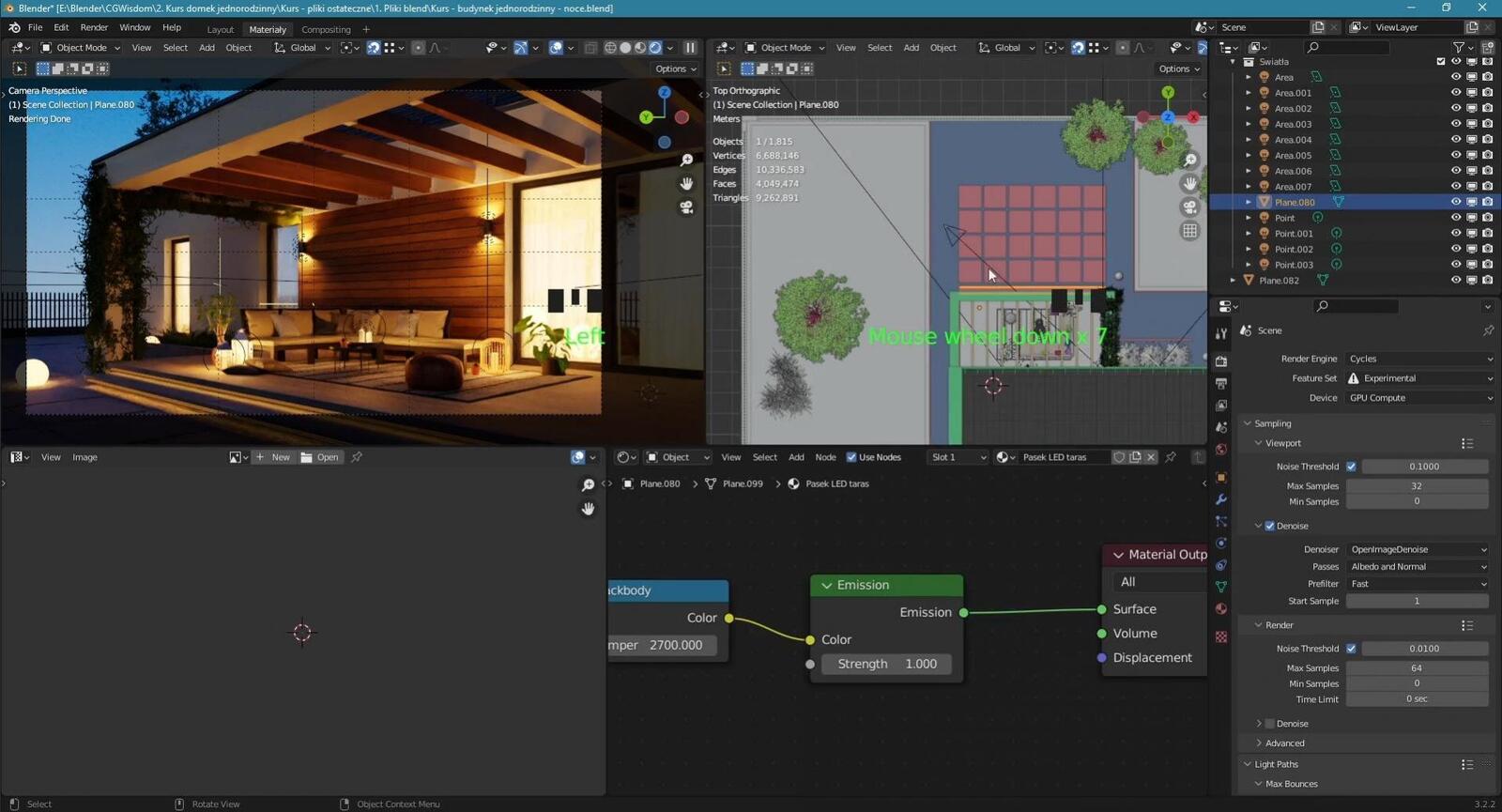
Blender Course - Single-Family House Visualizations - Lighting Techniques

Visualization Post-Production

Post-production is the finishing touch of our visualization. It brings out extra details and makes the result even better. You will learn a simple and effective post-production method in Affinity Photo.
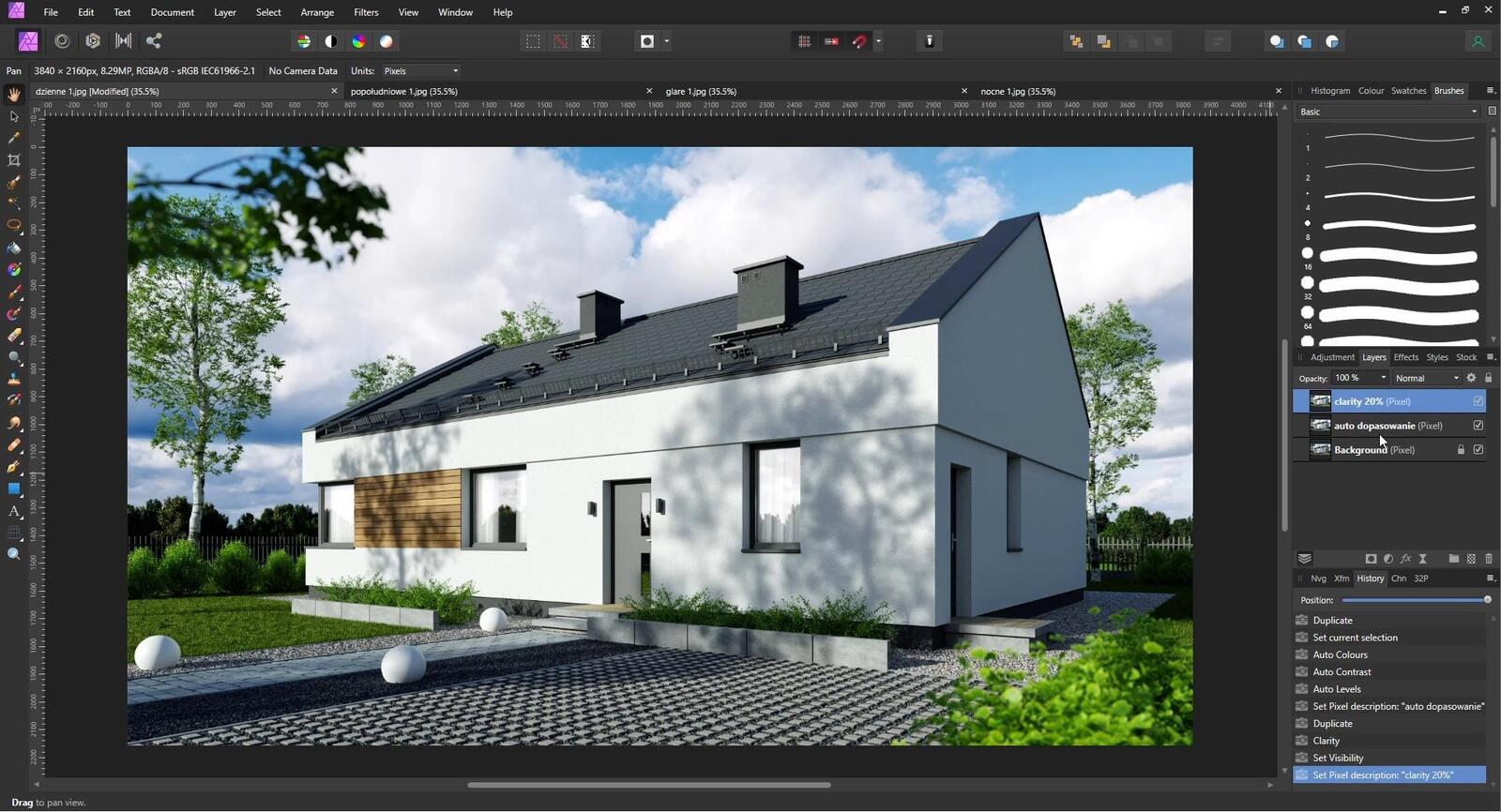
Blender + Cycles Single-Family House Visualization from Scratch - Post-Production

Why is it worth completing this online Blender + Cycles basics training?

Blender is an open-source program. In practice, this means it is completely free. You can use it in your professional work as a graphic artist or designer, or as a student in class. Blender can handle all tasks related to 3D graphics.

Course level of Blender + Cycles - for beginners

Our online computer graphics training is intended for people who have not previously been in contact with Blender. Don't worry if you have no experience with 3D visualizations. We will teach you to use Blender efficiently and effectively so that you can independently create photorealistic visualizations.

Who is the Blender + Cycles online training for? For designers, architects, and more!

Blender is free software widely used in the creative industry. The portfolios of interior designers, architects, and computer graphic artists will definitely benefit from the additional skill of working in Blender.
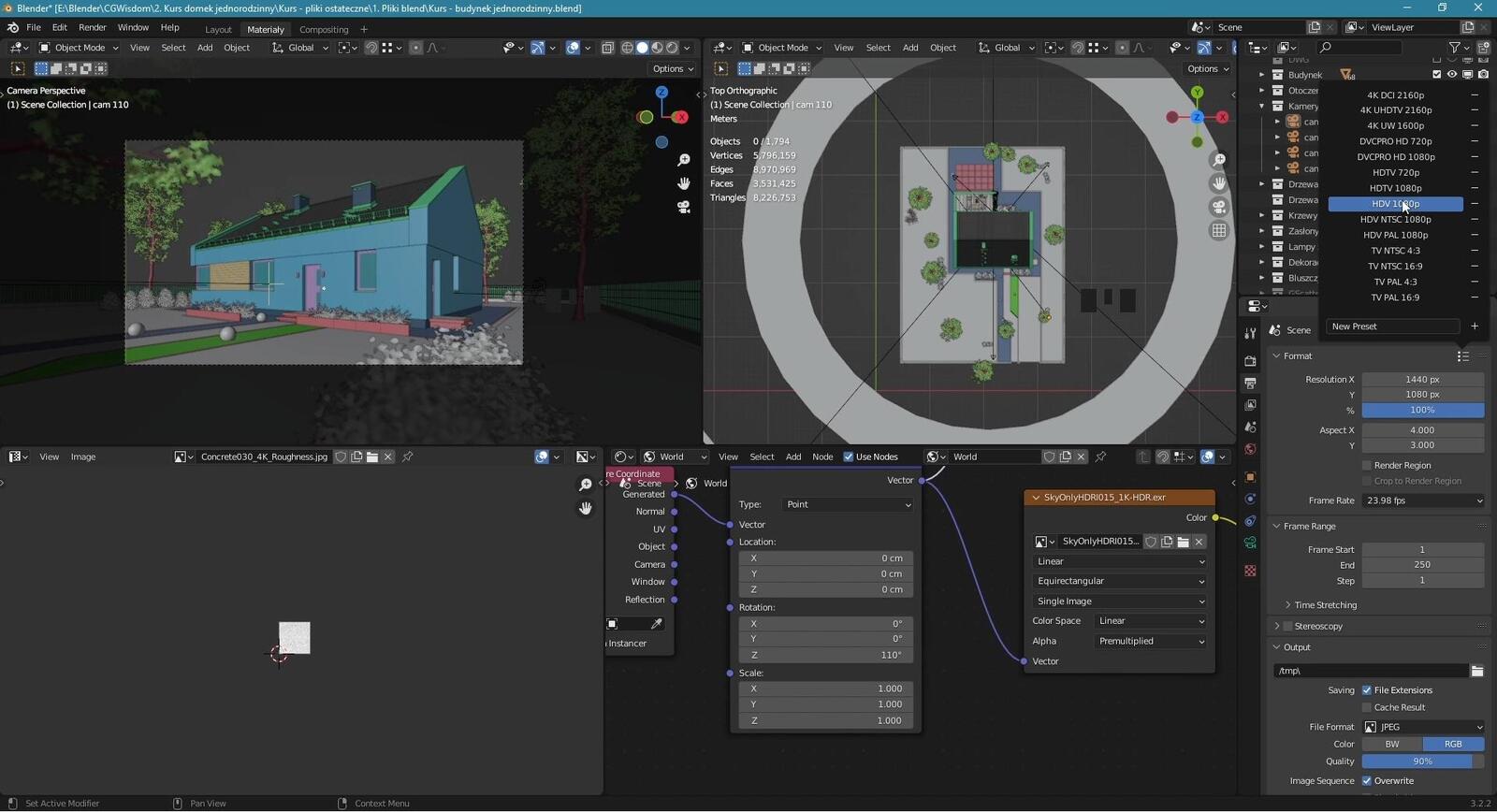

When is it worth completing a Blender + Cycles software course?

If you are tying your professional future to computer graphics, or want to create photorealistic visualizations for fun, it is worth learning Blender. The software's open license makes it widely used in both commercial and private projects. Unfortunately, the rather high entry barrier and unfriendly interface can discourage potential users. All the more reason to take advantage of a professional trainer's help and complete an online training.

Is it worth taking the Blender + Cycles training for graphic artists?

Yes, the Blender single-family building visualization course is a good choice if you want to learn proven methods of working in Blender + Cycles. You can learn the working methods of an experienced professional and not have to discover them on your own. Participating in our online training will save you a lot of time.

On the other hand, if you prefer to work alone and use trial and error to find the most efficient way to work, do not buy our Blender course for computer graphic artists.

Personally, I recommend relying on an experienced trainer and more effective learning.

Online Blender Course - Single-Family House Visualization from Scratch - Course Program

In our Blender + Cycles online training, the following topics are covered:

  • First launch and program setup
  • Navigating the program and essential tools for creating visualizations
  • Efficient modeling techniques
  • Creating realistic models
  • Importing models
  • Creating your own materials
  • Cameras – adding and configuration
  • Depth of Field (DOF)
  • Overview of the Cycles rendering engine
  • Overview of scene lighting methods
  • Creating realistic types of lighting: daytime, afternoon, nighttime
  • Render time optimization – using a denoiser
  • Post-production using Affinity Photo

How long does the beginners Blender course last?

The recordings in our single-family house visualization training last as much as 16 hours. However, remember that aside from watching the recordings, you also need time for independent practice and learning to work in the program.

SEE MORE COLLAPSE

Video list

  • 00.01 - Introduction Watch a free lesson3 min 7 s
  • 01.01 - First Blender Launch Watch a free lesson3 min 26 s
  • 01.02 - Interface 2 min 46 s
  • 01.03 - Navigation 1 min 40 s
  • 01.04 - Units 4 min 31 s
  • 01.05 - Views 7 min 31 s
  • 01.06 - Cursor 4 min 3 s
  • 01.07 - Origin 4 min 40 s
  • 02.01 - Adding objects 3 min 3 s
  • 02.02 - Moving, rotating, scaling 6 min 0 s
  • 02.03 - Copying objects 4 min 40 s
  • 02.04 - Snaps 7 min 33 s
  • 02.05 - Keyboard shortcuts 5 min 43 s
  • 03.01 - Vertex, edge, polygon 7 min 29 s
  • 03.02 - Dividing solids into smaller elements 5 min 49 s
  • 03.03 - Insert and extrude functions 5 min 3 s
  • 04.01 - Array modifier 5 min 44 s
  • 04.02 - Bevel modifier 7 min 58 s
  • 04.03 - Mirror modifier 5 min 19 s
  • 04.04 - Solidify modifier 3 min 14 s
  • 04.05 - Subdivision surface modifier 5 min 34 s
  • 05.01 - Add-ons 6 min 1 s
  • 06.01 - Creating custom keyboard shortcuts 3 min 50 s
  • 06.02 - Creating custom workspaces 10 min 35 s
  • 07.01 - Importing reference images 13 min 15 s
  • 07.02 - Modeling exterior walls 20 min 59 s
  • 07.03 - Modeling interior walls 5 min 22 s
  • 07.04 - Modeling windows 15 min 8 s
  • 07.05 - Modeling doors 28 min 28 s
  • 07.06 - Modeling roof tiles and ridge tiles 24 min 35 s
  • 07.07 - Modeling gutters 20 min 3 s
  • 07.08 - Modeling chimneys 25 min 58 s
  • 07.09 - Modeling metal flashings 11 min 17 s
  • 07.10 - Modeling window sills - edit 4 min 47 s
  • 07.11 - Modeling pergola beams 12 min 14 s
  • 07.12 - Importing additional roof elements 15 min 24 s
  • 07.13 - Modeling terrace 15 min 23 s
  • 07.14 - Modeling cladding boards 6 min 7 s
  • 07.15 - Organizing the scene 7 min 7 s
  • 08.01 - Site development - importing reference images 9 min 59 s
  • 08.02 - Modeling curbs 29 min 39 s
  • 08.03 - Modeling retaining walls 2 min 36 s
  • 08.04 - Modeling sidewalk slabs 4 min 50 s
  • 08.05 - Modeling fences 15 min 54 s
  • 08.06 - Modeling wicket and gate 10 min 26 s
  • 09.01 - Plastic material 14 min 35 s
  • 09.02 - Metal material 3 min 56 s
  • 09.03 - PBR material 20 min 54 s
  • 09.04 - Glass material 6 min 12 s
  • 09.05 - Leaf material 6 min 44 s
  • 10.01 - Mapping 16 min 9 s
  • 10.02 - Creating materials 45 min 49 s
  • 10.03 - Creating materials - displacement 17 min 18 s
  • 10.04 - Creating materials - brightness variation 17 min 33 s
  • 11.01 - Adding cameras 23 min 58 s
  • 11.02 - DOF settings 8 min 26 s
  • 12.01 - Importing models - theory 15 min 4 s
  • 12.02 - Importing .obj models - Vizpeople trees 19 min 36 s
  • 12.03 - Importing .blend models 3 min 18 s
  • 13.01 - Placing vegetation in the scene 24 min 24 s
  • 13.02 - Placing terrain models 24 min 21 s
  • 13.03 - Creating ivy 12 min 58 s
  • 14.01 - Gscatter Add-on - grass placement 24 min 48 s
  • 14.02 - Placing background trees 13 min 59 s
  • 15.01 - Cycles - overview 21 min 42 s
  • 16.01 - Types of lights in Blender 17 min 0 s
  • 16.02 - Daytime lighting settings 51 min 51 s
  • 16.03 - Denoiser settings 3 min 12 s
  • 16.04 - Test renders of daytime lighting 14 min 8 s
  • 16.05 - Daytime shot adjustments 15 min 52 s
  • 17.01 - Afternoon lighting settings 21 min 9 s
  • 17.02 - Test renders and adjustments of the afternoon shot 9 min 40 s
  • 18.01 - Night shot settings - HDRI A 7 min 30 s
  • 18.02 - Night shot settings - additional lights A 28 min 25 s
  • 19.01 - Final renders of the daytime shot 2 min 59 s
  • 19.02 - Final renders of the afternoon shot 2 min 14 s
  • 19.03 - Final renders of the night shot 4 min 49 s
  • 20.01 - Post-production in Affinity Photo 24 min 50 s
  • 20.02 - Summary 2 min 29 s
  • blender-single-family-house-additional-files-01
  • blender-single-family-house-additional-files-02
  • blender-single-family-house-additional-files-03
  • blender-single-family-house-additional-files-04
  • blender-single-family-house-additional-files-05
  • blender-single-family-house-additional-files-06

SEE MORE ZWIŃ

The course covers topics such as:

  • Basics of Blender
  • Importing DXF underlays
  • 3D modeling techniques
  • Importing models
  • Creating materials
  • Scene lighting techniques
  • Overview of Cycles
  • Achieving depth of field
  • Preparing three lighting variants
  • Optimizing render times

                  Author

                  Jarosław Piszczek Architect, 3D Graphic Designer rating: 5  

                  Graduate of the Faculty of Civil Engineering at the Cracow University of Technology. A certified constructor by profession, however, he is engaged in 3D graphics specializing in visualization, particularly in architecture, at Do It Studio. He uses Blender for his work. More information about the author and his work can be found on the website www.doit-studio.com


                  Frequently Asked Questions

                  Will I receive a certificate after completing the course?
                  Yes, after completing the course, you can download a PDF certificate, which you can save on your computer. Each course comes with a separate certificate, which is visible in the top right corner of the course's subpage in the customer panel.
                  Are the courses available in DVD format or only digitally?
                  The courses are available only in digital format. This allows for instant access after the payment is processed.
                  How quickly will I get access to the course?
                  You will receive access to the course within a few minutes after making the payment.
                  I have chosen a course I want to buy. How do I proceed?
                  To make a purchase, you need to create an account where the course will be made available. Then, select the course you are interested in and add it to the cart. To view the cart's contents, click on "My cart". Here, you can review your order, check if everything is correct, select whether you want a VAT invoice, and choose a payment method. After accepting the terms and conditions and clicking "Order", you will be redirected to the PayU service, where you can make the payment.

                  Once the payment is processed, the course will be available in the "My Courses" section of the account used to place the order.
                  How can I pay for the selected course?
                  You can make a payment via PayPal or credit card.
                  How long will the purchased course be available in my account?
                  Purchased materials will be available in your account without a time limit.
                  Can I download a purchased course?
                  No, downloading courses is not possible. Courses can only be accessed online. However, you can download additional files attached to the courses.

                  Read about the Blender program on our blog

                  If you're interested in working in Blender, learn more about creating 3D models.

                  Go to the blog


                  Success! The course has been added to your cart.

                  Go to cart

                  Aby dodać opinię, zaloguj się na swoje konto