EN
EN PL
PL ES
ES


Publication date: 13-05-2026 | Update date: 13-05-2026 | Author: Piotr Kurpiewski

-
Online courses
- All
 3ds Max
 AI - Artificial Intelligence
 Blender
 Corona renderer
 GstarCAD
 LayOut
 Photoshop
 Interior Design
 Revit
Revit Sketchup
 Stable Diffusion
 V-ray
V-ray
"Online courses" are comprehensive online training programs that will help you quickly master the software you are interested in.
- Plugins
- 3D Models
- Help
- Articles
Nano Banana 2 vs PRO: Which AI model to choose for visualization?
Does a faster AI model always mean better visualization quality? In this article, we take a closer look at Google's new Nano Banana 2 and compare it with the powerful Pro version. Check out our tests based on SketchUp models and find out which variant to choose to maintain full spatial consistency in your projects.
Index
Faster AI doesn’t always mean better visualizations. We’re putting Google’s new models under the microscope from an architectural perspective. Which one will give you full control over your project? At the end of February, the tech world experienced another, albeit quiet update. Google quietly changed the default image-generating model in the Gemini interface. While in everyday use this change may have been felt mainly as a pleasant speed boost in generating graphics, we – professionals, architects, and interior designers immediately noticed the difference in visualization quality and how the artificial intelligence interprets our complex spatial commands.
Nano Banana 2 – what is it and what does it offer?
To fully understand what we’re dealing with in the new interface, we first need to answer a fundamental question: What is Nano Banana 2? Simply put, it’s the latest solution in Google’s family of multimodal generative models. It was designed in response to the growing demand for mass-scale, lightning-fast image generation. This model combines the capabilities of the Pro model with dizzying speed, but that’s not all. It stands out above all for its advanced world knowledge, allowing it to better understand the broader context of queries.
- Working with text: The model reproduces text on images with high precision and excels at translations.
- Subject consistency: Even in complex compositions, when given many objects (e.g., up to 14 elements), it effectively maintains consistency.
- New resolutions and formats: Nano Banana 2 has gained a powerful asset in supporting a wide range of resolutions – from just 512 pixels up to an impressive 4K – and new aspect ratios such as 4:1, 1:4, and 8:1.
- Cost optimization: It is twice as cheap to operate as the Pro version (about 6–7 cents per image in AI Studio).
Practical test: Generating visualizations from SketchUp.
Technical specifications sound promising, but how does the model perform in practice? We decided to test it by conducting a rigorous trial based on a black-and-white SketchUp render.
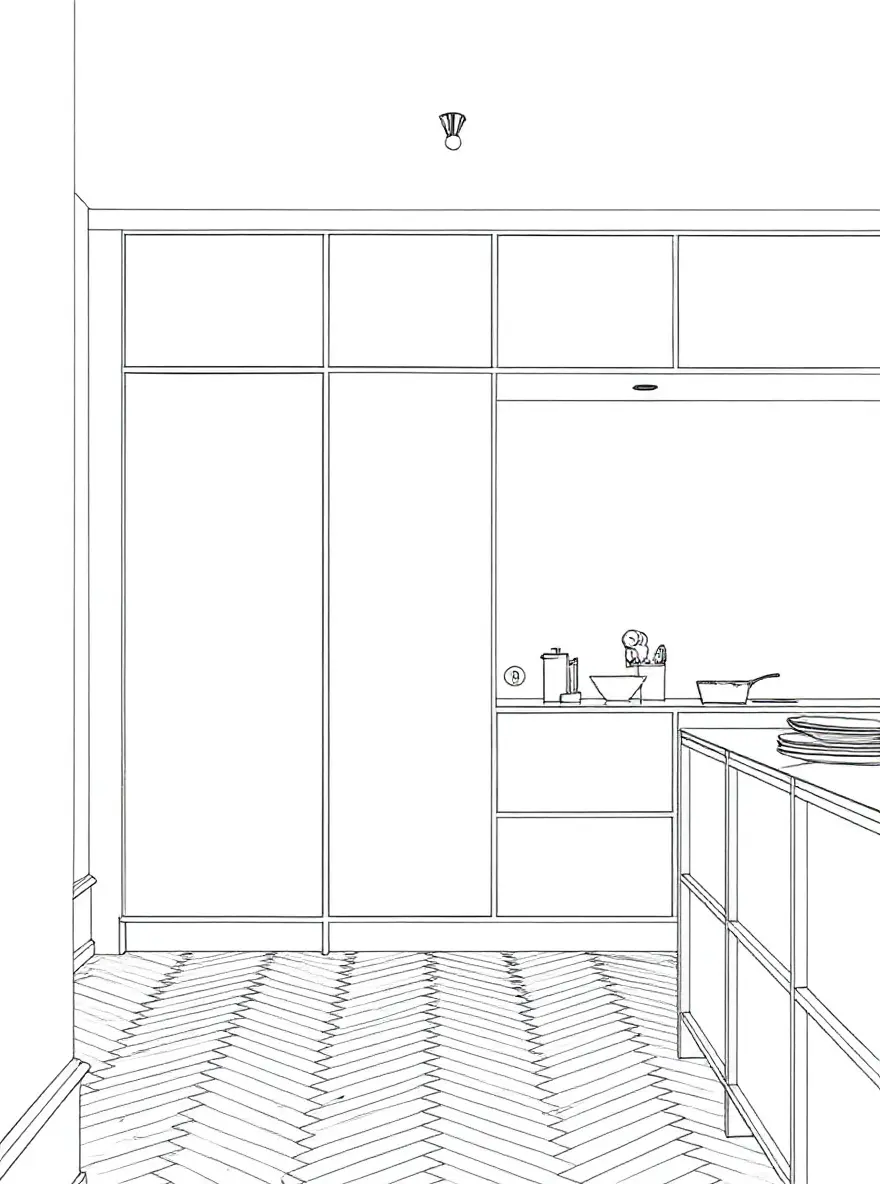
Besides the graphic, we added a clear and precise prompt. Our intention was simple: we instructed the AI to apply specific material finishes while strictly preserving the original geometry, composition, and proportions of the design.
Before we analyze the results, it’s worth mentioning the available working modes that affect how the model processes our commands. By default, the system uses Quick Mode, the “minimally thinking” variant focused on rapid results. However, if we need deeper analysis, we can choose Thinking Mode or Pro Mode. In these settings, Nano Banana 2 works much longer, attempting to analyze every aspect of the task. This is the highest level of AI “thinking” available in this interface. Let’s see if these modes were enough to meet the architect’s requirements.
Nano Banana Pro or Nano Banana 2 – which model delivers better results?
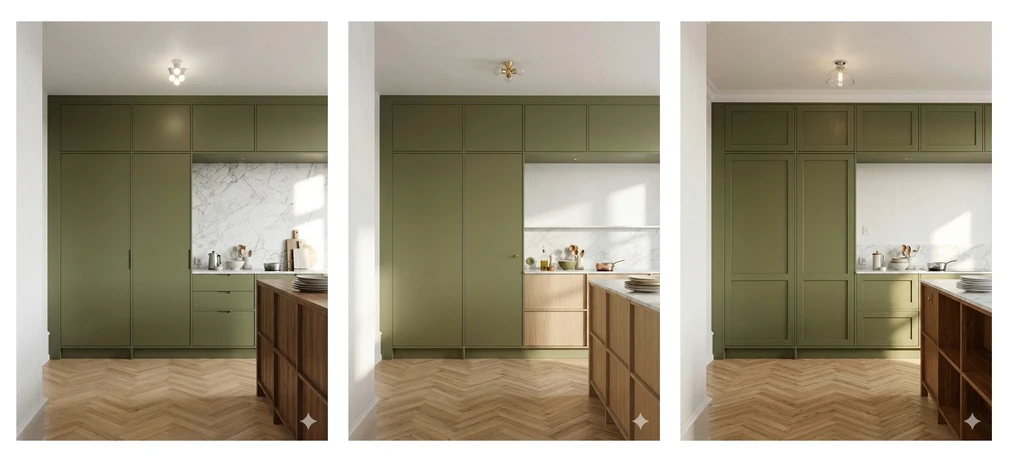
The tests yielded quite clear conclusions. For precise architectural work, Nano Banana 2 often proves to be a problematic tool. We noticed a very strong tendency to “hallucinate” and ignore strict geometric guidelines. What does this mean in a designer’s workshop?
- The model arbitrarily adds random geometries that do not exist in our 3D database.
- The tool fails to maintain consistency of key elements. During tests, we observed that the ceiling lamp looked completely different in each generation, making it impossible to preserve design consistency.
- It interprets the workspace design very loosely—for example, the milling details and kitchen cabinet layouts underwent drastic and unintended modifications.
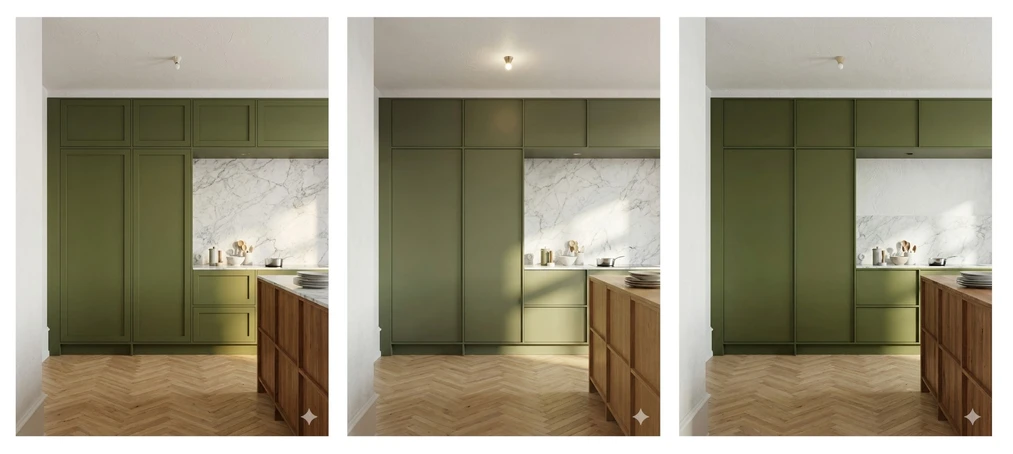
Nano Banana Pro behaves completely differently. This model maintains incredible loyalty to the imposed design. It precisely adheres to the guidelines set during prompt creation and rarely “invents” unplanned details. The Pro version definitely wins where full control over the spatial architecture is crucial.
CHECK OUT AN ALTERNATIVE TO NANO BANANA – DISCOVER RAYA
How to use Nano Banana Pro in the Gemini interface?
Unfortunately, Google has applied a business barrier here. In the standard chat window, you cannot directly select the higher model version on the first interaction. Here’s a step-by-step guide on how to access the Pro variant:
- Start with the basic generation: Enter your prompt and let the default, fast model (Nano Banana 2) produce the first visualization proposal.
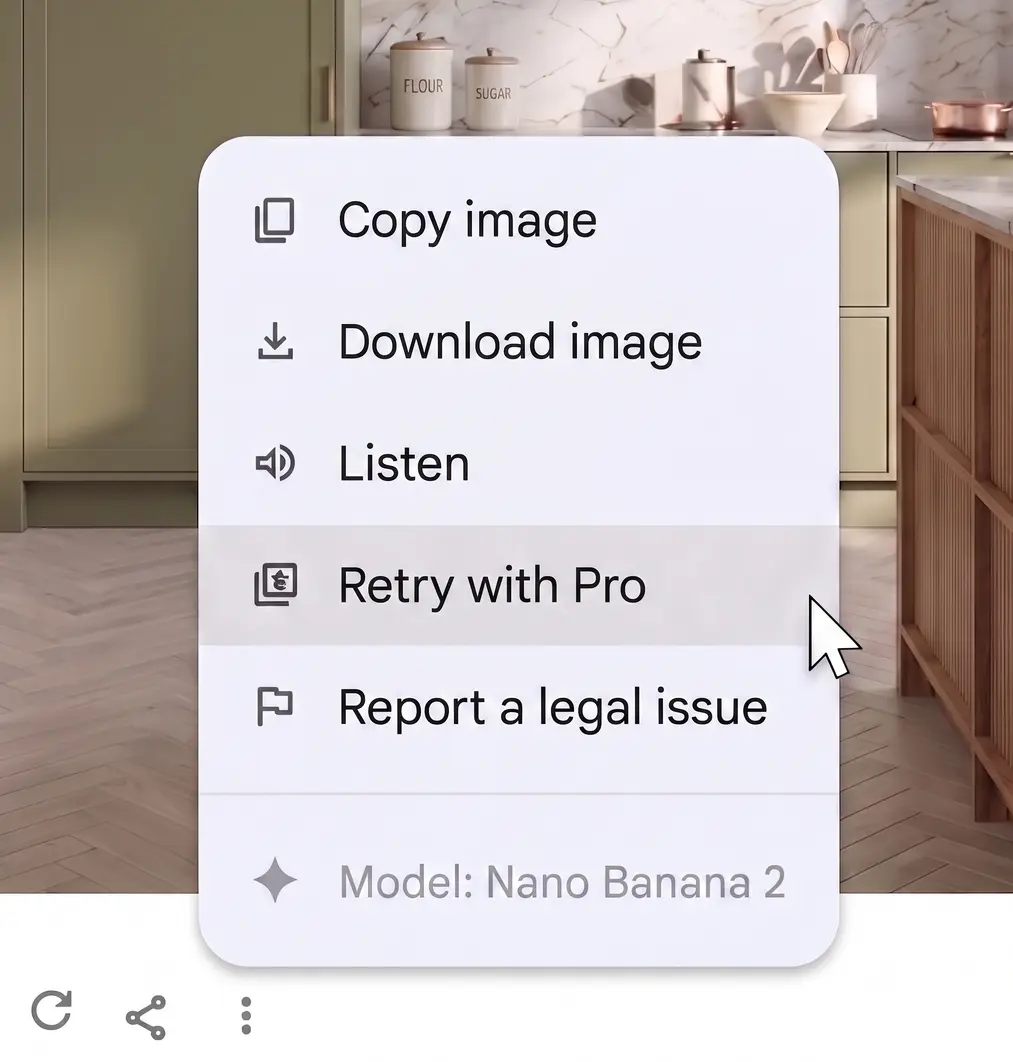
- Reveal the hidden menu: Click the three-dot icon on the generated file.
- Activate Pro mode: Select the "Retry with Pro" option.
- Note: The retry function requires a Google Pro or Ultra plan.
Google AI Studio – what is it?
For designers who refuse to compromise, there is a much more open environment – Google AI Studio. This is a panel dedicated to developers and advanced creators. However, it is worth noting that the beginnings in AI Studio can seem a bit complicated because they require setting up a special API key and linking your own credit card. If you want to go through these technical steps of creating an account step by step, I encourage you to watch my video entitled “Nano Banana Pro for Free”.
Although using these models is now paid, this video remains the most detailed guide to the technical aspects of account and API configuration.
After the initial setup, AI Studio immediately puts full creative control in your hands. Unlike the standard interface, here you can preselect the leading generative model, choosing the flagship Nano Banana Pro or the faster, configurable Nano Banana 2 variant. The tool provides a temperature slider for precise control over the AI’s “creativity”. At lower values, the AI sticks more faithfully to your prompt’s premise. Finally, there is an option to select the thinking level (quick or high mode), which forces the algorithm to perform a longer and much deeper analysis of the task’s spatial geometry.
Nano Banana 2 vs. PRO – Feature Comparison
| Model Feature | Nano Banana 2 | Nano Banana Pro |
|---|---|---|
| Main application | Quick concepts, moodboards, text-based images | Photorealistic, precise architectural visualizations |
| Geometry fidelity | Frequent hallucinations, loss of detail consistency | High precision and adherence to design assumptions |
| Base cost | ~ 6–7 cents per generation | ~ 13 cents per generation |
Practical Application: When Is It Worth Choosing the Nano Banana 2 Model?
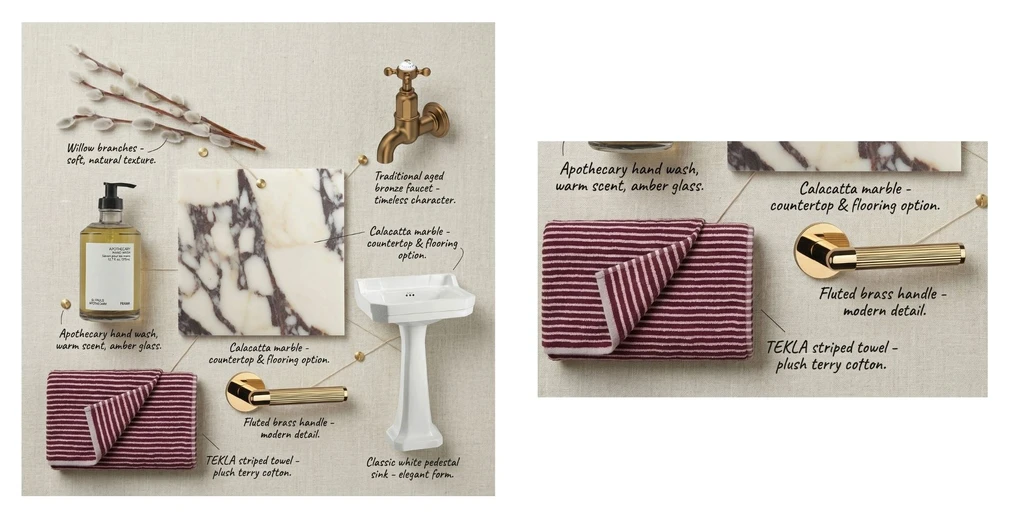
However, it’s worth looking at Nano Banana 2 from a broader perspective, because in certain scenarios this model offers unique advantages over the older Pro version. Its indisputable asset lies in its advanced typography capabilities and its ability to naturally embed text directly into the generated composition. A perfect confirmation of this thesis was our flat-lay moodboard test.
Nano Banana 2 not only instantly created an aesthetic sample layout but also – which remains a challenge for many AI models – flawlessly and typo-free labeled text annotations for each material. The entire composition maintained impeccable readability and visual consistency, making this model ideal for quickly creating professional inspiration boards.
Which AI model is ultimately best to choose for your projects?
The final conclusion is obvious. The new Nano Banana 2 model is a fantastic tool for quickly creating concepts, inspiration boards, and visual sketches with text elements. However, in technical disciplines where unwavering base geometry and physical object consistency come first, the Pro version unquestionably remains the king of photorealism. The choice between models depends primarily on the work stage and the goal we want to achieve.
The world of AI changes week by week. If you don’t want to grope around in the dark and want artificial intelligence to become your best assistant, check out our AI visualization and video course. There, I explain intricate technological issues in accessible, human language.
And if you’re looking for a tool that lets you create AI visualizations and videos without any introduction, without complicated prompts and advanced theory, then test our latest tool on the site: www.raya.design. Raya allows you to turn simple scenes from 3D programs into photorealistic visualizations. It will even create moodboards and animations for you! We’ve prepared free credits for new users.
Author

Przeczytaj o programie AI - Artificial Intelligence na naszym blogu
-
![Virtual staging and AI photos in real estate listings - what does the AI Act change?]()
Virtual staging and AI photos in real estate listings - what does the AI Act change?
The AI Act vs real estate. Does virtual staging require an AI label? Find out how to avoid legal pitfalls and properly label photos. -
![How to Label AI Content According to the Law? Ready-Made Formulas for Designers and Archviz Studios.]()
How to Label AI Content According to the Law? Ready-Made Formulas for Designers and Archviz Studios.
How to Legally Label AI Visualizations? Check When a Label Is Mandatory and Copy Ready-Made Formulas for Your Projects. -
![Do you have to label visualizations as AI? What does the AI Act really say and what changes on August 2, 2026?]()
Do you have to label visualizations as AI? What does the AI Act really say and what changes on August 2, 2026?
AI Act from August 2! Do you have to label 3D visualizations as AI? Check where the legal boundary lies between concept and deepfake. -
![AI for furniture manufacturers - See how to create furniture packshots and catalog arrangements with raya.design]()
AI for furniture manufacturers - See how to create furniture packshots and catalog arrangements with raya.design
Packshots without time-consuming sessions? Discover Raya Design. Change upholstery and create arrangements with AI in moments. See how it works!