EN
EN PL
PL ES
ES


Publication date: 17-12-2025 | Update date: 17-12-2025 | Author: Piotr Kurpiewski

-
Online courses
- All
 3ds Max
 AI - Artificial Intelligence
 Blender
 Corona renderer
 GstarCAD
 LayOut
 Photoshop
 Interior Design
 Revit
Revit Sketchup
 Stable Diffusion
 V-ray
V-ray
"Online courses" are comprehensive online training programs that will help you quickly master the software you are interested in.
- Plugins
- 3D Models
- Help
- Articles
People in visualizations: how to add realistic characters in Nano Banana Pro?
Are you tired of pasted, floating figures in your visualizations? See how Nano Banana Pro solves this problem by generating people with perfect shadows and lighting. In this article, you'll read about methods for quickly adding so-called background characters based on a simple text prompt and inserting specific silhouettes into interiors (e.g., an investor). You'll also learn tricks for achieving an architectural motion blur effect and see how, with a single click, you can turn a static image into a video using the Google Veo model.
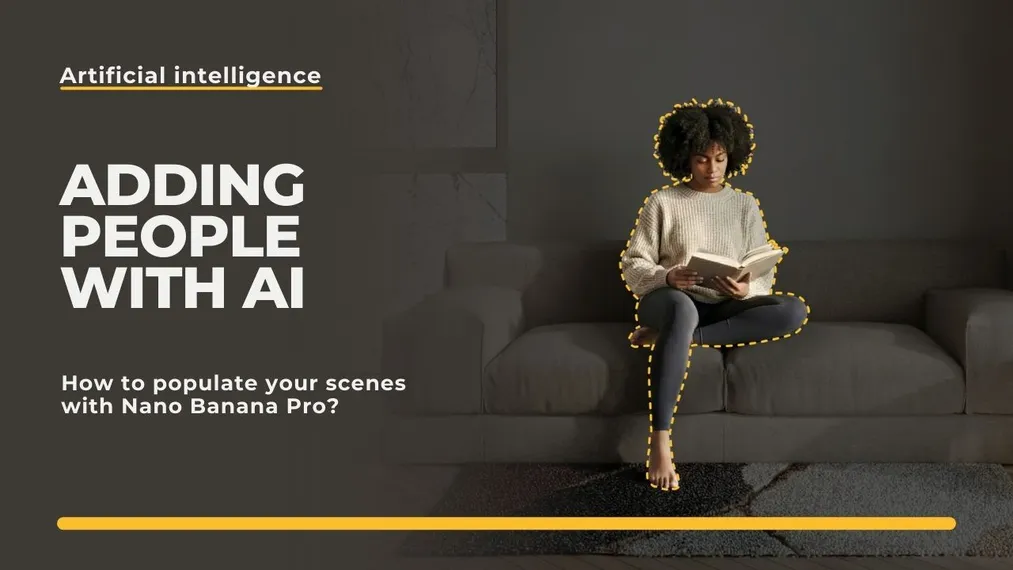
You have the perfect render. Light plays on the floor, materials are photorealistic, the composition is flawless. Time for the final polish – staffage, meaning adding people (though perhaps not as small as in the traditional staffage technique). You open Photoshop, paste in a figure from the popular "cutout people" library and… the magic is gone. The figure looks flat, it hovers above the floor, and the shadow falls in a different direction than the rest of the scene.
Sound familiar? This is the age-old problem of visualizers. Fortunately, artificial intelligence is changing the game. Nano Banana Pro doesn’t “paste” people – it generates them within the three-dimensional space of the image. In this article, I will show you how to populate your visualizations while maintaining perfect realism, how to place specific figures, and even how to set them in motion using the Veo video model.
If you want to first learn how to edit just the furniture and decor, check out my previous guide: AI Homestaging: How to Change Interior Decor in a Finished Photo?.
Why Pasting People in Photoshop Is a Thing of the Past?
The traditional post-production method requires a lot of skill. To make a pasted two-dimensional figure (2D) look good in a three-dimensional scene (3D), you have to manually paint the contact shadow (where the shoes meet the floor), match the figure’s color temperature to the interior lighting, and often add artificial blur.
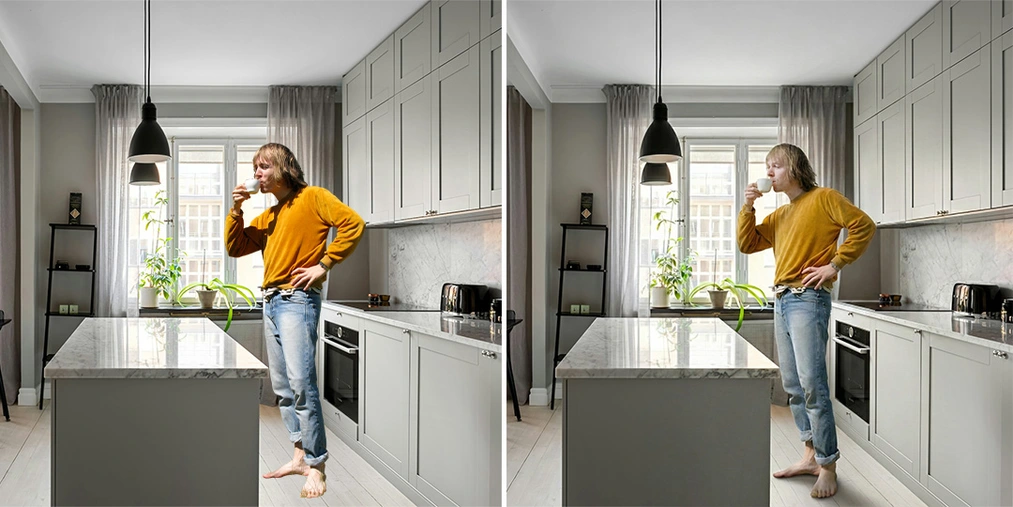
Nano Banana Pro does this automatically. The model understands the geometry of your render. It knows where the light source is (e.g. a window) and generates a figure that casts its shadow in the correct direction. Moreover, the light wraps around the figure, creating natural highlights on clothing and skin. This is the end of the “paper cutout” effect.
SEE OUR ARTIFICIAL INTELLIGENCE COURSES
Quick Scene Activation – the “Prompt” Method
This is the fastest way to fill an empty frame, ideal at the concept stage. Let’s say you have a finished living room visualization, but it lacks life. You’re not concerned about a specific person’s appearance, you just want someone reading a book.
You upload your render to the interface (Gemini or Google AI Studio) and enter the prompt:
"Add a young woman sitting on the sofa, reading a book. She is wearing casual home clothes. Soft natural lighting from the window, realistic shadows on the sofa."
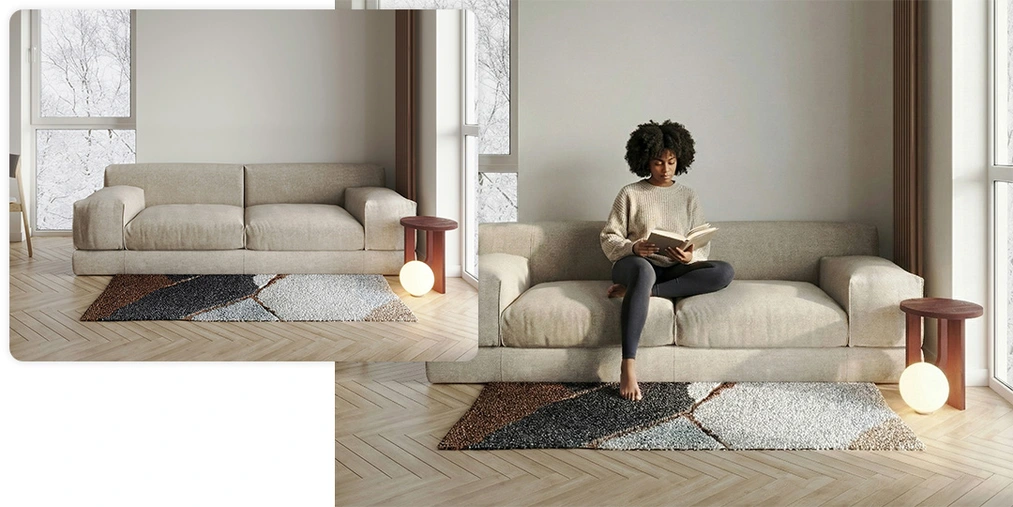
The AI analyzes the sofa’s perspective and places the figure on it. Notice how the cushions compress under the figure’s weight – a detail that in Photoshop would require advanced retouching (for example using the Liquify tool), and here it happens automatically.
Inserting Specific Figures – the Investor in Their Own Living Room
What if you want to insert a specific person? For example, an investor who wants to see themselves in their future office, or you have a set of favorite figures (e.g. previously generated) that match your style?
Here we use the model’s multimodality. The process looks like this:
- You upload the interior visualization (as the base).
- You add a photo of the figure/person on a neutral background (as a reference).
- You apply a binding prompt:
"Using the reference images, place the woman from the second image into the living room. She should be standing by the window, looking outside. Match the lighting and shadows to the scene."
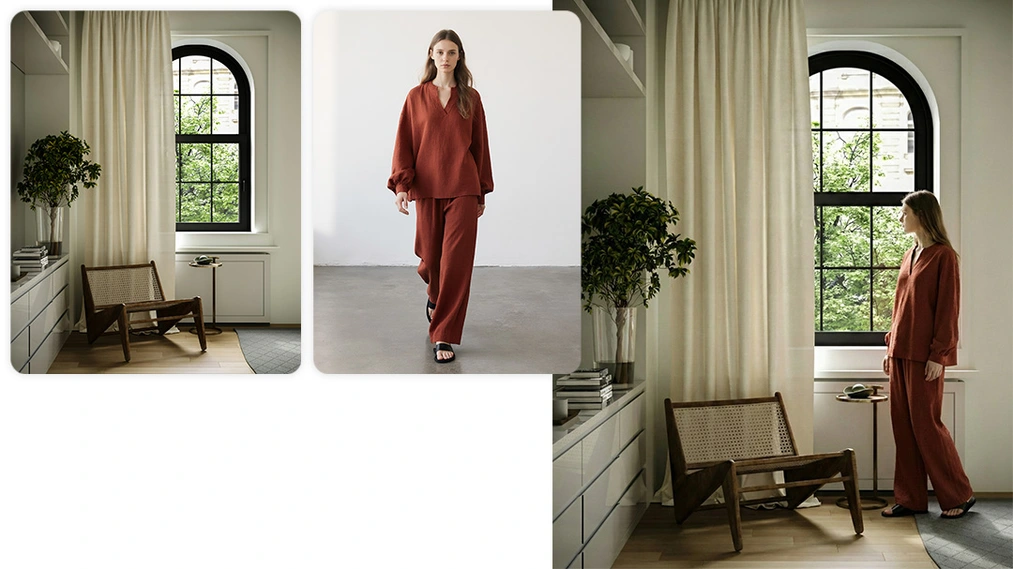
Important note: Nano Banana Pro handles the transfer of the overall silhouette, clothing style, and posture very well. However, it is not a deepfake tool for perfect facial copying (a face swap). The face may look very similar, but the model prioritizes lighting consistency over biometric accuracy. For architectural visualization purposes, this is more than sufficient.
Motion Blur and Ghost-People – Pro Tips for Architects
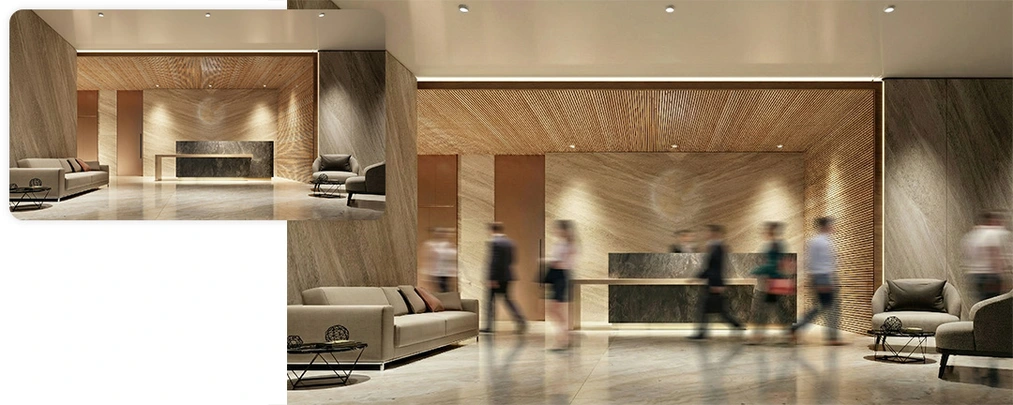
In professional architectural photography and visualizations, it is common to avoid showing sharp faces so they don’t distract from the project. A long exposure time is used, turning people into blurred “ghosts.” Can AI do that?
Of course! And it does it brilliantly. You just need to add the appropriate instructions in the prompt:
- Motion effect, which gives you dynamic streaks:
"Add people walking in the background with a strong motion blur effect. Long exposure photography style."
- Anonymity. A figure from behind creates a mysterious atmosphere and allows the viewer to identify with it without imposing specific facial features.
"A silhouette of a person standing with their back to the camera, looking at the view."
Ethics and Safety – What to Keep in Mind?
When using models from Google, you must remember the built-in safety filters. The model may refuse to generate a photorealistic face of a known public figure or content it deems inappropriate. This is a safeguard against creating fake news.
As designers, we should also remember diversity. In international architectural competitions, it’s standard to show society in its full spectrum. It’s worth including this in your prompts by ensuring representation of different age and ethnic groups, which adds authenticity to your projects.
Animate Your Visualizations with Google Veo!
Since you already have a static image with a perfectly integrated figure, why not take it a step further? The Google Veo model is a powerful video model available in the same ecosystems as Nano Banana Pro (e.g. in the Gemini interface).
You can upload your final visualization as the starting frame and enter a video prompt:
"A cinematic video based on this image. The person sitting on the sofa is slowly turning pages of the book. The camera is steady."
The result? You get a short, high-quality video in which the figure truly moves and the light works in space. This is an absolute game changer in project presentations to clients, allowing you to create animations without rendering thousands of frames in V-Ray.
Become an AI Visualization Master
Adding people and creating videos are techniques that will make your portfolio stand out from the competition. Do you want to see these workflows live, get ready-made prompt libraries, and learn how to work with the FLUX Kontext, Nano Banana, and Veo models? If so, then be sure to check out our AI Visualization and Video Course – Nano Banana, FLUX Kontext, Veo, etc. in Architecture and Design.
Author

Przeczytaj o programie AI - Artificial Intelligence na naszym blogu
-
![Virtual staging and AI photos in real estate listings - what does the AI Act change?]()
Virtual staging and AI photos in real estate listings - what does the AI Act change?
The AI Act vs real estate. Does virtual staging require an AI label? Find out how to avoid legal pitfalls and properly label photos. -
![How to Label AI Content According to the Law? Ready-Made Formulas for Designers and Archviz Studios.]()
How to Label AI Content According to the Law? Ready-Made Formulas for Designers and Archviz Studios.
How to Legally Label AI Visualizations? Check When a Label Is Mandatory and Copy Ready-Made Formulas for Your Projects. -
![Do you have to label visualizations as AI? What does the AI Act really say and what changes on August 2, 2026?]()
Do you have to label visualizations as AI? What does the AI Act really say and what changes on August 2, 2026?
AI Act from August 2! Do you have to label 3D visualizations as AI? Check where the legal boundary lies between concept and deepfake. -
![AI for furniture manufacturers - See how to create furniture packshots and catalog arrangements with raya.design]()
AI for furniture manufacturers - See how to create furniture packshots and catalog arrangements with raya.design
Packshots without time-consuming sessions? Discover Raya Design. Change upholstery and create arrangements with AI in moments. See how it works!