EN
EN PL
PL ES
ES


Publication date: 17-12-2025 | Update date: 17-12-2025 | Author: Piotr Kurpiewski

-
Online courses
- All
 3ds Max
 AI - Artificial Intelligence
 Blender
 Corona renderer
 GstarCAD
 LayOut
 Photoshop
 Interior Design
 Revit
Revit Sketchup
 Stable Diffusion
 V-ray
V-ray
"Online courses" are comprehensive online training programs that will help you quickly master the software you are interested in.
- Plugins
- 3D Models
- Help
- Articles
Nano Banana Pro in interior design - a complete guide with ready-made prompts!
Does artificial intelligence replace traditional 3D software? This article is your compendium of knowledge about Nano Banana Pro in interior design. We guide you through the entire process: from turning raw models into photorealistic visualizations, through intelligent 2D floor plan furnishing and texture generation, to advanced editing and video animations. Discover the tool that is changing the game in the architecture and design industry. Find out how to use it in your everyday work!
Index
Did you know that the architectural visualization industry is undergoing its greatest transformation since the advent of render engines? Just a decade ago, access to V-Ray was a luxury. Today, time has become the luxury. And it is time that is the currency offered by the new generation of artificial intelligence.
We’re talking about Nano Banana Pro – an advanced, multimodal model from Google that is not just an "image generator". It’s a tool that sees and understands geometry, architectural floor plans, and three-dimensional space. In this complete guide, you’ll learn how to use this technology in the daily work of an interior designer and architect. We’ll go through all stages: from lightning-fast visualizations from popular 3D programs, through furnishing floor plans, creating materials, all the way to video animations.
Will AI replace the architect? No. But an architect who uses AI will certainly outpace one who does not.
From raw view to photorealism in 3 minutes – AI visualizations
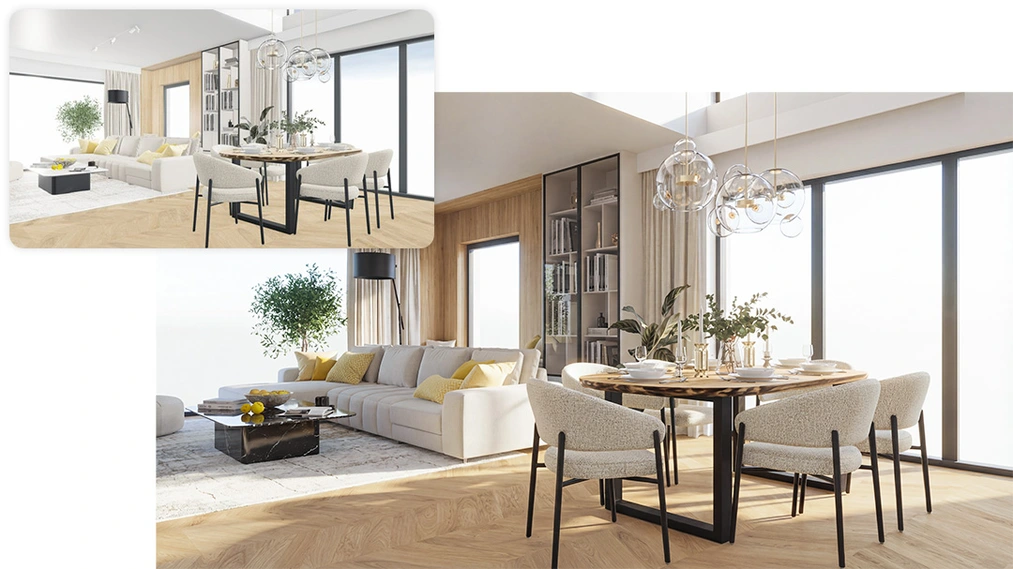
We all know the traditional workflow: modeling, setting up lights, choosing materials, test render, adjustments, final render... This is a process that takes hours. Nano Banana Pro shortens it to minutes, allowing you to turn a raw viewport from a 3D program into a ready conceptual visualization.
Why does "input" matter in AI visualizations?
The quality of what AI generates depends directly on what you feed it. Many beginners make the mistake of uploading a so-called clay render (a white mockup). Although it looks aesthetic, for the AI model it’s a puzzle – it doesn't know if the white floor is resin, carpet, or bleached wood. That's why it's crucial to work with views that include textures and colors straight from the viewport (in any program: SketchUp, CAD Decor, pCon planner, or Blender).
It's often better to start with a basic view with schematic textures and colors than to work with a view showing diffuse shadows and photorealistic surface details.
Workflow in a nutshell
The process is incredibly simple:
- Set up the shot in a 3D program (ensure simple framing and textures).
- Take a screenshot or export a 2D image.
- Upload the file to Nano Banana Pro and enter a prompt (a short instruction) describing the lighting and mood you want to achieve:
Create a photorealistic render from this SketchUp view. Preserve the original camera, framing, and materials. Add soft sunlight, PBR materials and global illumination. The scene should read as a modern living photographed in natural light.
This solution is ideal for the concept stage, tenders, or quick client consultations.
Want to see this process step by step, including SketchUp settings and Ambient Occlusion tricks? Read our detailed tutorial: SketchUp and Nano Banana Pro: Photorealistic Visualizations in 5 Minutes.
Intelligent planning – furnishing 2D floor plans and developer layouts
It's hard to believe, but Nano Banana Pro can furnish floor plans, at least in a basic form. You can use it during concept finding as if it were a collaborator. The model turns a raw plan into a furnished, presentation-ready functional layout, and it does it in literally a few moments!
How to transform an empty floor plan into a furnished functional layout?
Nano Banana Pro recognizes wall thicknesses as well as window and door symbols. It reads space proportions and the applied scale. Simply upload a basic top-down plan and use a prompt such as:
Transform this floor plan into a fully furnished plan of a modern apartment. Keep proportions accurate to the drawing and present the space in a clean AutoCAD style.
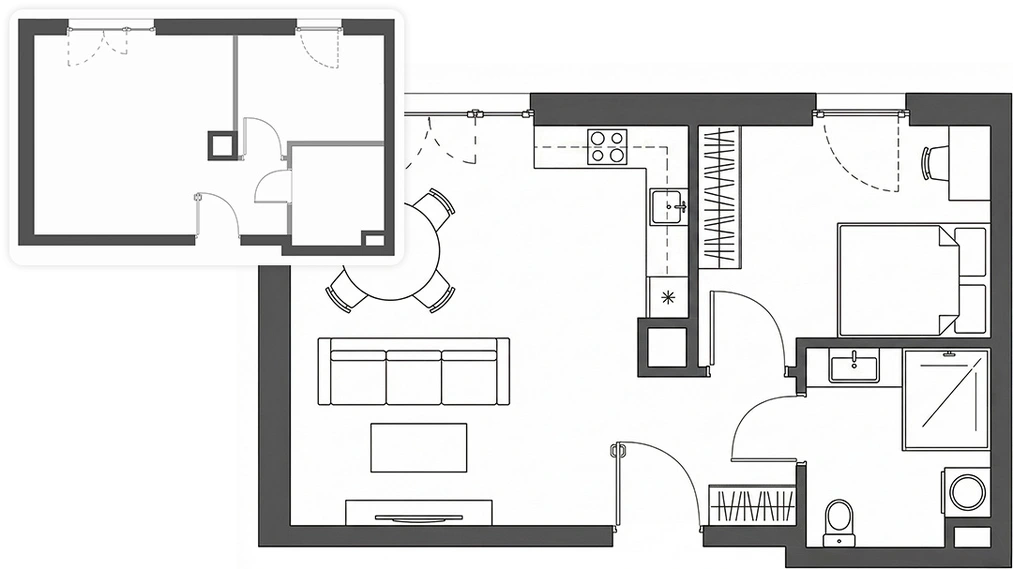
AI automatically places furniture according to room function – it will put a bed in the bedroom and a table in the dining room. It can also give the plan an artistic touch, e.g., the look of a hand-painted watercolor or a 3D model in perspective. The final effect depends on your creativity.
Beware of AI-driven developer junk
Let's be honest – artificial intelligence doesn't know building codes or ergonomic standards. It may place a bathtub in a passageway or a table where you can't pull a chair back. It often produces drawings at the wrong scale, creating too-small furniture. Treat this feature as a marketing and conceptual tool (for quick selling of a functional layout), not as a basis for a working construction project.
CHECK ONLINE AI TRAINING - ARTIFICIAL INTELLIGENCE
Materials and textures: Your PBR map generator
Finding the perfect texture is the bane of every visualizer. We often find a photo of a beautiful armchair but don’t have the fabric texture it’s made from. This is where Nano Banana Pro shows its claws in a slightly different way.
Fabric extraction from photos
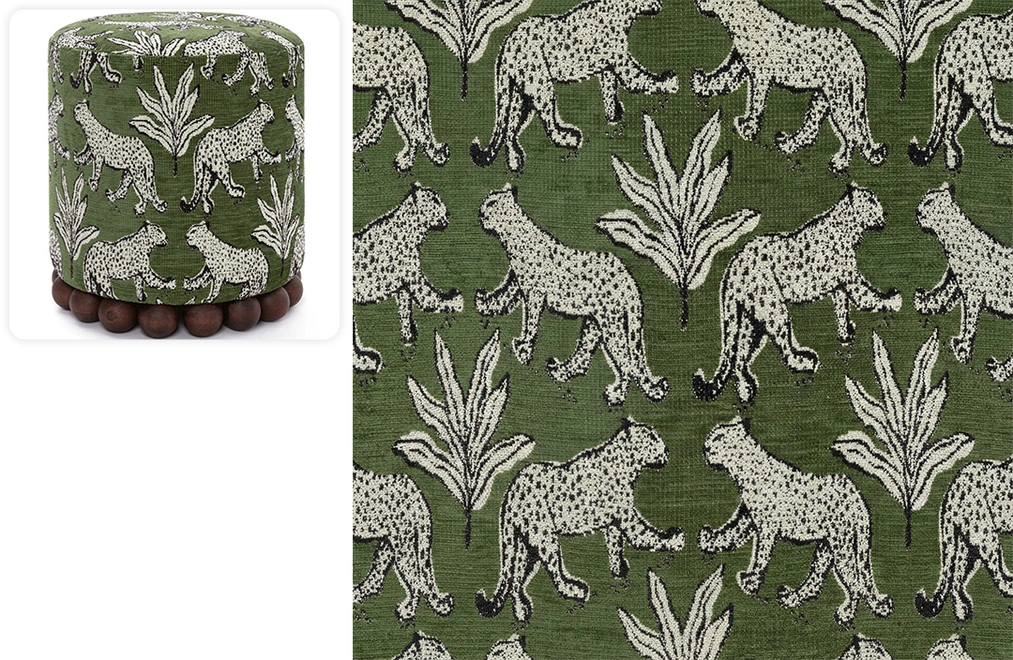
Imagine you have a photo of an ottoman in a perfect exotic upholstery with a distinctive weave. You can upload that photo to AI and ask the model to generate a flat sample of that material (flat texture). Nano Banana Pro can straighten out folds and shadows, giving you a clean color base as a Diffuse Map.
Generating PBR maps
With a color base, you can ask the model to prepare a Normal Map in shades of purple or a Displacement map in grayscale. While it’s not at the level of dedicated programs like Substance Designer, it’s more than sufficient for quick visualizations. This way, you give your materials depth.
Limitations in creating seamless textures
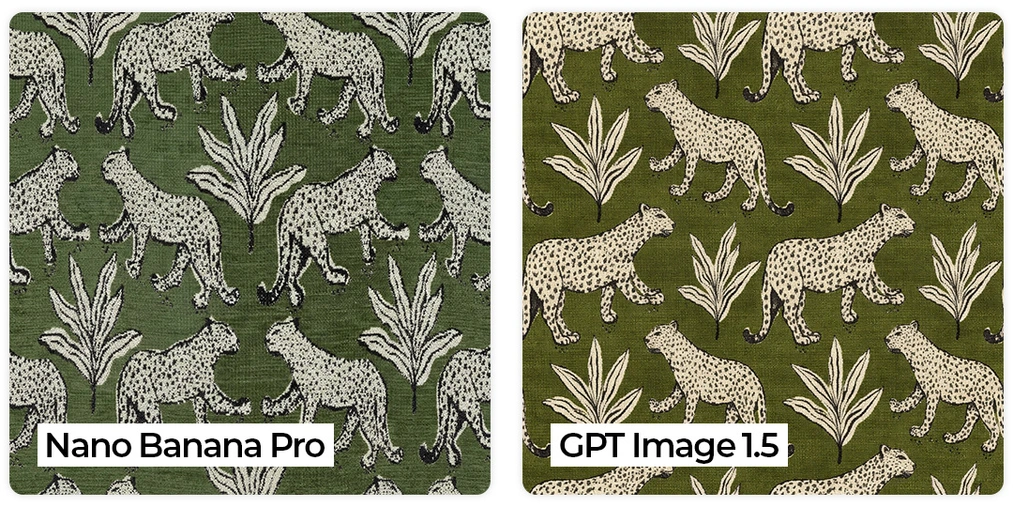
At the moment Nano Banana Pro handles generating perfectly seamless textures poorly. When tiled over large surfaces (e.g., a floor in a large interior), seams may be visible. However, for upholstered furniture or smaller elements, it works excellently.
Thanks to a new update, the GPT Image 1.5 OpenAI model gained the ability to generate seamless textures. However, this comes at the expense of detail and accurate material reproduction. In the comparison below, Nano Banana Pro is much closer to the original material, while GPT produced a texture that wraps seamlessly in all directions.
Digital homestaging – edit, don’t re-render
The client approved the visualization, but... "could this sofa be in a Scandinavian style after all?" In the world of traditional 3D, this means going back to the model, replacing the geometry, and re-rendering. In the AI world, it’s a matter of minutes.
Conversational editing
Nano Banana Pro allows editing of finished images. You can mark (even in Paint with a red circle!) the element to replace and describe the change in words. Moreover, thanks to multimodality, you can upload a photo of a specific product from a store and ask to insert it in place of the old furniture.
This is a powerful technique for real estate agents and investment designers. Learn how to carry out virtual renovations in our guide: Homestaging with AI: How to change interior decor on an existing image?
Mood control – changing lighting without HDRi
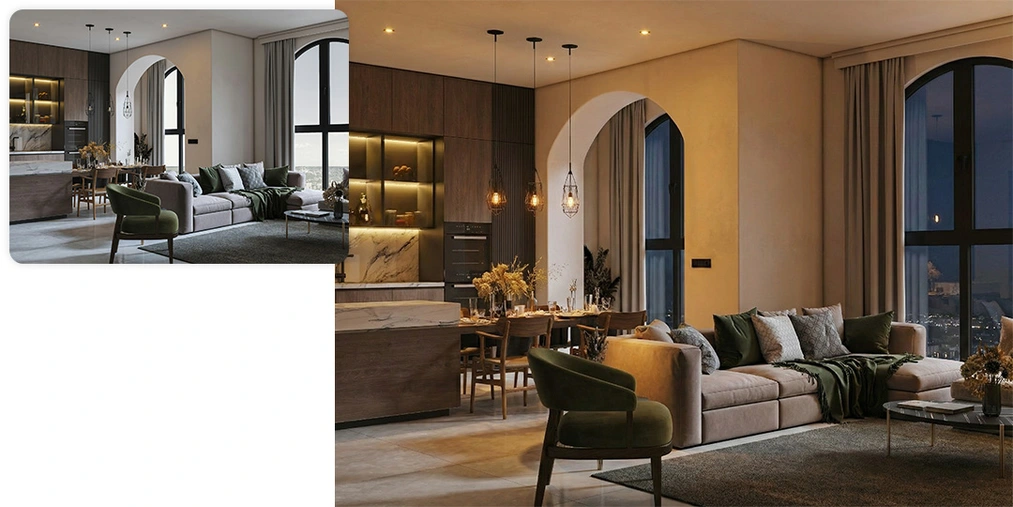
One of the model’s most spectacular features is light manipulation. You have a daytime render, but the client wants to see a moody evening version? You don’t have to add dozens of artificial IES lights or HDRi maps in SketchUp or 3ds Max.
Just use the following prompt:
Change the lighting on the image to evening mood, cozy artificial lighting, cinematic look.
AI will recognize the lamps in your project (e.g., ones hanging over the table or recessed in the ceiling) and turn them on, generating realistic glare and shadows. It will also adjust the view outside the window and the reflections. This is a saving that’s hard to overestimate!
Animating scenes – people who don’t levitate
An empty visualization looks sad, but poorly pasted people in Photoshop look cheap. A common problem is the lack of contact shadow (characters levitating) or inconsistent lighting (the sun shining from the left, but the figure’s shadow falling to the right).
Nano Banana Pro generates characters inside the scene. This means light wraps around the silhouette, and shadows are mathematically correct according to the room’s light sources. You can also create impressive motion blur effects, characteristic of architectural photography.
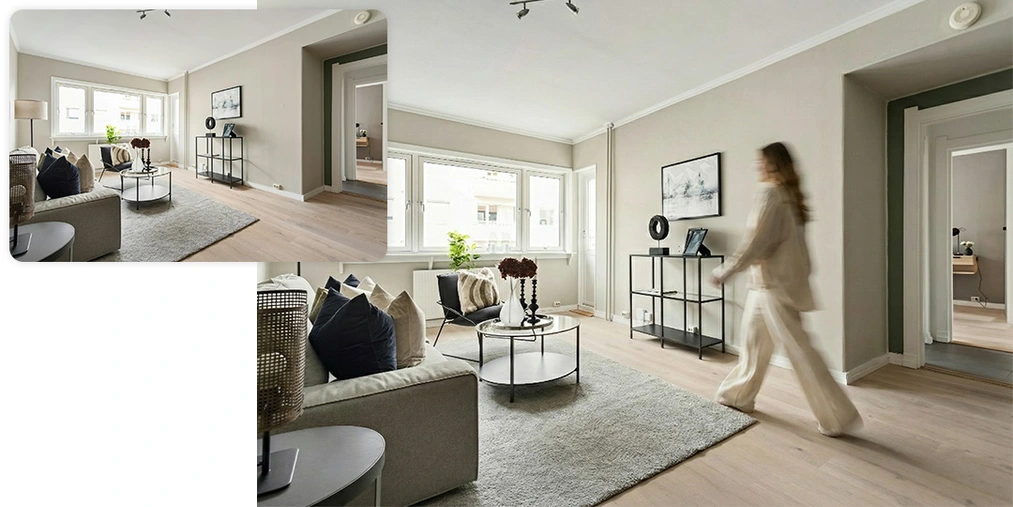
If you want to learn how to add realistic people or insert an investor’s silhouette into a project, check out the article: People in visualizations: how to add realistic figures in Nano Banana Pro?
The future is moving images (Google Veo)
Static images are no longer enough to capture attention on Instagram or TikTok. The future of marketing in architecture is video. In the same ecosystem (in the Gemini interface or Google AI Studio), you’ll find the Veo model.
It allows you to animate a static visualization generated in Nano Banana Pro or traditionally in V-Ray. You can add a subtle camera movement, make the curtains flutter in the wind, or bring the fireplace fire to life. You can also show how your interior changes over time by creating a convincing time lapse. All of this is generated from a single image and a short text description, creating multi-second clips perfect for social media.
Summary – is it worth abandoning traditional 3D workflows?
The answer is: It depends on the project stage.
- Concept and sales phase: here Nano Banana Pro is unbeatable. The speed of creating variants, ease of making changes, and artistic quality outclass traditional methods.
- Production and detailing phase: if you need to showcase a specific custom joinery detail or a made-to-measure piece of furniture with millimeter precision – classic rendering engines (V-Ray, Corona) still offer greater control and accuracy.
As designers, we are entering a new era. We are no longer just operators of complex software but become creative directors managing the vision. AI is a tool that lifts the technical burden, allowing us to focus on what matters most – design.
Take your creativity to the next level with AI!
What I described above is just the beginning. If you want to see these workflows in action, learn how to generate video, and work with the most advanced models (including FLUX Kontext), I invite you to our AI visualization and video course - Nano Banana, FLUX Kontext, Veo etc. in architecture and design. With the skills gained in this course, you will gain independence in creating marketing materials and full interior arrangements, achieving a work pace that the competition can only dream of.
Author

Przeczytaj o programie AI - Artificial Intelligence na naszym blogu
-
![Virtual staging and AI photos in real estate listings - what does the AI Act change?]()
Virtual staging and AI photos in real estate listings - what does the AI Act change?
The AI Act vs real estate. Does virtual staging require an AI label? Find out how to avoid legal pitfalls and properly label photos. -
![How to Label AI Content According to the Law? Ready-Made Formulas for Designers and Archviz Studios.]()
How to Label AI Content According to the Law? Ready-Made Formulas for Designers and Archviz Studios.
How to Legally Label AI Visualizations? Check When a Label Is Mandatory and Copy Ready-Made Formulas for Your Projects. -
![Do you have to label visualizations as AI? What does the AI Act really say and what changes on August 2, 2026?]()
Do you have to label visualizations as AI? What does the AI Act really say and what changes on August 2, 2026?
AI Act from August 2! Do you have to label 3D visualizations as AI? Check where the legal boundary lies between concept and deepfake. -
![AI for furniture manufacturers - See how to create furniture packshots and catalog arrangements with raya.design]()
AI for furniture manufacturers - See how to create furniture packshots and catalog arrangements with raya.design
Packshots without time-consuming sessions? Discover Raya Design. Change upholstery and create arrangements with AI in moments. See how it works!