EN
EN PL
PL ES
ES


Publication date: 27-01-2026 | Update date: 27-01-2026 | Author: Piotr Kurpiewski

-
Online courses
- All
 3ds Max
 AI - Artificial Intelligence
 Blender
 Corona renderer
 GstarCAD
 LayOut
 Photoshop
 Interior Design
 Revit
Revit Sketchup
 Stable Diffusion
 V-ray
V-ray
"Online courses" are comprehensive online training programs that will help you quickly master the software you are interested in.
- Plugins
- 3D Models
- Help
- Articles
SketchUp - how to fix invisible .skp icon previews?
The problem with invisible .skp file icon previews in SketchUp may result from a conflict between installed program versions or installation errors. In the article, you’ll find a detailed explanation of why this happens and a simple way to fix this issue that you can perform in a few steps. If you’re experiencing this problem or want to better understand how to manage different versions of SketchUp, be sure to read the article.
Index
When working with SketchUp, especially when multiple versions (e.g. 2024 and 2023) are installed, you may encounter an issue with missing .skp file icon previews. It's frustrating when at first glance you can't recognize the file you're working on. This issue often results from errors in the installation process or conflicts between program versions. Fortunately, fixing this is simpler than it seems. In this article, we'll explain how to quickly and effectively resolve this problem.
What Causes the .skp Icon Preview to Be Missing?
Many SketchUp users install new versions of the program while keeping previous ones on their computers. Although this can be convenient because it allows working with different file versions, it often leads to conflicts, especially on Windows. Each version of SketchUp is a separate application, and the operating system does not always know which one should manage .skp file previews. This can result in situations where we don't see thumbnails of our files, making them harder to identify.
Another common source of the problem is a faulty installation process of a new SketchUp version that does not correctly overwrite the file previews. Fortunately, there is a simple method to fix this.
SKETCHUP PRO COURSE - BEGINNER COURSE
How to Fix Missing .skp Icon Previews?
Step 1: Open the Apps Panel
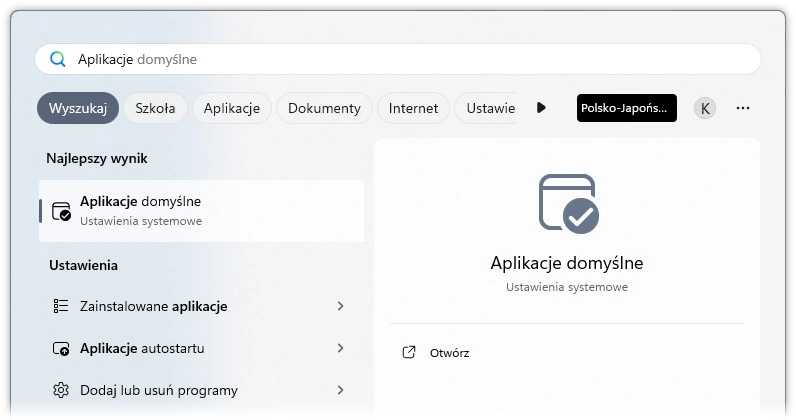
The easiest way to fix the issue is to repair the SketchUp installation. To do this, go to the Start Menu, then:
- Select Apps from the menu.
- Go to the Installed apps section.
- Find SketchUp in the list and right-click on it.
- Choose Modify.
Step 2: Run the Installation Repair
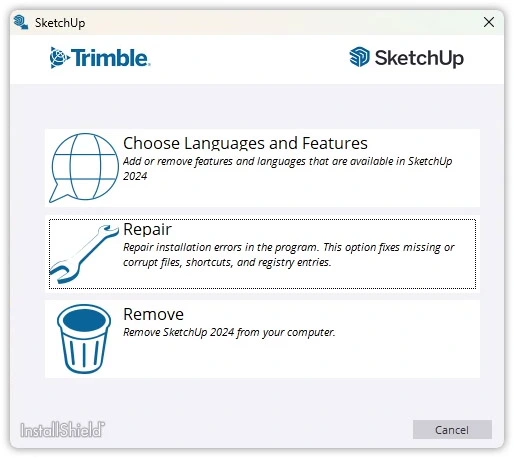
After selecting "Modify", the SketchUp installer will launch. Then:
- In the installer, select the Repair option.
- The installer will repair corrupted files and update the .skp icon previews.
Step 3: Verify the Results
After the repair is complete, restart your computer to ensure the changes have been applied correctly. Once the system restarts, you should see the correct .skp file icon previews in Windows Explorer.
Alternative Solutions
While repairing the installation solves the problem in most cases, it's also worth considering other options, especially if the issue recurs. Check that all necessary Windows updates are installed and ensure there are no conflicts with other graphic or CAD programs.
Troubleshooting technical issues like missing .skp file previews is an important part of working with SketchUp. However, to fully leverage the potential of this tool, it's worth enhancing your skills through professional training. Check out the SketchUp Pro - Training for Beginners course, which will help you master the basics of the program and resolve such technical issues.
Conclusion
The issue of missing .skp icon previews in SketchUp mainly stems from conflicts between installed versions of the program or errors in the installation process. Fortunately, repairing the installation is a quick way to restore correct file icon display. If the problem persists, it's worth exploring other options, such as system updates. To fully utilize this software's capabilities and handle various challenges, we encourage you to explore the full range of SketchUp courses on the CG Wisdom platform.
Author

Przeczytaj o programie Sketchup na naszym blogu
-
![Profile Builder 4 or Magic Molding? Comparison of Ornamentation Plugins in SketchUp]()
Profile Builder 4 or Magic Molding? Comparison of Ornamentation Plugins in SketchUp
How does Profile Builder 4 differ from Magic Molding? Scope, pricing, profile libraries, and learning curve. Find out which plugin fits your projects. -
![The Best Free SketchUp Plugins for Interior Designers in 2026!]()
The Best Free SketchUp Plugins for Interior Designers in 2026!
Which SketchUp plugins are really worth having? Discover 7 free extensions for interior designers and find out which ones have just stopped being free! -
![English wainscoting in SketchUp - how to design wall panels step by step]()
English wainscoting in SketchUp - how to design wall panels step by step
How to design English wainscoting in SketchUp? Learn the rules for panel division, wainscot proportions, and speed up your work with the Magic Molding plugin. -
![Reversed Faces in SketchUp – why are blue faces showing and how to fix them?]()
Reversed Faces in SketchUp – why are blue faces showing and how to fix them?
Blue faces in SketchUp are flipped faces. Learn where they come from, how to quickly locate and fix them before they mess up your render or model export.




Want to learn Sketchup? Check out our free online course!