EN
 PL
 ES


Publication date: 13-11-2026 | Update date: 13-11-2026 | Author: Piotr Kurpiewski

-
Online courses
- All
 3ds Max
 AI - Artificial Intelligence
 Blender
 Corona renderer
 GstarCAD
 LayOut
 Photoshop
 Interior Design
 Revit
 Sketchup
 Stable Diffusion
 V-ray
"Online courses" are comprehensive online training programs that will help you quickly master the software you are interested in.
- Plugins
- 3D Models
- Help
- Articles
AI vs V-Ray? Does rendering still make sense in 2026?
Yes, rendering in V-Ray still makes sense in 2026, but it's no longer the only path to a photorealistic visualization. Artificial intelligence has entered design studios and cut the time a visualization takes from hours to minutes. Not long ago, rendering meant a long coffee break and waiting for the computer to finish a single frame. Today you can get a visualization from a SketchUp or 3ds Max view in a few dozen seconds. Let's look at where V-Ray and Corona still win, and where AI does the job faster and more simply.
Index
How long did a good render take just two years ago?
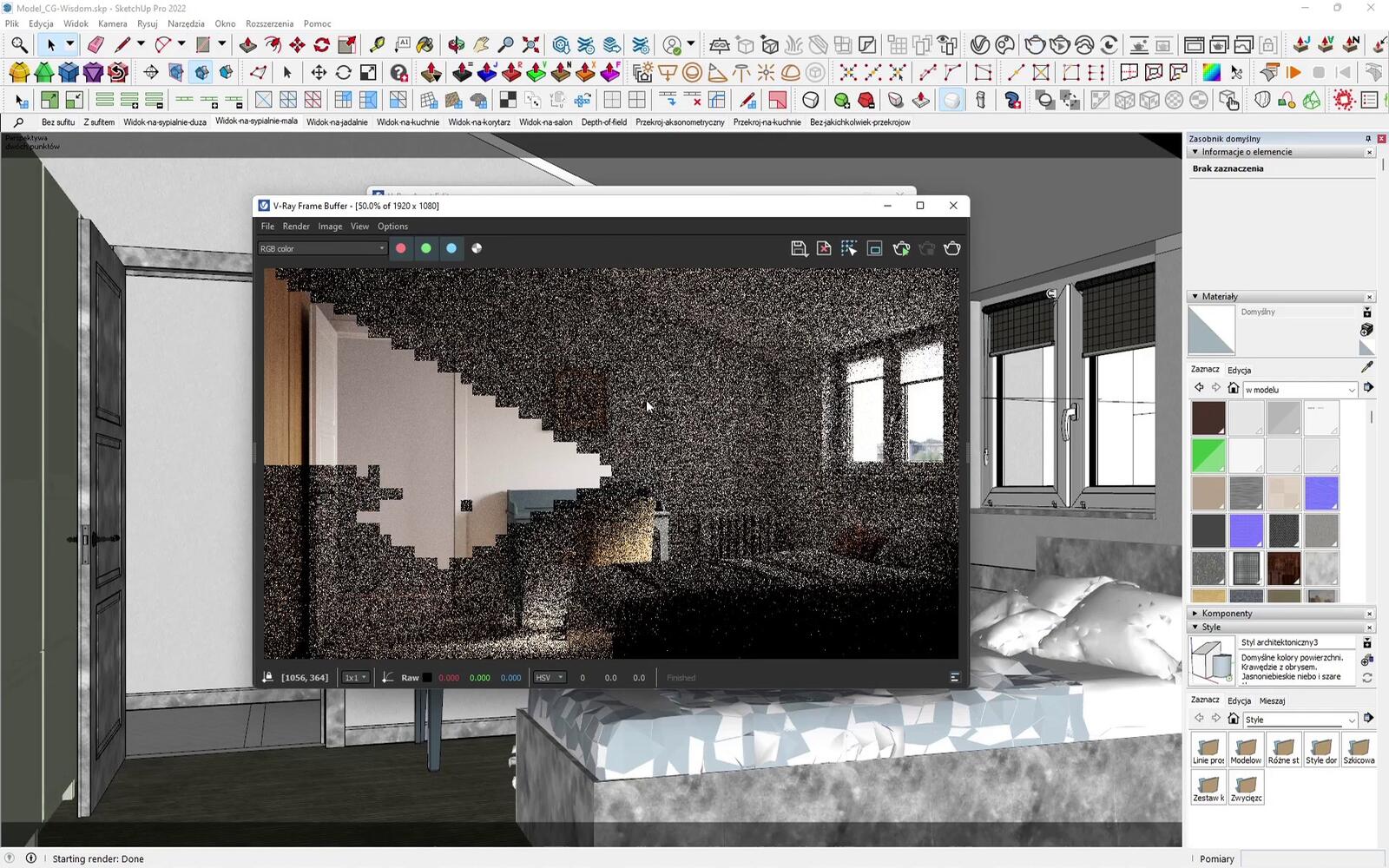
Setting up a scene in V-Ray was never a one-afternoon job. You had to assign materials, place light sources, set up the camera and run several test passes, and before anyone even started rendering the final frame, weeks went into simply learning the software. We know of cases where a single shot with lots of glass and reflections took six to eight hours to render. Overnight, because during the day the computer was needed for other work. The results were often great, but not every project justified that much time.
Then there was optimization. Heavy plant models, high-resolution textures and poorly chosen sampling settings could stretch render times considerably, which is why we wrote a separate guide on how to optimize a SketchUp model for V-Ray rendering performance. Every client comment, such as a different cabinet color or warmer lighting, meant another round of rendering.
What has changed in visualization rendering?
Hardware hasn't become cheap enough to explain the difference. What changed is that generative models entered the toolkit. They turn a plain SketchUp view or a photo of an empty room into a finished visualization. AI picks the lighting and materials, and you wait a few dozen seconds for the result instead of several hours. For many designers, this shortcut now decides whether they create visualizations themselves or outsource them.
CREATE YOUR FIRST AI VISUALIZATION WITH RAYA.DESIGN
How does AI rendering work in SketchUp and 3ds Max?
An image generator that gets only a text description invents the room from scratch every time. AI rendering from a 3D model starts from a view of your scene, so the wall layout, furniture proportions and camera framing stay exactly as you designed them. AI fills in what you would set up by hand in a classic render: material textures, lighting, shadows and the view outside the window.
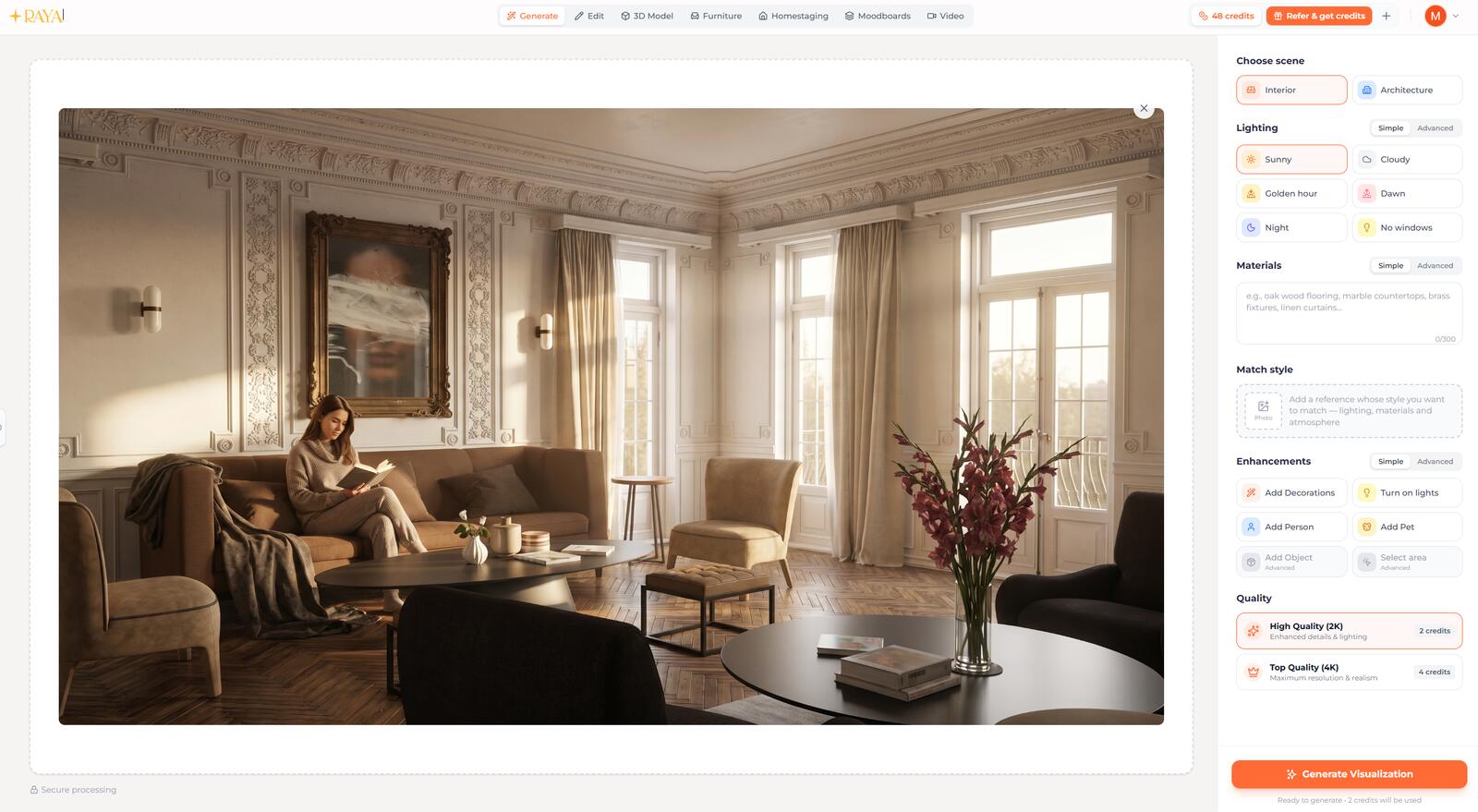
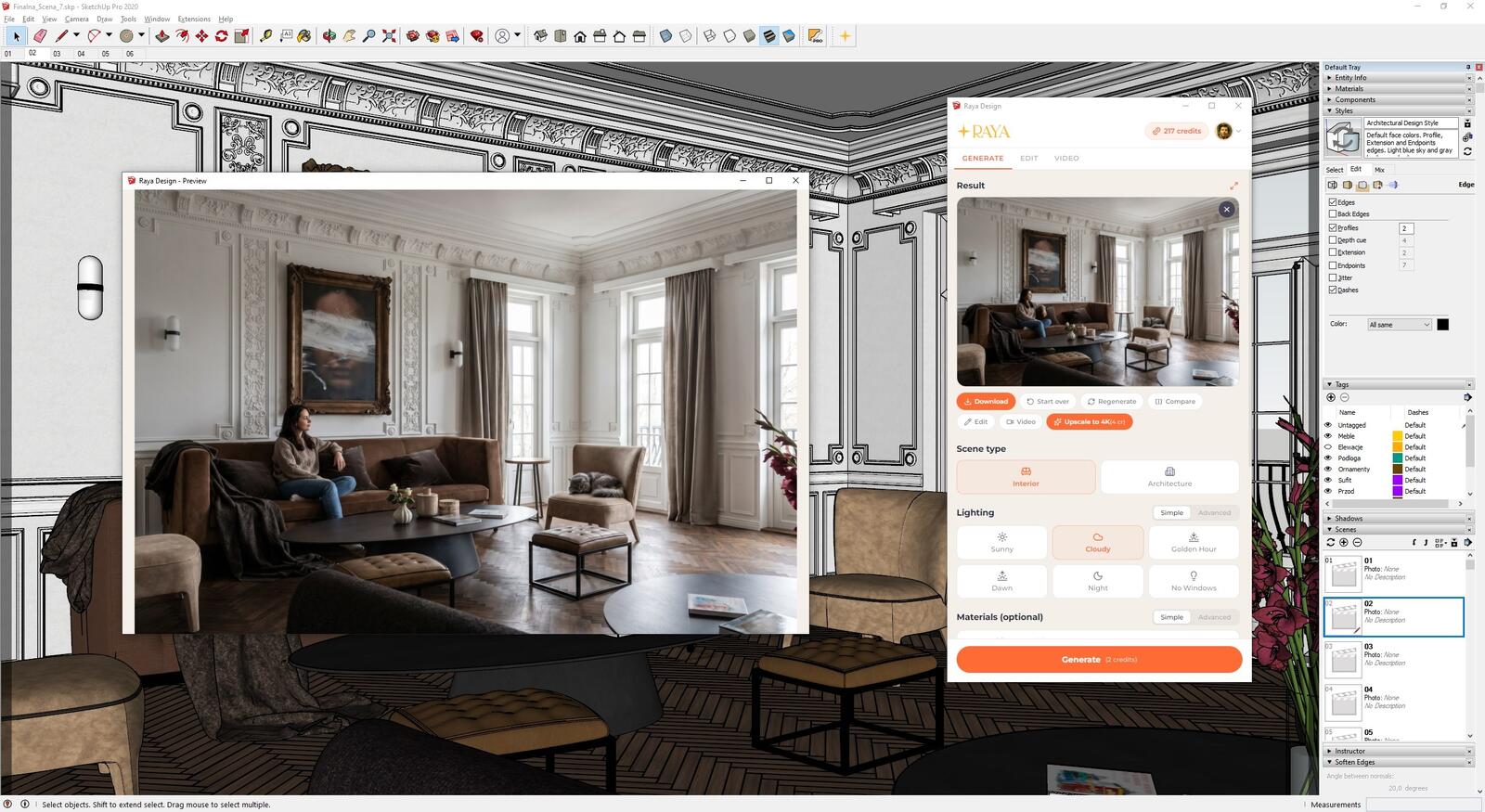
This is how Raya works. The plugin adds a panel right inside your 3D software, captures the current view and generates a photorealistic visualization from it. In the panel you choose the time of day and type of light, from full sun and overcast sky to golden hour and dusk. You can refine the scene with a reference photo, for example of a specific armchair or the fabric you want on the sofa. You also decide whether a person or a pet should appear in the shot and can add your own comment, although you don't have to write a prompt.
The image is generated in the cloud, so your graphics card stays free for further work on the model. A 2K visualization usually takes 20-40 seconds, and a 4K one takes 1-2 minutes. The plugin doesn't change your model or project files.
- Raya for SketchUp works with SketchUp 2020 and later on Windows and macOS. It has a Mirrors feature that calculates the scene's reflection in the selected panes before generation. A raw mirror in a SketchUp view is a flat, uniform surface that AI can't read a reflection from, so this feature saves you a lot of corrections.
- Raya for 3ds Max supports versions 2021-2027 on Windows 10 and 11. You can create a visualization before the scene gets its final shaders and lighting, and your workstation isn't tied up while the image is generated.
- Raya also has plugins for Revit, Archicad, Rhino, Blender and pCon.planner. In the browser, it accepts a screenshot from any 3D program, a hand sketch or a photo of an interior.
You can fix the finished visualization in the same panel. Select part of the image, describe the change, and Raya replaces only that area while keeping the rest of the frame. You can also turn the visualization into a short video, such as a camera fly-through or a change in the time of day, which works well on Instagram or in a client presentation.
V-Ray, Corona or AI? A side-by-side comparison
Here is what separates a classic render engine from AI rendering in everyday work. Render times for V-Ray and Corona are approximate, because they depend on the scene and the hardware.
| V-Ray / Corona | AI rendering (e.g. Raya) | |
|---|---|---|
| Scene setup | Materials, lights, camera and test renders | A clear view of the model with basic materials |
| Time per image | From a dozen minutes to several hours | 2K in 20-40 seconds, 4K in 1-2 minutes |
| Hardware | Powerful CPU or GPU, computer busy while rendering | Cloud generation, any computer that runs your 3D software is enough |
| Control over detail | Full, down to every material and light parameter | Layout and framing come from the model, details are fixed by editing part of the image |
| Repeatability | The same settings give the same image | Successive generations may differ slightly |
| Variants (time of day, materials) | Each variant is a separate render | Several versions of the same shot in a few minutes |
| Animation | Full camera control, hundreds of frames to render | Short clips created from a finished visualization |
| Learning curve | Weeks of learning the software | First image a few minutes after installing the plugin |
| Cost | Render engine license and powerful hardware | Free plugin, you pay with credits for generated images |
Where do V-Ray and Corona still win?
There are areas where nobody is giving up classic rendering yet. Furniture catalogs, where upholstery has to match the manufacturer's sample down to the weave and shade. Animations for developers, where the camera flies through an entire housing estate and hundreds of frames must stay consistent. A series of shots that has to be recreated pixel for pixel six months later, because the client adds a new product to the campaign. In these cases V-Ray and Corona remain the standard, because they give you full control over every scene parameter.
If you want to learn Corona from the ground up, take a look at our 3ds Max and Corona Renderer course on interior visualizations.
AI visualization tools that are actually worth knowing
The biggest weakness of image generators was, and still is, the lack of control. You write a prompt, get something completely different and start over. That's why tools that build on what the designer has already done in a 3D program, instead of generating the scene from scratch, are gaining popularity. We described this process in our article on fast AI visualizations from SketchUp, where we test Raya as an alternative to V-Ray. We show a different approach to the same problem in our article on how combining SketchUp with Nano Banana Pro gives a photorealistic result in five minutes.
Both approaches stick to the room layout and proportions you designed, so the result is predictable and you can refine it step by step. Where they differ is convenience. In a general-purpose generator you write the instructions yourself and move images between programs, while a rendering plugin works inside SketchUp or 3ds Max and gives you a few settings to choose from instead of a prompt.
TRY RAYA FOR FREE - AI PLUGINS FOR SKETCHUP AND 3DS MAX
A kitchen: a real-life example
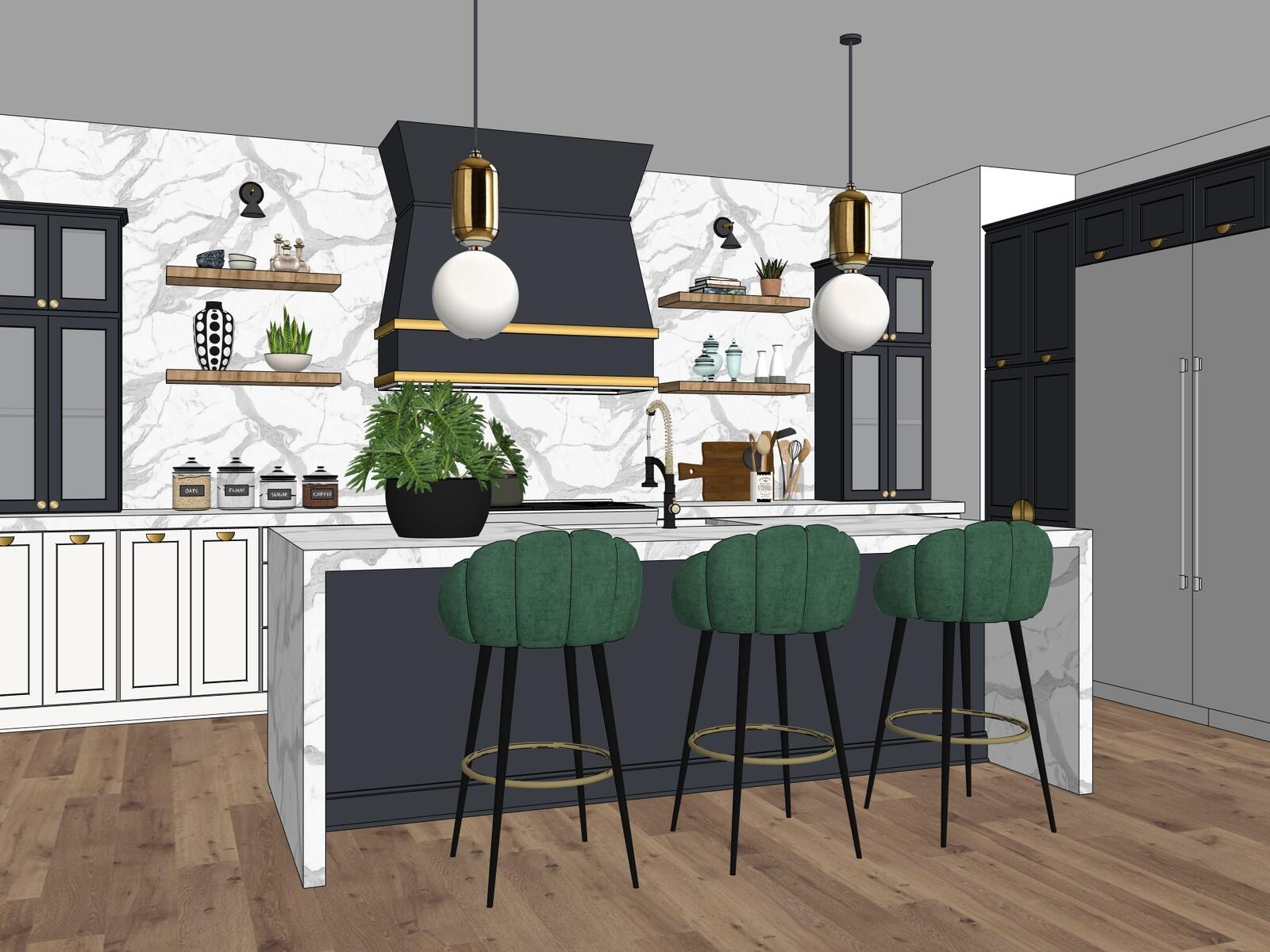
The brief was simple: the client wanted to see her kitchen with dark cabinets instead of light ones before committing to the purchase. The classic workflow would look like this: a model in SketchUp, materials set up from scratch in V-Ray, several hours of rendering, maybe a full day of work in total. Instead, the designer generated a visualization from the 3D view in an AI tool and had a finished image within minutes. It was enough for the client to make her decision that same evening.
If the next step had been about specific cabinet fronts from a manufacturer's catalog, the material could be swapped on part of the image or shown with a reference photo. It only makes sense to go back to a classic render engine when the visualization has to match a sample exactly in shade and texture, for example in documentation for the contractor.
Who gains, and who needs to rethink their career?
Rendering artists who for years sold nothing but their skill with the software face a tougher market today. Knowing how to set parameters is no longer rare when a similar result can be achieved without years of practice. Visualizers who sell their eye for framing, light and mood come out ahead. With AI, they can give the client several directions in the time a single test render used to take.
Interior designers gain too. They used to wait a week for an external visualization studio, and now they show the concept at the first meeting, before the client has time to change their mind. We wrote more about this in How artificial intelligence helps interior designers.
That's probably the core of this change: AI moves forward the moment the client sees the result, while the designer still decides what the client gets to see. For a broader look at the topic, read Artificial intelligence and graphics: is AI a threat?
Do AI visualizations have to be labeled?
The AI Act transparency rules for AI-generated content apply from 2 August 2026. Before you publish an AI visualization in an offer, a portfolio or a property listing, check whether and how you need to label it. We explain this in Do you have to label visualizations as AI?, and you'll find ready-to-copy wording in How to label AI content according to the law.
Is it still worth investing time in learning V-Ray?
It depends on where your career is heading. If you're aiming for a job at a large architecture firm or in film production, V-Ray or Corona skills will be required there for a long time to come. If you plan to run your own interior design business and handle clients yourself, it makes more sense to learn AI tools and put the time you save into the design itself, because the design is what sells the service, not the hours spent on rendering.
There's also an argument that's easy to overlook. If you understand how light, reflections and materials behave in V-Ray, you'll judge an AI visualization faster and describe corrections more precisely. Knowing classic rendering pays off even when you generate images with AI every day.
For those who want to master V-Ray from scratch and build a complete rendering workflow in SketchUp, we've prepared a separate course.
CHECK OUT THE COURSE - V-RAY FOR SKETCHUP FROM SCRATCH
Frequently asked questions about AI rendering and V-Ray
Will AI replace V-Ray?
In many cases it already does, especially for interior visualizations for private clients, material variants and concept presentations. V-Ray and Corona remain the choice when materials must match a specification, shots must be repeatable pixel for pixel, or a long animation is rendered from a single camera path.
Is an AI visualization good enough as a final image for the client?
Yes. 4K visualizations go into presentations, offers and portfolios, and you fix individual elements by editing a selected part of the image. With Raya, you have commercial rights to the images even when using free credits.
Do I need a powerful computer for AI rendering?
No. The image is generated in the cloud, so all you need is a computer that runs your 3D software smoothly and an internet connection.
How much does an AI visualization cost in Raya?
The SketchUp and 3ds Max plugins are free, and you pay for generation with credits. A 2K visualization costs 2 credits and a 4K one costs 4 credits. New accounts get 20 free credits valid for 14 days, and you don't need a card to sign up. You'll find current plans on the Raya pricing page.
Does the AI plugin change my model in SketchUp or 3ds Max?
No. Raya captures the current view as an image and doesn't modify your model or project files.
Summary
V-Ray is here to stay, but it's losing its monopoly on a good render. AI rendering cuts working time wherever speed, the number of variants and first impressions matter, and more and more often it also delivers the final image for the client. The classic render engine still leads where the client pays for precision down to the last pixel. Which tool you choose depends on the task at hand, and more and more studios use both.
Author

Przeczytaj o programie AI - Artificial Intelligence na naszym blogu
-
![Virtual staging and AI photos in real estate listings - what does the AI Act change?]()
Virtual staging and AI photos in real estate listings - what does the AI Act change?
The AI Act vs real estate. Does virtual staging require an AI label? Find out how to avoid legal pitfalls and properly label photos. -
![How to Label AI Content According to the Law? Ready-Made Formulas for Designers and Archviz Studios.]()
How to Label AI Content According to the Law? Ready-Made Formulas for Designers and Archviz Studios.
How to Legally Label AI Visualizations? Check When a Label Is Mandatory and Copy Ready-Made Formulas for Your Projects. -
![Do you have to label visualizations as AI? What does the AI Act really say and what changes on August 2, 2026?]()
Do you have to label visualizations as AI? What does the AI Act really say and what changes on August 2, 2026?
AI Act from August 2! Do you have to label 3D visualizations as AI? Check where the legal boundary lies between concept and deepfake. -
![AI for furniture manufacturers - See how to create furniture packshots and catalog arrangements with raya.design]()
AI for furniture manufacturers - See how to create furniture packshots and catalog arrangements with raya.design
Packshots without time-consuming sessions? Discover Raya Design. Change upholstery and create arrangements with AI in moments. See how it works!