EN
EN PL
PL ES
ES


Publication date: 17-12-2025 | Update date: 17-12-2025 | Author: Mateusz Ciećwierz

-
Online courses
- All
 3ds Max
 AI - Artificial Intelligence
 Blender
 Corona renderer
 GstarCAD
 LayOut
 Photoshop
 Interior Design
 Revit
Revit Sketchup
 Stable Diffusion
 V-ray
V-ray
"Online courses" are comprehensive online training programs that will help you quickly master the software you are interested in.
- Plugins
- 3D Models
- Help
- Articles
GPT Image 1.5 - Check out the new model for generating images from OpenAI
OpenAI has released a new model for editing and creating images - GPT Image 1.5. For several months, we had been waiting for a response to the excellent generator from Google - Nano Banana, and now we have finally received the update. I tested whether the new version truly fixed what didn’t work in its predecessor and how it stands up against the competition.
Index
What's new in GPT Image 1.5?
OpenAI has announced the release of a new version of its image generation and editing model.GPT Image 1.5 is said to bring several significant improvements that should bring it closer to Google's Nano Banana Pro. If you’re not yet familiar with this tool’s capabilities, I encourage you to read the article on Nano Banana - Google's free AI photo editor. According to OpenAI’s official information, the most important new features are:- Better preservation of the original image during editing – the model does a much better job of preserving faces, logos, and key visual elements when making changes. This is where the previous version had the biggest issues.
- More accurate execution of commands – GPT Image 1.5 executes user instructions more reliably, allowing for more precise edits and more complex original compositions.
- Significantly improved text rendering – the model can now handle denser and smaller text, which was a major issue in the first version.
- 20% lower API costs – for both input and output images, allowing you to generate more graphics on the same budget.
Practical applications – who is GPT Image 1.5 for?
OpenAI points to two main areas of application for the new model. The first is e-commerce and retail – the ability to generate multiple visual variants of a product from a single source photo while maintaining consistency in models’ faces as clothes or accessories change.The second is marketing and branding – creating posters, ads, presentations, and other branded materials with better preservation of logos and brand visual identity elements. All of this sounds great in theory, but how does it look in practice?
If you want to discover more AI tools for generating images, check out the article: Artificial Intelligence for Image Generation – Best Free Tools in 2026. We waited a long time for OpenAI’s response to Google’s great image generator. The GPT Image model version 1.0, despite having been released about 9 months ago, unfortunately lagged noticeably behind Nano Banana Pro. It performed much worse at text generation, and the consistency of edited images left much to be desired.
VIEW AI VISUALIZATION COURSE – NANO BANANA, FLUX & MORE
First impressions – has the interface changed?
At first glance, it doesn’t seem like there have been revolutionary changes to the interface. Visual style hints have been added, but in reality they are just ready-made prompt templates. After selecting a style and adding the image you want to edit, a generated prompt appears automatically. For some users this may be a helpful convenience, but more advanced users will probably see it as an unnecessary overlay – after all, you can achieve the same effects by entering your own commands.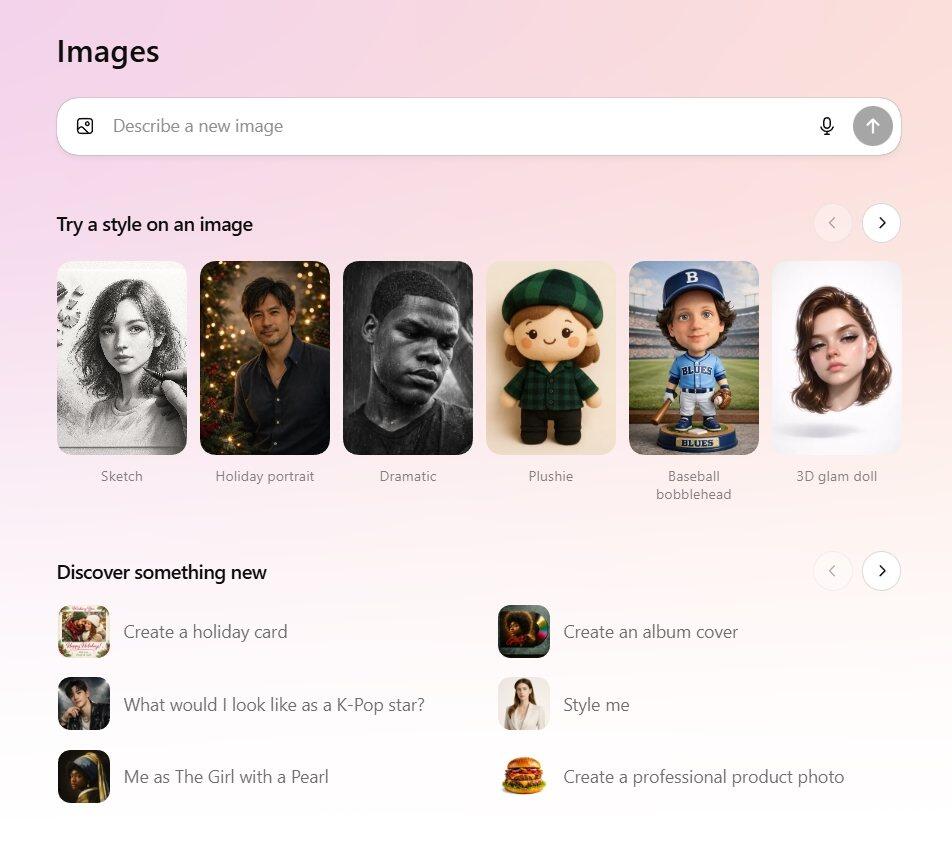
Flaws of the previous GPT Image version
Before we move on to the tests, it’s worth recalling the problems the first version faced. The biggest challenge was changing a person’s clothing while preserving their identity. Each subsequent generation altered the original image – the generated people could look similar, but it was no longer exactly the same individual. Subtle changes in facial features, a different skin tone, or altered proportions meant the final result deviated from the original. Additionally, typos often appeared in generated text, and the model completely failed at translating text visible on images. It was also impossible to precisely remove or add objects to a scene without altering the entire context of the image. So let’s see how GPT Image 1.5 handles these same challenges!Test 1: Removing elements from an interior
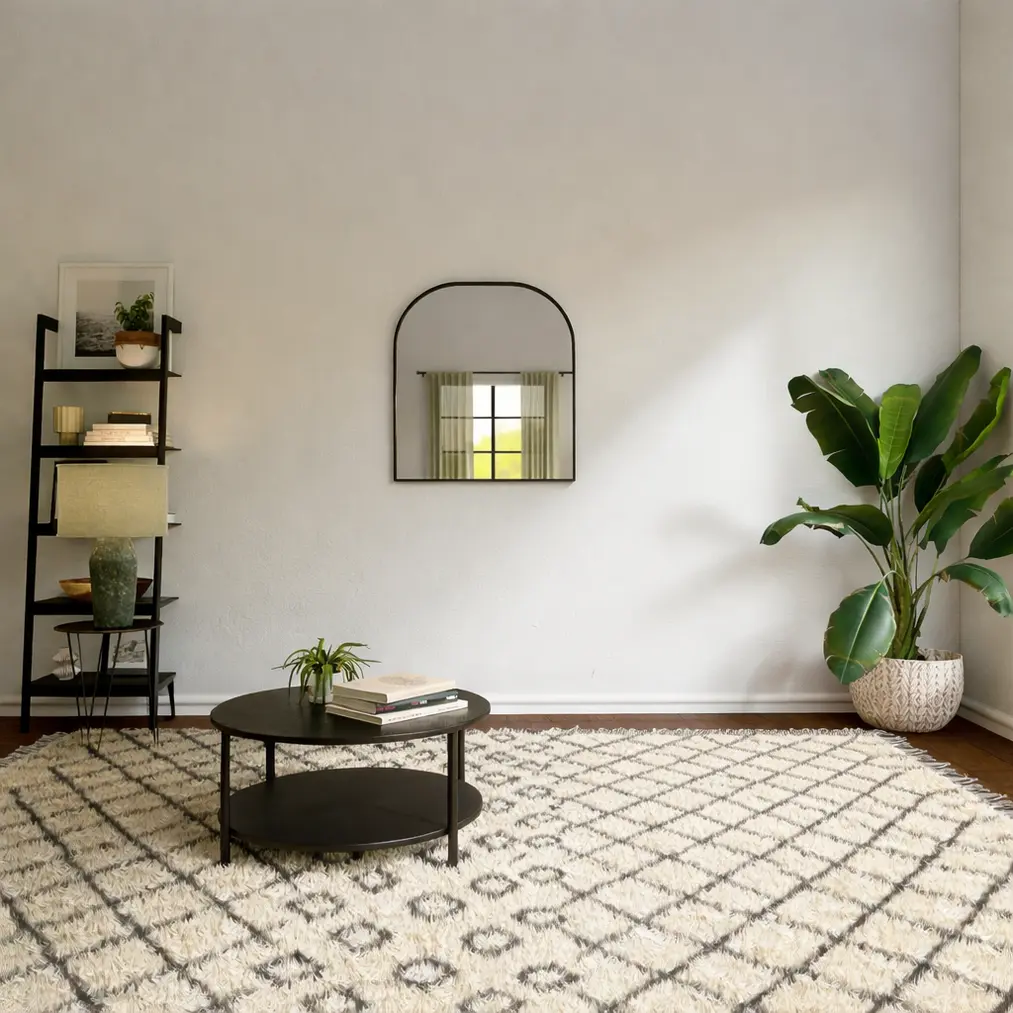
The first practical test involved removing a sofa from a living room photo. This is a classic inpainting task – we want a specific object to disappear while leaving the rest of the scene intact. Visually, the result looks promising – GPT Image 1.5 indeed handled it much better than its predecessor. The sofa disappeared, and in its place a section of wall and floor appeared that blends reasonably well with the rest of the interior.
Test 2: Changing clothes with AI
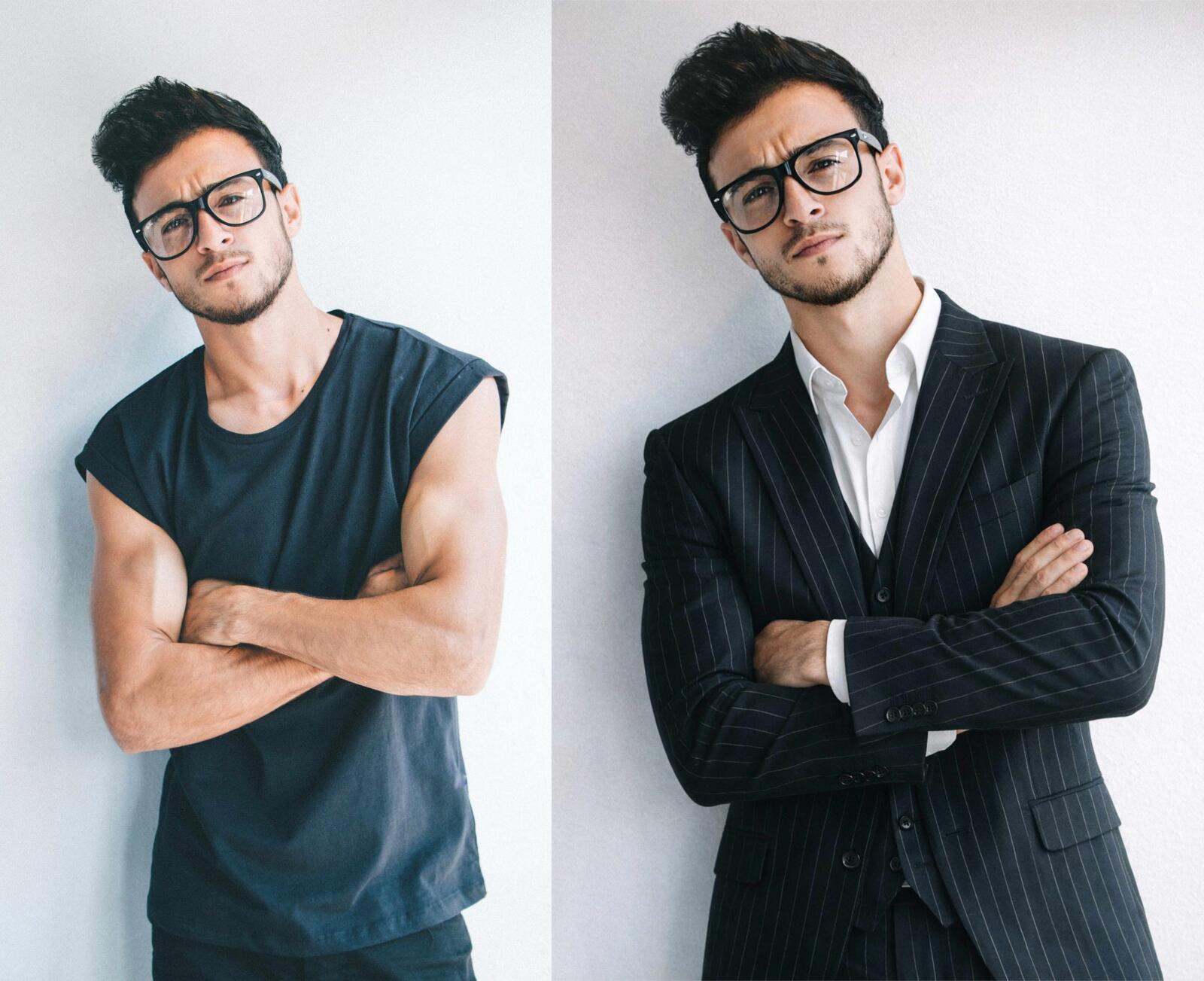
The second test dealt with an even more demanding task – changing a person’s outfit while preserving their identity. I asked GPT Image 1.5 to change a man in a casual outfit into an elegant black suit.My first reaction upon seeing the result: "wow, really impressive!" The suit looks realistic, the body posture remained the same, and the overall composition is cohesive. This is a huge improvement compared to the first version, which generated a practically new person. However, upon closer inspection, the devil is in the details. The facial features have undergone subtle changes – the shape of the nose, the proportions of the jaw, and even the skin tone are slightly different. These are not drastic differences that immediately catch the eye, but when you compare both photos side by side you can see that it’s a very similar, yet different person.
The problem stems from the same mechanism I mentioned earlier – the model doesn’t edit a portion of the image, it generates the entire image from scratch. With each subsequent iteration these subtle differences can accumulate, so after several rounds of editing you will significantly deviate from the original.
Test 3: Using reference images in GPT
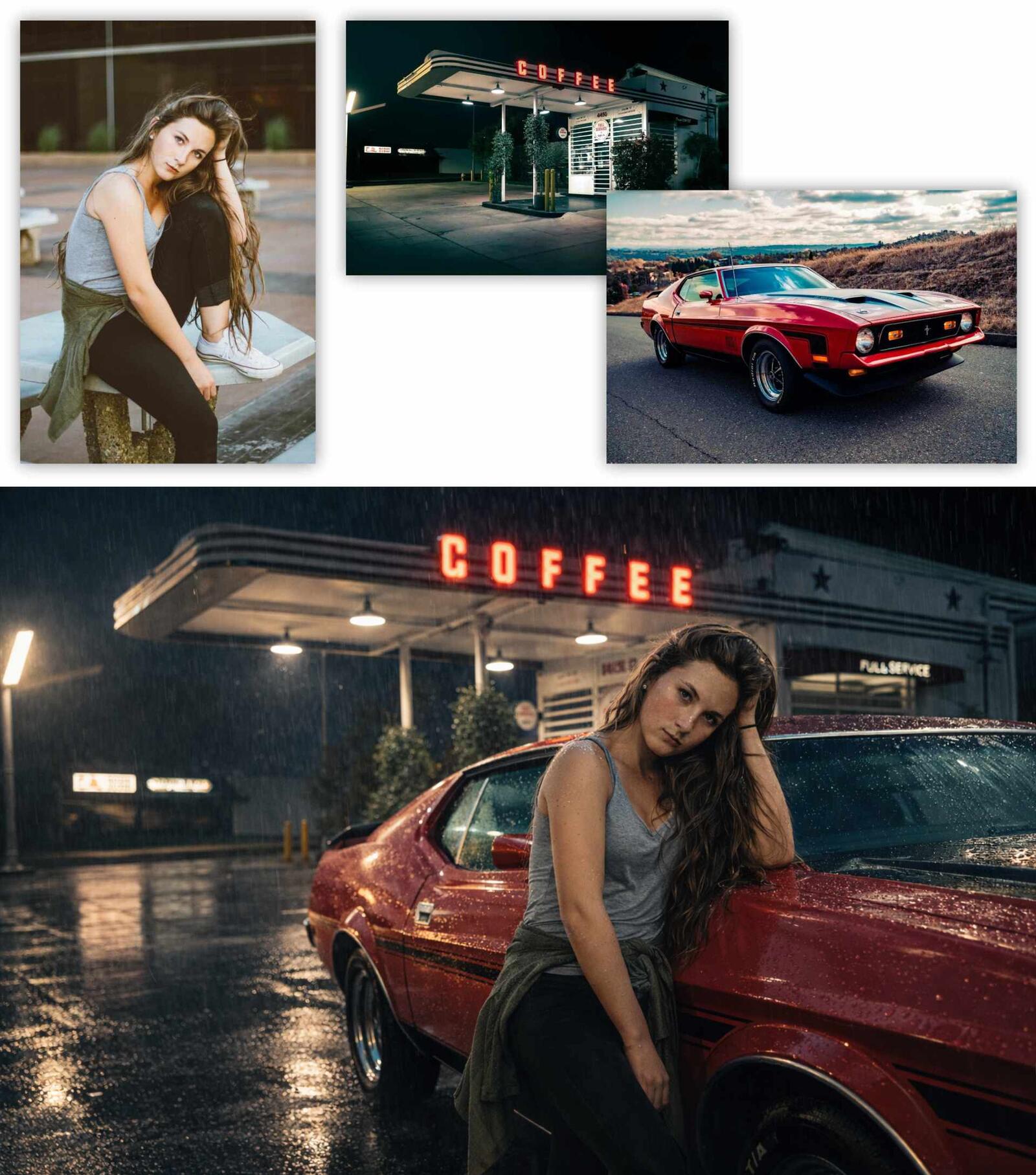
The third test was the most creative – I wanted to see how GPT Image 1.5 would handle merging elements from several different photos into one coherent composition. I fed the model three separate reference images: a portrait of a girl, a red Mustang, and a vintage gas station.The prompt used was: "Treat the attached images as inspiration. Create a shot based on them showing a girl on a rainy evening leaning against the red Mustang from the reference, at a retro gas station styled like the reference. Aspect ratio 16:9".
The final result is admirable. The model not only combined all three elements into one scene but did so in an artistic and atmospheric way. The girl, the car, and the gas station form a coherent visual narrative, and the addition of rainy weather and evening lighting gives the image a cinematic feel. The colors, perspective, and lighting have been harmonized as if all elements were truly present in the same scene. This shows that GPT Image 1.5 performs well not only in editing existing materials but also in creatively combining various inspirations into new compositions.
VIEW AI BASICS COURSE – DISCOVER THE MOST IMPORTANT TOOLS
Test 4: Generating product photos with AI
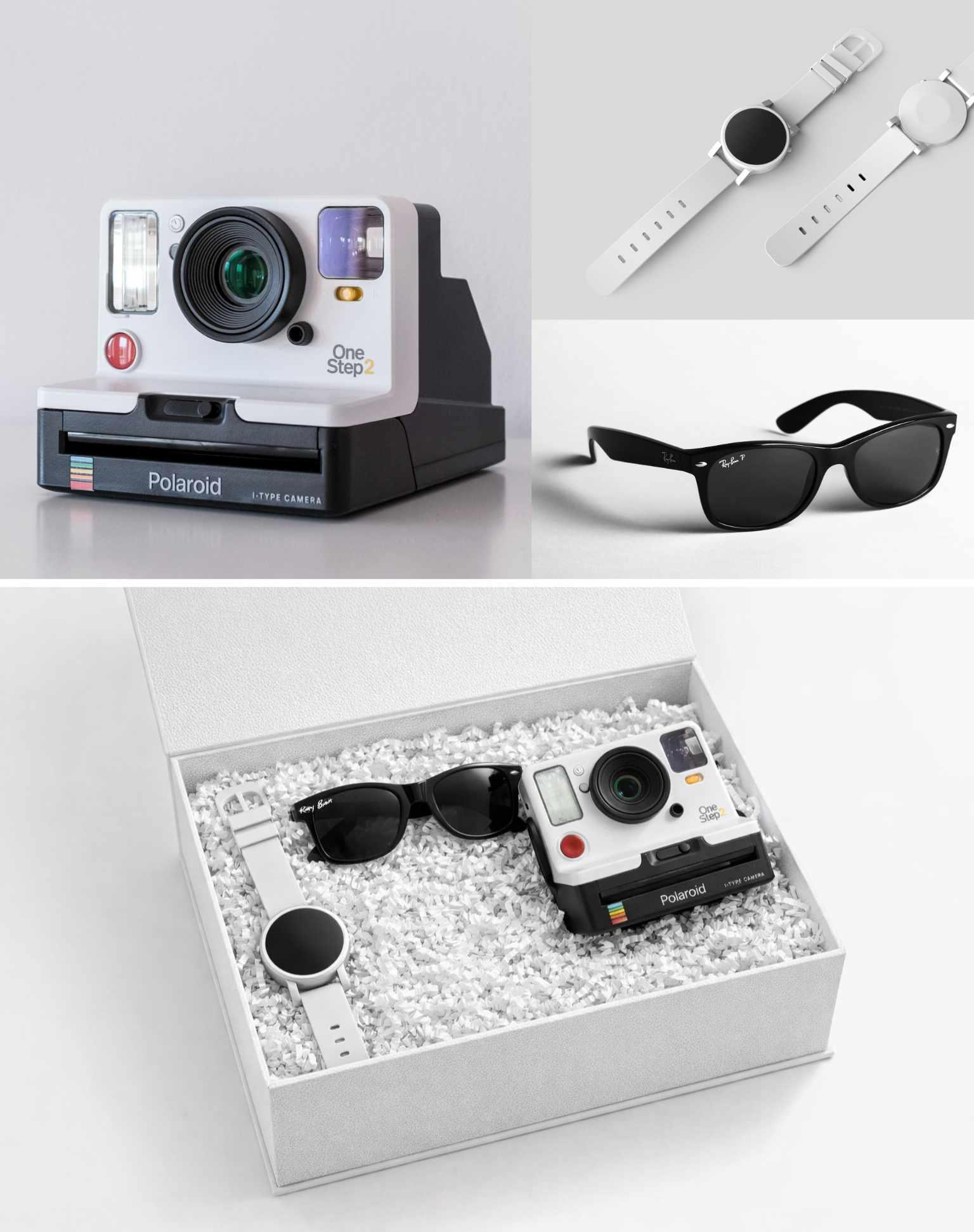
The fourth test focused on a practical e-commerce application – creating a professional product photo. The task was as follows: prepare an elegant gift box containing three specific items – a watch, sunglasses, and a camera.Detailed prompt: "Create a realistic product photo of a white textured gift box containing the three products from the attached images. The box should be on a white background. The box should be lined with white shredded paper as padding, with the items resting on it."
GPT Image 1.5 executed the task very solidly. All three products were placed in the box aesthetically, the paper padding adds a premium feel to the composition, and the white background makes the image immediately ready for use in an online store. The lighting is even, proportions are maintained, and the products look realistic. This is proof that the tool can truly find practical application in small businesses or online shops that need to quickly generate visual materials without organizing a photoshoot.
Test 5: Generating a recipe infographic
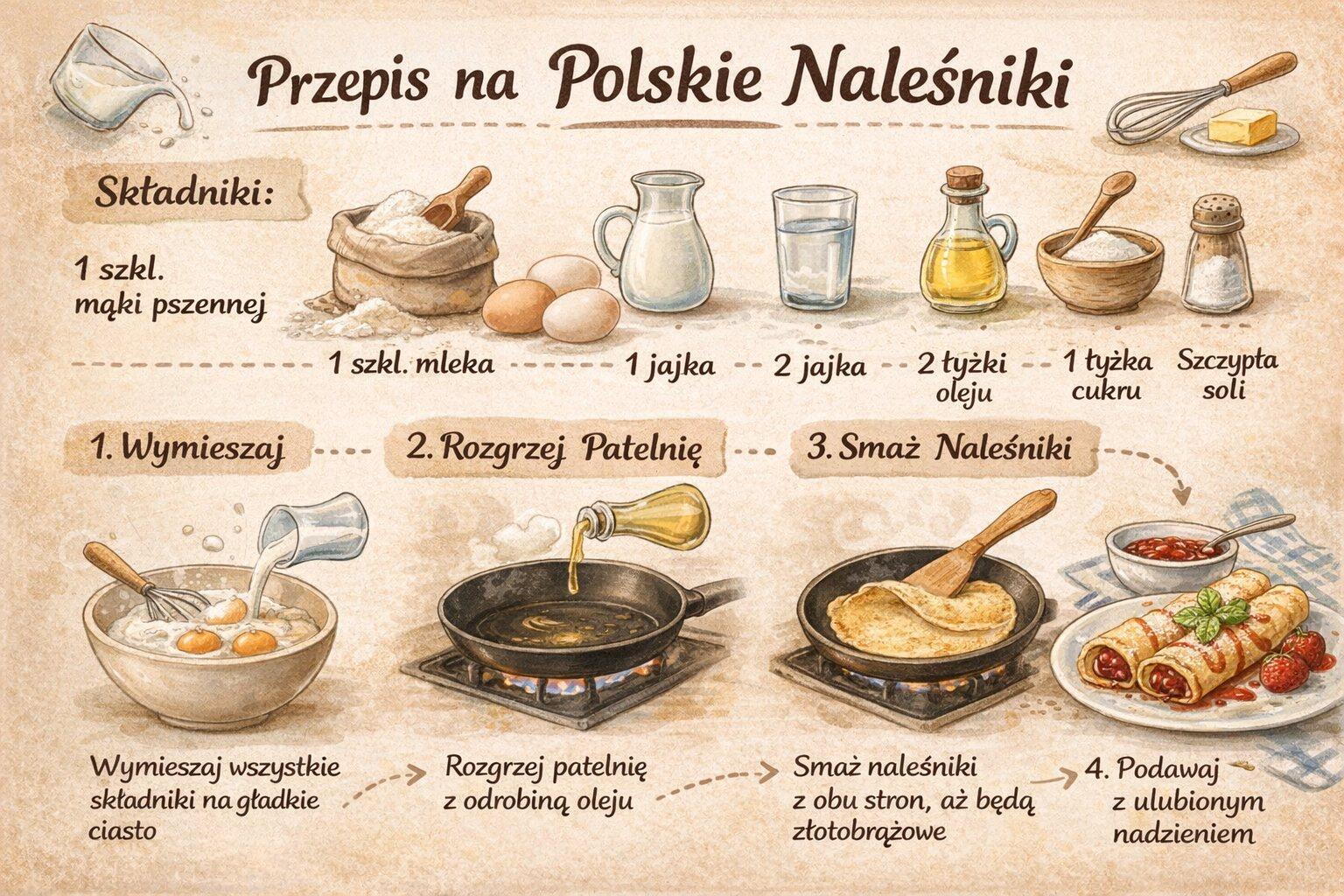
The fifth test was to check the model’s capabilities in creating educational materials – specifically a cooking infographic. I asked it to generate a pancake recipe as a visual step-by-step instruction. The result? Really good!The model generated an aesthetic infographic with clear illustrations of each preparation step, textual descriptions, and a list of ingredients. The fonts are legible, the layout is logical, and the color scheme is pleasing to the eye. Most importantly, the text is almost entirely correct.
There was a minor error in the recipe, but it is still a huge improvement compared to the previous version of GPT Image, which generated texts full of weird characters and typos. This functionality opens the door to quickly creating instructional materials, educational infographics, or visual tutorials - all without the need to use graphic design software.
Test 6: Image Translation with Artificial Intelligence
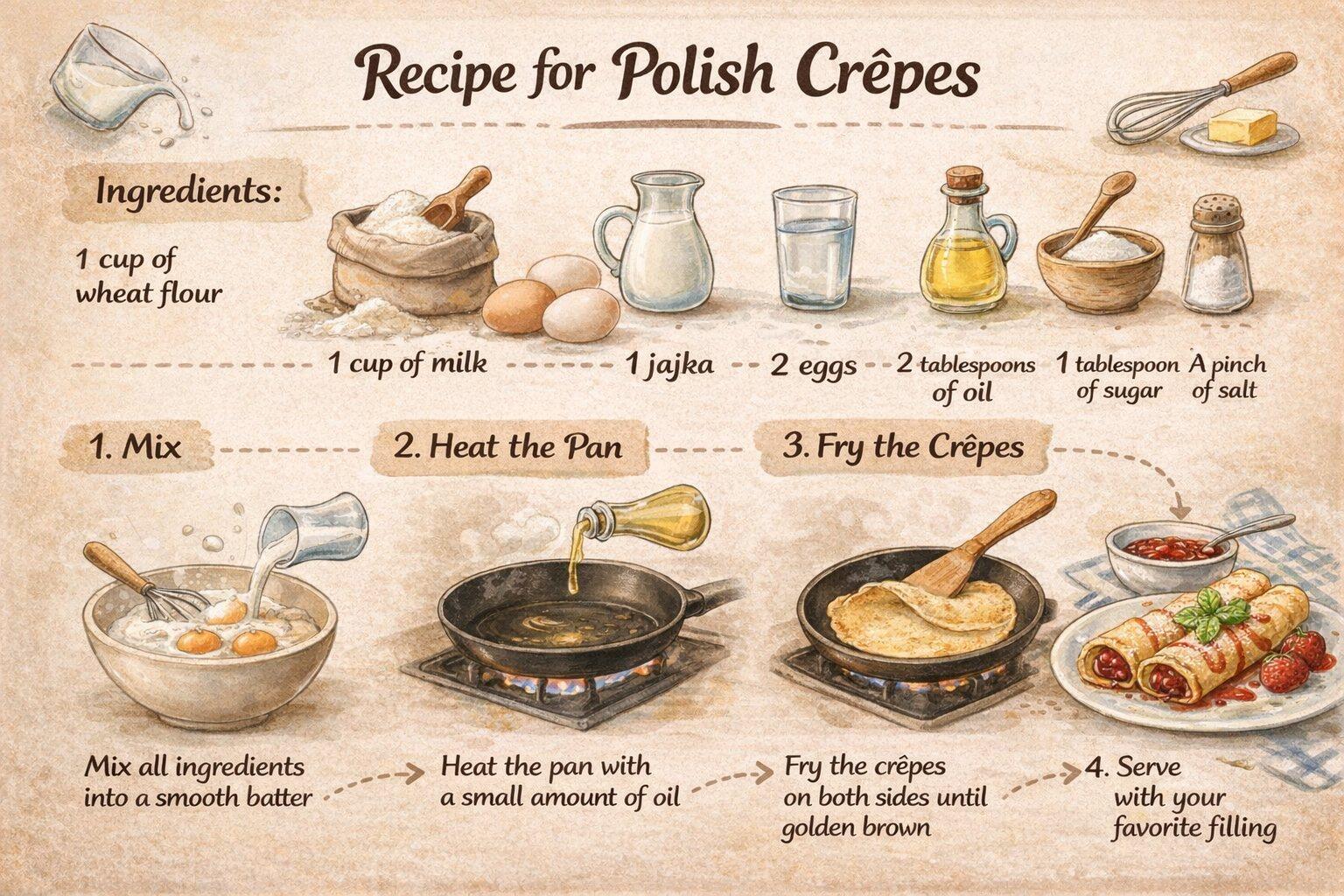
The sixth test was a natural continuation of the previous one - if the model can generate text on images, can it handle its translation?I asked GPT Image 1.5 to translate the previously generated recipe infographic from Polish to English. The result is impressive. The model not only translated all the text, but did so while preserving the original layout and graphic style.
Moreover - and this is the most important observation - it is clear that only the text-containing parts were edited. Illustrations, background colors, the arrangement of elements - everything remained identical to the original. This shows that GPT Image 1.5 can operate more precisely than in some earlier tests. Perhaps the model handles text editing better than object or person modifications? It's an interesting observation that may indicate the direction in which the tool works best.
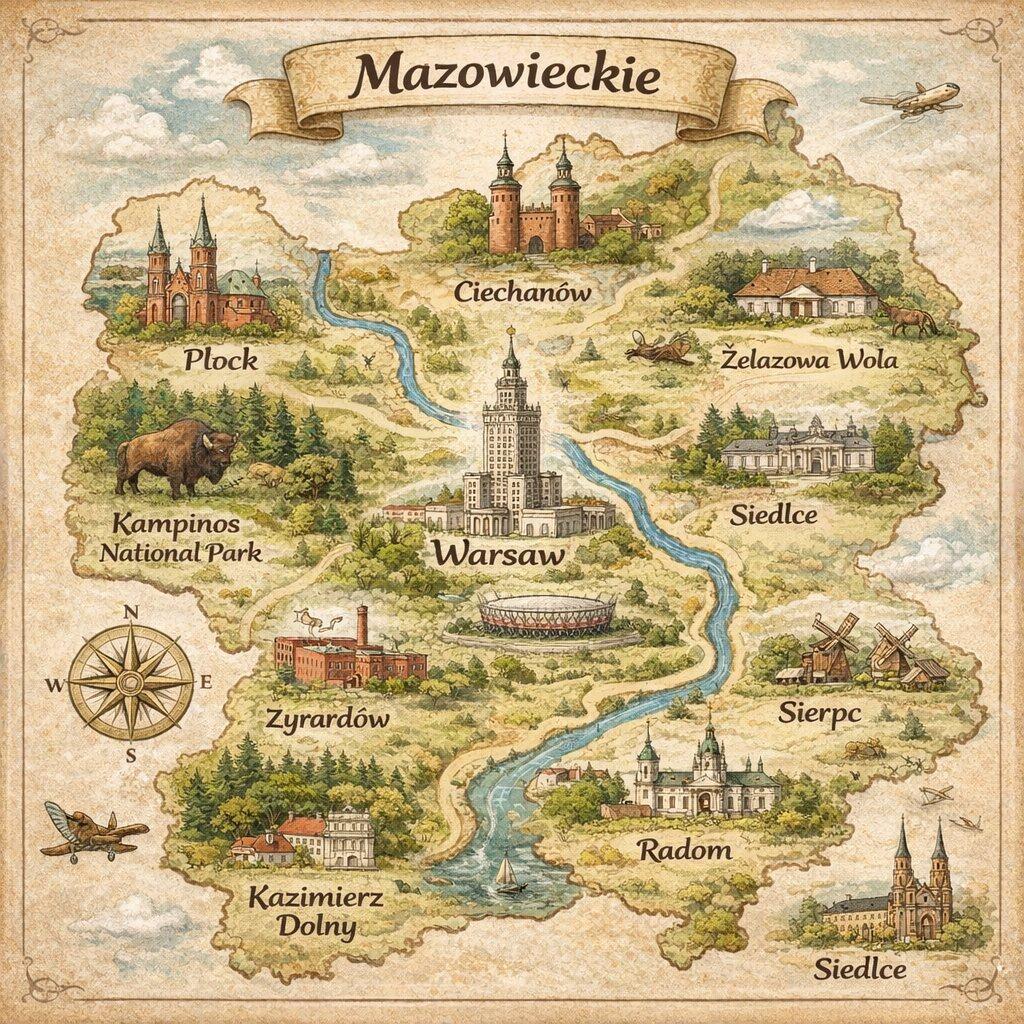
Test 7: Voivodeship Map Generation
The seventh test was meant to check the model’s geographical knowledge. The task was simple: generate a map of the Mazovia Voivodeship. I deliberately did not include any reference materials - I wanted to see if GPT Image 1.5 has sufficiently precise information about Polish regions in its database. Unfortunately, the model clearly got confused here.The generated graphic is aesthetically pleasing, has nice colors, and looks professional... but the outline of the Mazovia Voivodeship bears no relation to reality. The shape is completely incorrect, the borders do not match the actual geography, and the placement of cities seems random. This clearly shows the limitations of this type of tool - GPT Image 1.5 is great at creating aesthetic compositions and visual manipulation, but you cannot rely on it for tasks that require factual precision without providing appropriate source materials.
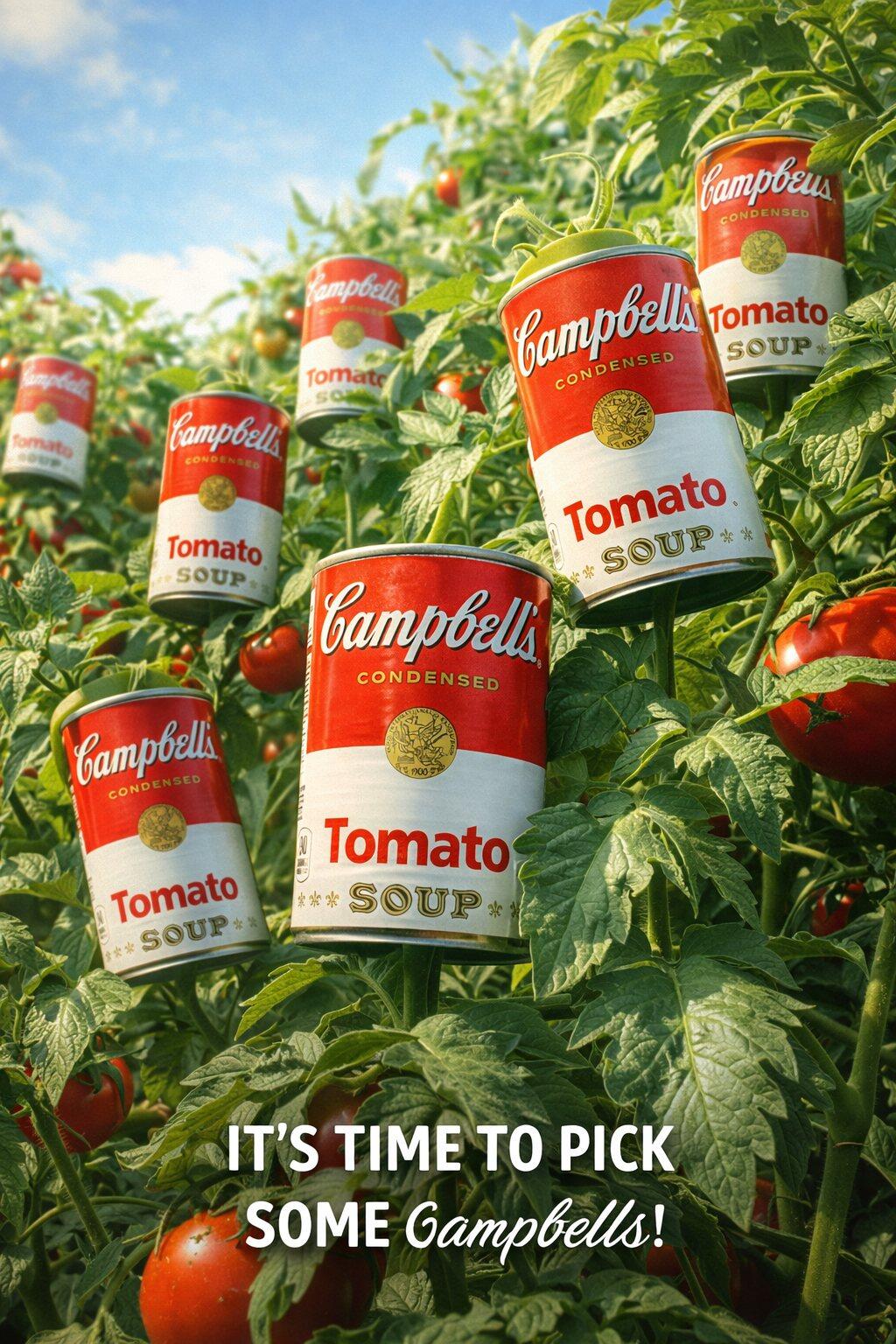
Test 8: Generating Advertising Graphics in Image 1.5
The eighth test transported us into the world of marketing and advertising. I decided to check whether GPT Image 1.5 could create a catchy, creative advertising graphic with an imaginative visual concept.The prompt was: "Create a realistic advertising graphic resembling a photograph of a Campbell's soup can. The graphic should depict Campbell's cans growing on tomato plants, but instead of tomatoes! The graphic should have a sunny day atmosphere. Add a catchy advertising slogan in English to the graphic. 9:16 aspect ratio."
The final result is a real positive surprise! The model created a surreal yet extremely impressive composition that would be perfect for an advertising campaign. Campbell's cans actually "grow" on tomato bushes, creating an absurd but eye-catching image. The sunny lighting, natural color palette, and dynamic composition make the graphic look like a professional advertising production. Furthermore, the generated advertising slogan is catchy and fits well with the visual concept. This shows that GPT Image 1.5 can be a real support for marketing teams when creating promotional materials.
Test 9: Old Photo Restoration
The last test used one of GPT's built-in functions - the prompt "Restore an old photo", which is meant to restore old, damaged photographs. I fed the model a photo from the 1940s and... frankly, the result disappointed me. The effect is too artificial and deviates too much from the original. The model overly "smoothed" faces, giving them a plastic, unnatural look, and the colorization is too intense and inconsistent with the era's aesthetic. It looks more like computer-generated graphics than a restored photograph. The problem likely lies in the prompt used by OpenAI - perhaps it tries too aggressively to "enhance" the image instead of gently refreshing it. You could probably get better results by crafting a more precise prompt yourself. Nevertheless, I would expect the official tool from OpenAI to perform better out of the box.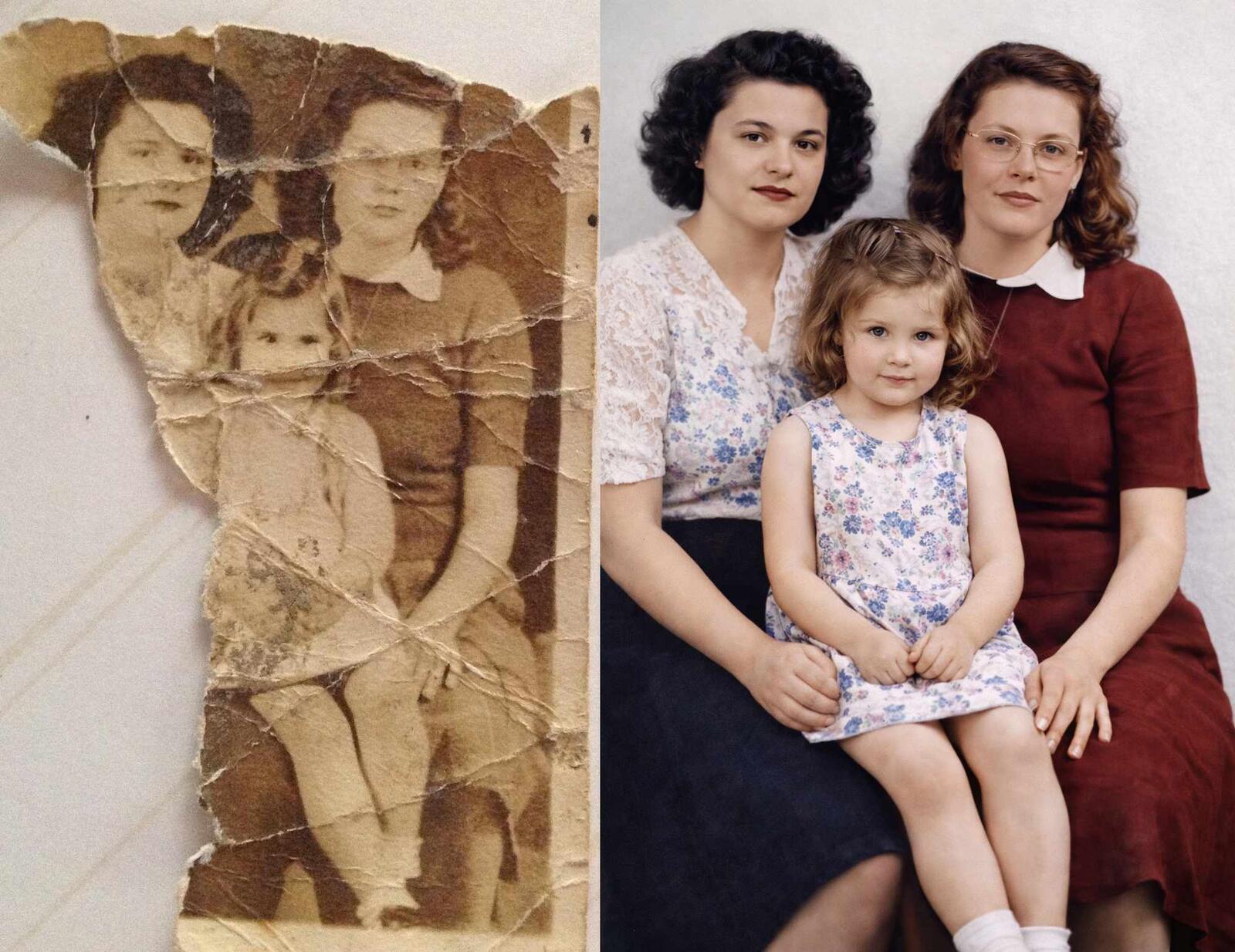
Summary - is it worth using GPT Image 1.5?
GPT Image 1.5 is definitely a big step forward compared to its predecessor. The improvement in text rendering is spectacular - what was practically impossible before now works really well. The ability to create complex compositions from multiple sources and generate marketing materials are additional strengths. The biggest limitation remains the lack of true inpainting - the model regenerates the entire graphic instead of editing only selected parts, making it impossible to fully preserve the identity of people or objects during editing.Did GPT Image 1.5 match up to Nano Banana Pro? It's hard to say definitively, but the gap has certainly narrowed. For ChatGPT users, this is great news - they no longer have to look for alternatives for basic graphics tasks. Will it replace professional tools? No. But as support in everyday work - definitely.
Author

Przeczytaj o programie AI - Artificial Intelligence na naszym blogu
-
![Virtual staging and AI photos in real estate listings - what does the AI Act change?]()
Virtual staging and AI photos in real estate listings - what does the AI Act change?
The AI Act vs real estate. Does virtual staging require an AI label? Find out how to avoid legal pitfalls and properly label photos. -
![How to Label AI Content According to the Law? Ready-Made Formulas for Designers and Archviz Studios.]()
How to Label AI Content According to the Law? Ready-Made Formulas for Designers and Archviz Studios.
How to Legally Label AI Visualizations? Check When a Label Is Mandatory and Copy Ready-Made Formulas for Your Projects. -
![Do you have to label visualizations as AI? What does the AI Act really say and what changes on August 2, 2026?]()
Do you have to label visualizations as AI? What does the AI Act really say and what changes on August 2, 2026?
AI Act from August 2! Do you have to label 3D visualizations as AI? Check where the legal boundary lies between concept and deepfake. -
![AI for furniture manufacturers - See how to create furniture packshots and catalog arrangements with raya.design]()
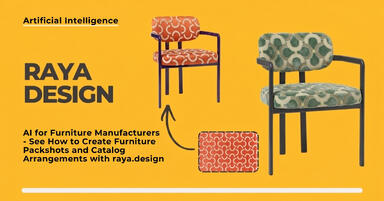
AI for furniture manufacturers - See how to create furniture packshots and catalog arrangements with raya.design
Packshots without time-consuming sessions? Discover Raya Design. Change upholstery and create arrangements with AI in moments. See how it works!