EN
EN PL
PL ES
ES


Publication date: 23-06-2025 | Update date: 18-06-2025 | Author: Piotr Kurpiewski

-
Online courses
- All
 3ds Max
 AI - Artificial Intelligence
 Blender
 Corona renderer
 GstarCAD
 LayOut
 Photoshop
 Interior Design
 Revit
Revit Sketchup
 Stable Diffusion
 V-ray
V-ray
"Online courses" are comprehensive online training programs that will help you quickly master the software you are interested in.
- Plugins
- 3D Models
- Help
- Articles
How to write effective prompts in FLUX Kontext? A guide for designers.
Good visualizations with FLUX Kontext start with… a good prompt. In this guide you’ll learn what a prompt is, how to write one, what to avoid, and which phrases to use to create photorealistic visualizations without rendering. We’ll show concrete examples and the most common mistakes made by designers. If you want to learn to speak the AI language and achieve professional results in seconds, this article is for you!
Index
FLUX Kontext is a breakthrough AI tool that enables the creation of photorealistic interior visualizations without classical rendering. Based on simple views from SketchUp or other programs, it can build a coherent, realistic image in seconds. However, to achieve the best results, you need one thing: a good prompt.
What is a prompt and why does it matter?
A prompt is nothing more than a text instruction you give to the AI to describe what it should generate. It’s a form of communication with the AI that must be both precise and comprehensible enough for the machine. The better you describe what you expect, the greater the chance of a high-quality result.
Principles of effective prompting according to FLUX Kontext
The creators of FLUX Kontext recommend using prompts that have a clear structure and include key information about the desired outcome. Here are the most important guidelines:
- Maintain the camera angle – use phrases like "keep the same camera angle and framing" or "preserve the original perspective".
- Don't describe what is already visible – you don't need to mention elements that are already in the input image (e.g., walls, floors) unless you want to change them.
- Avoid vagueness – instead of "nice room" write "modern loft interior with soft indirect lighting".
- Use strong verbs – e.g. "transform", "enhance", "create", "generate".

Common mistakes in prompts
Many users make similar mistakes that lead to chaotic or inconsistent results. Here are some of them:
Best practices - how to write like a professional?
If you aim for a photorealistic effect, it’s worth using terms associated with photographic and rendering technologies. In the context of V-Ray or Corona, these include: "global illumination", "photorealistic lighting", and "PBR materials". When it comes to photography, a general DSLR reference works well: "DSLR", or even specific lens parameters: "35mm lens" or aperture settings: "f/2.8 aperture".
Such phrases help direct the model toward the desired effect and generate lighting and textures in a way that aligns with the principles of physics and traditional photography.
Example prompts in FLUX Kontext
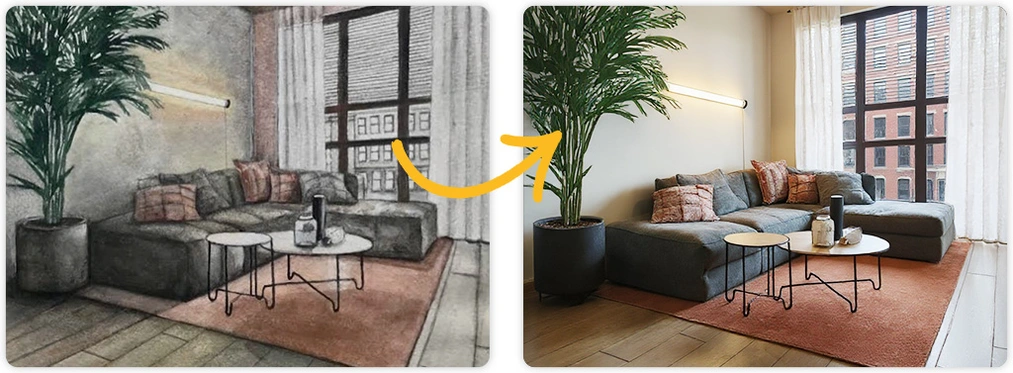
Watercolor → photorealistic visualization:
"Transform this watercolor sketch into a realistic interior visualization with natural light. Keep the camera angle. Keep the original materials and textures. Make it an ultra-detailed view with global illumination and photo-based rendering materials."
SketchUp → pencil sketch:
"Convert this SketchUp view into a hand-drawn pencil sketch with natural graphite lines, cross-hatching, and visible paper texture. Maintain the original perspective and keep the spatial layout intact."
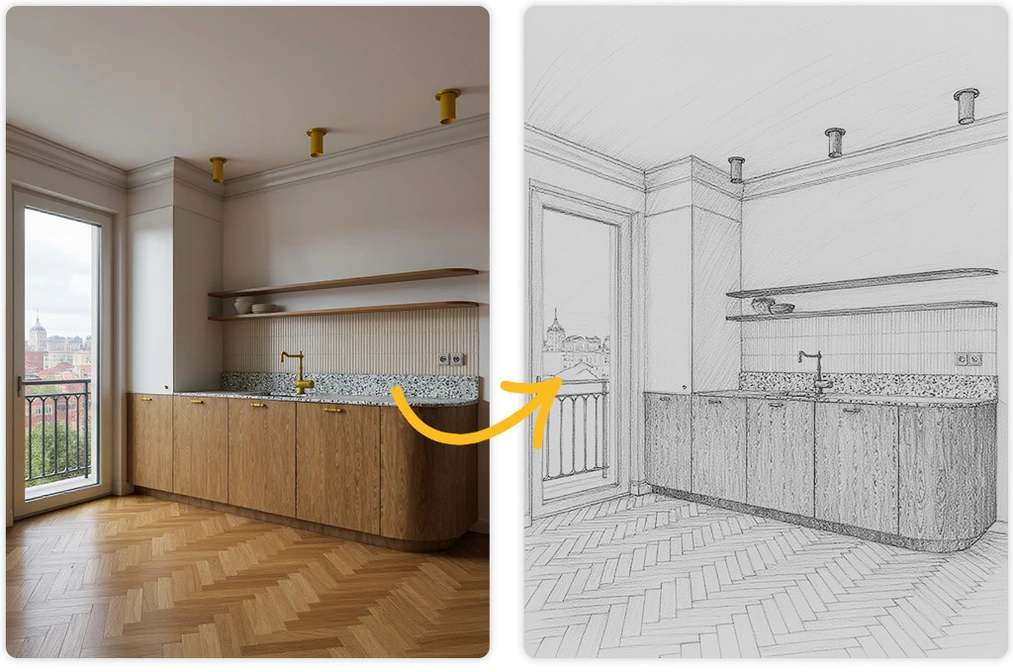
As you can see, prompts don’t have to be long to deliver good results. The key is precision and a command of the language that the AI "speaks". Try it yourself and find your own style.
If you want to learn how to work with artificial intelligence, check out our Stable Diffusion and Flux course in architecture and interior design - there you will find even more theory dedicated to prompting and concrete examples of using popular models to generate inspirations, textures, editing and post-production of interior and exterior visualizations in the ForgeUI interface.
Conclusion
A good prompt is the key to success when working with FLUX Kontext, as well as other AI tools. A well-formulated instruction will allow you to create visualizations that look like professional renders, but are produced in seconds, without the need for a powerful computer or knowledge of complex software. Remember: precision, simplicity, and familiarity with AI language will make you a true creator of the future!
Author

Przeczytaj o programie AI - Artificial Intelligence na naszym blogu
-
![Virtual staging and AI photos in real estate listings - what does the AI Act change?]()
Virtual staging and AI photos in real estate listings - what does the AI Act change?
The AI Act vs real estate. Does virtual staging require an AI label? Find out how to avoid legal pitfalls and properly label photos. -
![How to Label AI Content According to the Law? Ready-Made Formulas for Designers and Archviz Studios.]()
How to Label AI Content According to the Law? Ready-Made Formulas for Designers and Archviz Studios.
How to Legally Label AI Visualizations? Check When a Label Is Mandatory and Copy Ready-Made Formulas for Your Projects. -
![Do you have to label visualizations as AI? What does the AI Act really say and what changes on August 2, 2026?]()
Do you have to label visualizations as AI? What does the AI Act really say and what changes on August 2, 2026?
AI Act from August 2! Do you have to label 3D visualizations as AI? Check where the legal boundary lies between concept and deepfake. -
![AI for furniture manufacturers - See how to create furniture packshots and catalog arrangements with raya.design]()
AI for furniture manufacturers - See how to create furniture packshots and catalog arrangements with raya.design
Packshots without time-consuming sessions? Discover Raya Design. Change upholstery and create arrangements with AI in moments. See how it works!