EN
EN PL
PL ES
ES


Publication date: 17-11-2025 | Update date: 18-11-2025 | Author: Piotr Kurpiewski

-
Online courses
- All
 3ds Max
 AI - Artificial Intelligence
 Blender
 Corona renderer
 GstarCAD
 LayOut
 Photoshop
 Interior Design
 Revit
Revit Sketchup
 Stable Diffusion
 V-ray
V-ray
"Online courses" are comprehensive online training programs that will help you quickly master the software you are interested in.
- Plugins
- 3D Models
- Help
- Articles
Nano Banana - How to edit a photo or graphic?
Nano Banana, officially known as Gemini 2.5 Flash, is the latest AI model from Google that has revolutionized the way visualizations and photos are edited in the design industry. It allows you to remove or add objects, change materials, improve lighting, or insert realistic characters in minutes: without re-rendering and without any knowledge of complex graphic tools. In this article, we show how to work with Nano Banana in the Gemini and Google AI Studio interfaces: how to craft effective prompts in English and how to combine them with other models like FLUX Kontext. This is a comprehensive guide to the practical use of AI in interior design, design, and architectural visualizations.
Index
Nano Banana is one of the latest artificial intelligence models from Google, officially known as Gemini 2.5 Flash. Although the name sounds funny, it hides an exceptionally effective photo editing and visualization tool, especially useful for architects, interior designers, and 3D graphic artists.
What is Nano Banana and how does it work?
The model belongs to the Gemini family, which means it "understands" both text and image, analyzes spatial relationships, and maintains consistency between scene elements. In practice: when you ask it to remove a plant from a desk or change the upholstery on a sofa, Nano Banana does it naturally, without distorting light, perspective, or reflections.
This is not a new image generator but an intelligent editor, ideal for quick visualization tweaks, texture swaps, adding elements or characters without re-rendering the entire scene.
If you want to learn the basics of the model, read our previous post titled: Nano Banana – free AI photo editor from Google.
How to use Nano Banana: Gemini and Google AI Studio
Nano Banana works in several environments, but two of them are key for image work: Gemini and Google AI Studio.
Gemini - quick start with Nano Banana
Gemini (available at: https://gemini.google.com/) is the simplest way to get started. Just drag an image and type a text command, e.g. “Change the colour of the chair from green to blue.”
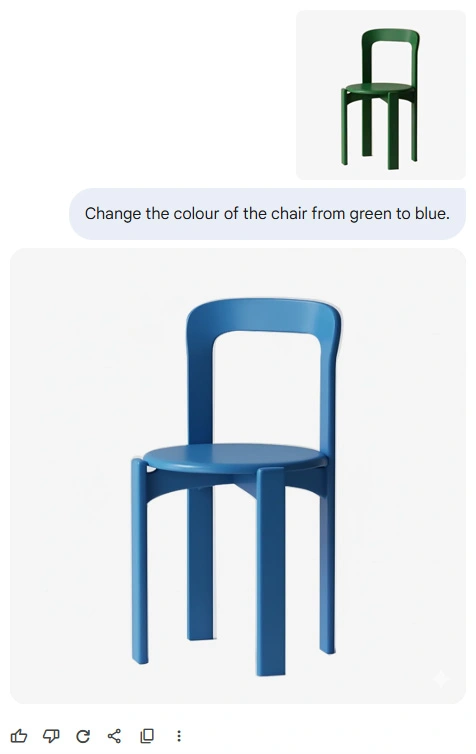
The interface requires no configuration, and the model automatically recognizes the image. It’s the perfect tool for:
- quick prompt testing,
- visualization retouching,
- minor layout adjustments.
Google AI Studio - more features and control
If you want to work more precisely, choose Google AI Studio available at: https://aistudio.google.com/. This environment allows you to set, among other things:
- Temperature - creativity level (for photo editing best to start at 0.7),
- Aspect ratio - image proportions,
AI Studio is especially useful for technically challenging tasks. It allows handling images with various proportions and complex input parameters.
How to write effective prompts in Nano Banana?
Nano Banana operates on prompting, i.e. issuing commands in text form. The more precisely you describe the change, the better the final result.
How to build good prompts?
Avoid too general instructions. Instead of simply: “Remove the chair.” write:
“Remove the chair from the provided image of a modern living room. Don’t change anything else on the interior image. Keep its camera angle, perspective and framing unchanged.”
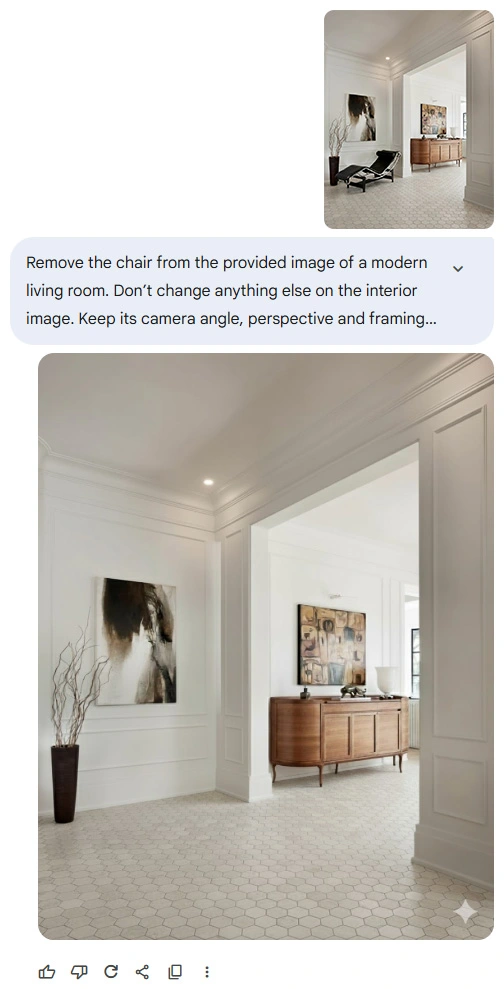
With such phrases the model understands the context of the room, preserves lighting and composition, and focuses on just one task. This is crucial because each edit in Nano Banana generates a new image. Without a precise prompt, you may lose scene consistency.
Which language is best for prompts with Nano Banana?
Nano Banana understands English best. Models in the Gemini family are primarily trained on English data, so English commands produce the most natural results.
For the best outcomes, use precise verbs:
- place – place,
- blend – blend,
- replace – replace,
- maintain / keep – maintain,
- using provided images – using provided images.
These terms precisely convey your intention and help the AI understand the task correctly.
It’s worth noting that Nano Banana also understands Polish and instructions expressed in it. If you wish, you can write in your native language equally well.
How to end a prompt to maintain consistency?
It’s best to close each command with the phrase: “Don’t change anything else on the image. Keep its camera angle, perspective and framing unchanged.”
This signals the model not to interfere with lighting, background, or overall composition.
Photo or visualization editing in Nano Banana: practical examples and prompts
Nano Banana is not just a simple retouch tool but a full-fledged AI-based visual editor that allows you to modify interiors and 3D visualizations while preserving realism. It was also added relatively recently to Photoshop (alongside another popular model – FLUX Kontext), which shows Adobe’s trust in this architecture.
Below you will find concrete work scenarios – from removing and adding objects to texture swaps and inserting characters in a realistic way. Each example contains a ready-to-use prompt you can copy into Gemini or Google AI Studio.
How to remove an object from a photo or visualization in Nano Banana?
One of the most common designer tasks is getting rid of unwanted elements, e.g., a plant, a lamp, or a chair that disrupts the composition. Nano Banana handles this instantly, provided you describe the command precisely.
Example prompt: “Remove all of the furniture from the provided image of a modern living room. Don’t change anything else on the interior image. Keep its camera angle, perspective and framing unchanged.”
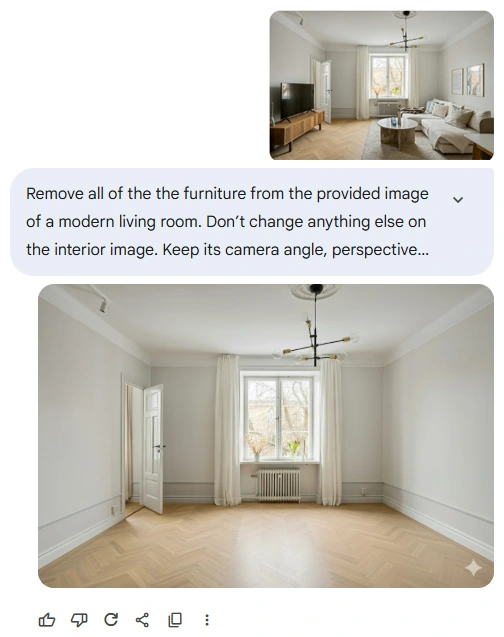
Prompt creation rules:
- Always specify what to remove (chair, plant, lamp or more generally: furniture),
- Mention the type of interior (living room, kitchen, bedroom),
- Add an ending about preserving framing and lighting.
Important: the more precise the description, the less likely the model will “improve” something on its own. Nano Banana can replicate reflections in windows, light, and shadows by fully understanding the context. This is something classic tools like Content-Aware Fill in Photoshop can’t achieve.
How to add a new object to an interior with AI?
Nano Banana excels at adding new elements to existing photos – e.g., a new sofa, vase, or lamp. Just specify exactly what to add and where it should go in the prompt.
Example prompt: “Using provided image, place only the green armchair into the living room. It should stand just under the painting, in the corner. Make sure it blends seamlessly into the image. Don’t change anything else. Keep the original image’s camera angle, perspective and framing unchanged.”
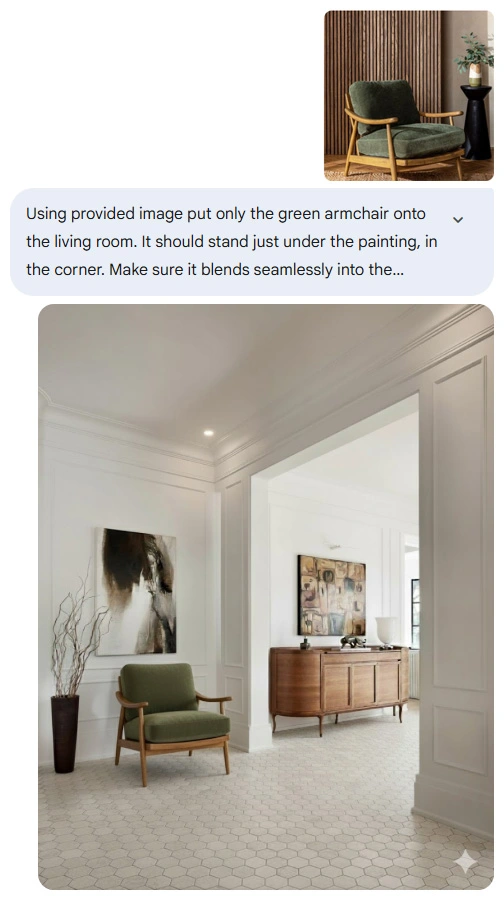
Use location terms (e.g., in front of, next to, near the window). You can specify material and color (e.g., wooden, marble, black metal legs). Nano Banana automatically adjusts perspective and lighting to match the rest of the image. The final result looks like the new element was always there.
How to swap one element for another – reference editing
Sometimes you need to replace one object with another – e.g., swap a chair for a different model or a lamp for another version from the manufacturer’s catalog. In such cases, use a second reference image.
Prompt with reference image: “Replace the existing carpet in the interior scene (Image 1) with the new carpet from the provided reference image (Image 2). The new carpet must seamlessly blend into the environment, matching lighting and shadows for a photorealistic result. Preserve the entire composition, framing, perspective, and all other elements of Image 1.”
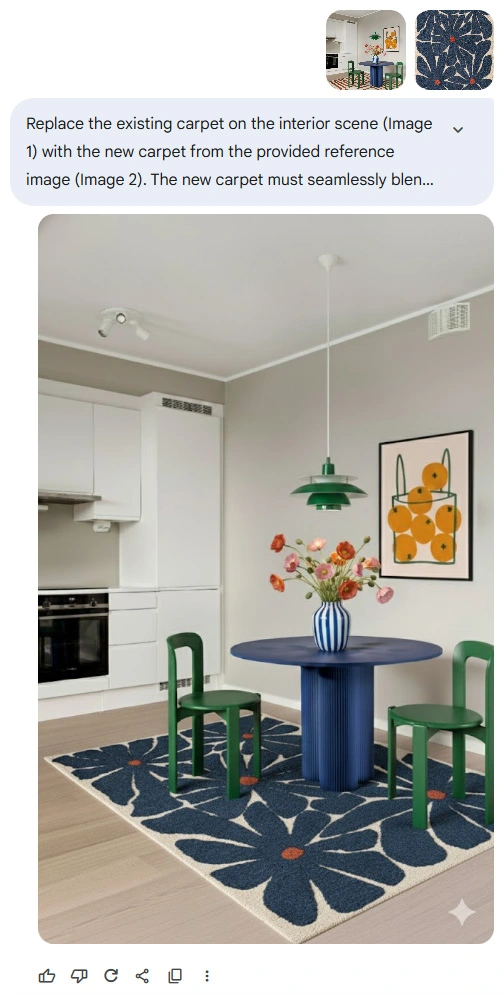
In practice, Image 1 is your visualization, and Image 2 is a reference from a catalog or moodboard.
With this structure, Nano Banana transfers the selected object, adjusting it to the interior’s lighting and space. It’s a huge time saver for prototyping and client consultations. You can show different furniture, tile, or fixture options in minutes without opening a 3D program.
How to change a texture or material in an image?
Another use of Nano Banana is changing one material to another, e.g., wood to marble, velvet to leather, or white fronts to dark. Just provide the model with a reference image of the desired texture.
Prompt: “Using the provided images, change the wooden kitchen countertop in the interior scene to the marble texture from the reference image. It should blend seamlessly into the image with matching light and shadows. Don’t change anything else on the interior image. Keep its camera angle, perspective and framing unchanged.”
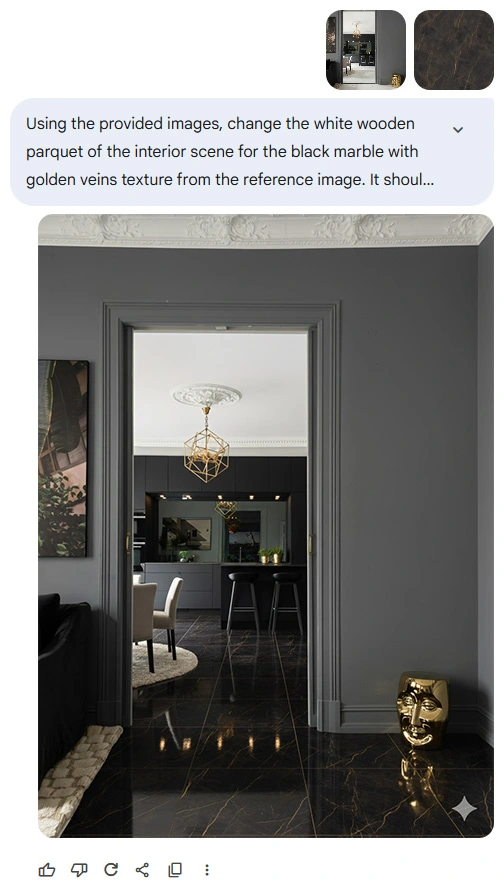
Make sure the reference texture is sufficiently large (ideally 1K). For a better result, specify the exact material (e.g. white Carrara marble, oak veneer, matte black stone), even if it seems obvious. Add the phrase “blend seamlessly” to avoid an unnatural insertion effect.
This is one of the most practical ways to use Nano Banana in an interior designer’s workflow. You can quickly test different finish options and show clients realistic comparisons without tedious rendering.
How to add a realistic person to an AI visualization?
One of the most striking uses of Nano Banana is adding people to visualizations: e.g. in home, commercial or lifestyle scenes. Unlike traditional “cut-outs”, the model can match the person to the scene’s lighting and perspective, creating entirely new representations.
Prompt: “Using the provided images, place the woman from the reference image onto an interior scene image. She blends into the image seamlessly, with matching light and shadows. She is sitting on the sofa in a relaxed pose, reading a book. It could be an intimate moment of her morning daily routine. Keep her facial features, outfit and overall similarity. Don’t change anything else on the interior image. Keep its camera angle, perspective and framing unchanged.”
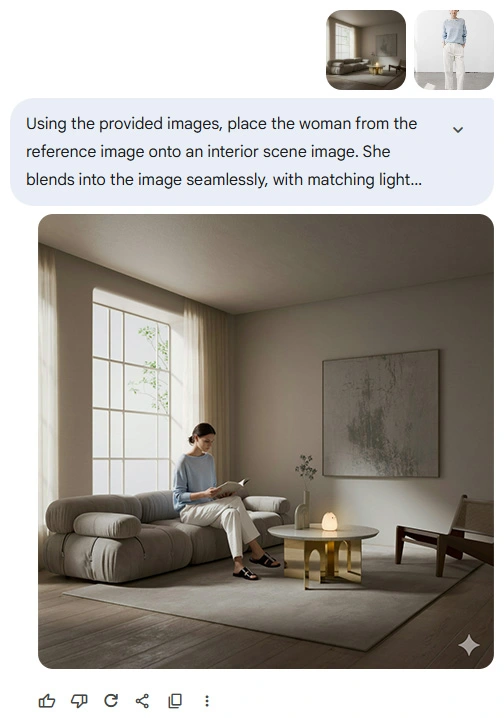
Why does this work? AI understands spatial relationships and lighting, preserves the reference subject’s facial and clothing features, and adds subtle shadows and reflections that enhance realism.
This way the person doesn’t look “pasted on” but becomes an integral part of the interior. You can thus create narrative, emotional visualizations: morning routine scenes, social gatherings, moments of relaxation in the living room. This makes it much easier for viewers to connect with the design.
Key tips for editing AI visualizations
Nano Banana works best when you make one change at a time and keep the original framing. Avoid prompts with multiple modifications at once. The model then loses context and starts to fantasize. Sometimes, instead of replacing an object in one go, it’s better to first remove the unwanted item and then add the new one in a separate session.
Always append the ending “Keep it's camera angle, perspective and framing unchanged” to maintain shot consistency. You don’t have to use the exact same wording, but keep the meaning. It’s also worth working with high-quality images and a lower temperature than the default.
Most common mistakes when working with Nano Banana
Even the best prompt doesn’t always yield a perfect result. Many errors stem from excessive generality, lack of precision, and sometimes they are simply random. Here is a list of the most common issues to be aware of:
Too vague commands
“Remove object” is not enough! The AI needs to know what, with what, and how very precisely. Include the type of interior and the ending about preserving the framing. You can also use a classic text model like Gemini or GPT to expand your prompt.
No location specified
Nano Banana understands space very well, but you have to specify it. Instead of “add a lamp”, write “add a lamp on the left side of the sofa near the window.”
Too high creativity (Temperature)
A value above 0.7 makes the model start to fantasize. Some tasks require creativity, but for simple transformations, values lower than 1 work better.
No phrase limiting changes
Always end the prompt with: “Don’t change anything else on the image.” This is the simplest way to maintain the integrity of the entire scene.
Poor quality reference image
If the source or reference image is too small, Nano Banana may misinterpret details. It’s best to use JPG or PNG files that are at least 1024 px on the longer side.
Accident?
I don’t think so, yet! The nature of generative AI finally involves a certain randomness. Among many good results, a few will be noticeably worse. Simply ask the exact same question again to get a completely different answer.
Nano Banana vs FLUX Kontext - which is better?
Nano Banana is great for editing existing visualizations: it allows you to remove or add elements, change textures, and introduce realistic tweaks without re-rendering.
On the other hand, FLUX Kontext generates photorealistic shots directly from SketchUp, Blender, or 3ds Max views, creating complete scenes with full consistency and capturing complex details. You can find more about this in the article titled: How to turn a SketchUp view into a photorealistic rendering with AI - FLUX Kontext?
In practice, both tools complement each other. Nano Banana can’t do what FLUX Kontext does so well, and vice versa. If you want to learn how to use them together along with other models such as Seedream, Qwen Image 2509, video models like WAN, Veo, or Kling, as well as enhancers and upscalers, be sure to check out our AI Visualization and Video Course - Nano Banana, FLUX Kontext, Veo, etc. in Architecture and Design.
Summary
Nano Banana is a fast and intuitive way to realistically edit visualizations without rendering. For architects, interior designers, and creatives, it’s the ideal tool for concept testing, retouching, and tailoring details to the client. Combined with FLUX Kontext and other AI models, it enables the creation of professional visual materials in record time—without quality loss and with full control over the outcome.
This is no longer the future; it’s the new standard in the industry. If you want to introduce AI solutions into your workflow, Nano Banana is the best place to start.
Author

Przeczytaj o programie AI - Artificial Intelligence na naszym blogu
-
![Virtual staging and AI photos in real estate listings - what does the AI Act change?]()
Virtual staging and AI photos in real estate listings - what does the AI Act change?
The AI Act vs real estate. Does virtual staging require an AI label? Find out how to avoid legal pitfalls and properly label photos. -
![How to Label AI Content According to the Law? Ready-Made Formulas for Designers and Archviz Studios.]()
How to Label AI Content According to the Law? Ready-Made Formulas for Designers and Archviz Studios.
How to Legally Label AI Visualizations? Check When a Label Is Mandatory and Copy Ready-Made Formulas for Your Projects. -
![Do you have to label visualizations as AI? What does the AI Act really say and what changes on August 2, 2026?]()
Do you have to label visualizations as AI? What does the AI Act really say and what changes on August 2, 2026?
AI Act from August 2! Do you have to label 3D visualizations as AI? Check where the legal boundary lies between concept and deepfake. -
![AI for furniture manufacturers - See how to create furniture packshots and catalog arrangements with raya.design]()
AI for furniture manufacturers - See how to create furniture packshots and catalog arrangements with raya.design
Packshots without time-consuming sessions? Discover Raya Design. Change upholstery and create arrangements with AI in moments. See how it works!