EN
EN PL
PL ES
ES


Publication date: 16-02-2026 | Update date: 16-02-2026 | Author: Piotr Kurpiewski

-
Online courses
- All
 3ds Max
 AI - Artificial Intelligence
 Blender
 Corona renderer
 GstarCAD
 LayOut
 Photoshop
 Interior Design
 Revit
Revit Sketchup
 Stable Diffusion
 V-ray
V-ray
"Online courses" are comprehensive online training programs that will help you quickly master the software you are interested in.
- Plugins
- 3D Models
- Help
- Articles
SketchUp, V-Ray - Frame Buffer Window Not Responding - Tutorial Guide
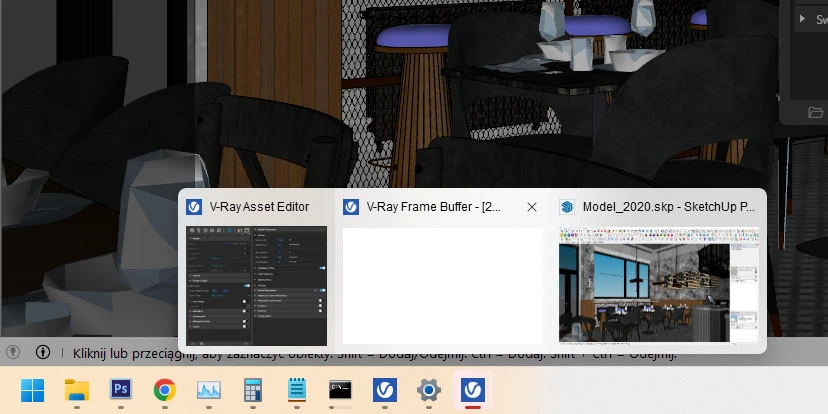
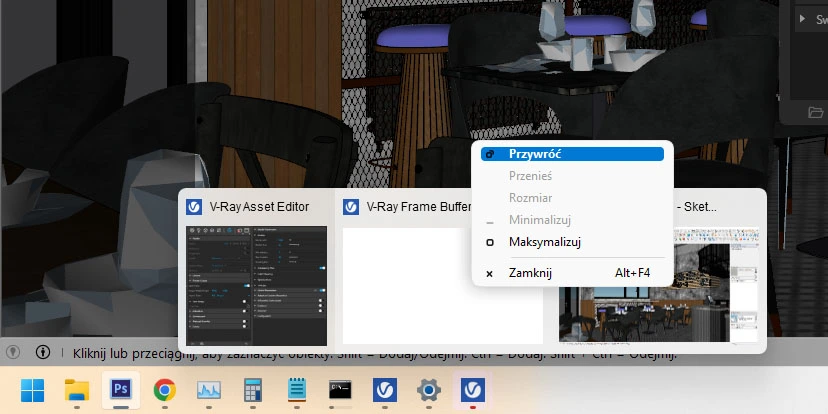
When the Frame Buffer window is unresponsive, simply hover your cursor over the white Frame Buffer window at the bottom of the Windows taskbar. Then right-click to bring up the context menu and click "Restore". This will restore the functionality of the render progress window without stopping and restarting the render.
V-Ray 5 for SketchUp introduced many conveniences, such as the LightMix feature, advanced post-production, or completely new special materials. Unfortunately, it can also be a source of frustration, especially when the Frame Buffer window becomes unresponsive while working in Windows.
How to restore the Frame Buffer window?
When searching for the right lighting or testing convincing materials, I often render the same scene multiple times. In the meantime, I sometimes switch back to SketchUp, move the Frame Buffer window, minimize and maximize it. Often, V-Ray carries out the render in the background but does not allow previewing the progress of the visualization. The workspace preview then appears white, and although rendering continues, the progress cannot be viewed in any way.
The problem of the Frame Buffer window closing on me occurred very frequently; the more visualizations I performed, the more often it happened. Each time, I would stop the render, save the .skp file, then close it, only to open it again a moment later. You can imagine how frustrating that was.
It turns out the solution is simple and does not require any intervention from V-Ray. Just point your mouse at the white Frame Buffer window on the bottom of the Windows taskbar, open the context menu with a right-click, and select Restore. Only this way will the rendering progress window functionality be restored.
Summary
I hope that I have solved once and for all the issue discussed in this article. If you are just starting your adventure with V-Ray, many unpleasant surprises still await you. Save yourself from them today and find answers to the most popular questions in our course SketchUp - V-Ray 5 from the basics.
Author

Przeczytaj o programie Sketchup na naszym blogu
-
![Profile Builder 4 or Magic Molding? Comparison of Ornamentation Plugins in SketchUp]()
Profile Builder 4 or Magic Molding? Comparison of Ornamentation Plugins in SketchUp
How does Profile Builder 4 differ from Magic Molding? Scope, pricing, profile libraries, and learning curve. Find out which plugin fits your projects. -
![The Best Free SketchUp Plugins for Interior Designers in 2026!]()
The Best Free SketchUp Plugins for Interior Designers in 2026!
Which SketchUp plugins are really worth having? Discover 7 free extensions for interior designers and find out which ones have just stopped being free! -
![English wainscoting in SketchUp - how to design wall panels step by step]()
English wainscoting in SketchUp - how to design wall panels step by step
How to design English wainscoting in SketchUp? Learn the rules for panel division, wainscot proportions, and speed up your work with the Magic Molding plugin. -
![Reversed Faces in SketchUp – why are blue faces showing and how to fix them?]()
Reversed Faces in SketchUp – why are blue faces showing and how to fix them?
Blue faces in SketchUp are flipped faces. Learn where they come from, how to quickly locate and fix them before they mess up your render or model export.




Want to learn Sketchup? Check out our free online course!