EN
EN PL
PL ES
ES


Publication date: 20-11-2025 | Update date: 20-11-2025 | Author: Mateusz Ciećwierz

-
Online courses
- All
 3ds Max
 AI - Artificial Intelligence
 Blender
 Corona renderer
 GstarCAD
 LayOut
 Photoshop
 Interior Design
 Revit
Revit Sketchup
 Stable Diffusion
 V-ray
V-ray
"Online courses" are comprehensive online training programs that will help you quickly master the software you are interested in.
- Plugins
- 3D Models
- Help
- Articles
What are the advantages and limitations of SketchUp compared to more advanced CAD tools?
SketchUp has enjoyed immense popularity among architects, interior designers, and hobbyists for years. Its intuitive interface and fast performance attract those who want to efficiently create 3D models without delving into complex tools.But can SketchUp truly compete with advanced CAD programs like AutoCAD, Revit, or Archicad? In this article, we will take a closer look at the strengths and limitations of this popular software and suggest when it's worth reaching for it and when it's better to choose a more professional solution.
Index
Advantages of SketchUp - Why Do Designers Choose It?
One of the greatest advantages of SketchUp is its ease of use. The software is designed to be intuitive – even people with no 3D modeling experience can create their first projects within a few hours. The interface is clear, and the basic tools operate in a natural and logical way.
Another strong point is the speed of work. SketchUp lets you instantly test different design concepts, which is invaluable in the early stages of design. Instead of spending time on precise dimensioning of every element, we can quickly visualize our ideas and present them to clients.
The program also offers access to a huge library of ready-made 3D models through the 3D Warehouse. This repository contains millions of free objects – from furniture and electronics to plants and architectural elements. This way, we don't have to model everything from scratch.
SketchUp also supports an extensive ecosystem of plugins that significantly expand its capabilities. Add-ons like V-Ray allow you to create photorealistic visualizations, while tools like ClothWorks enable fabric simulation. If you want to discover the latest features of the software, be sure to check out 5 new features in SketchUp 2025 that will streamline architects' and designers' work.
The license cost is also not insignificant. Although SketchUp Pro is not free, its price is much lower compared to giants like Revit or Archicad. For small design studios or freelancers, this can be a deciding factor.

CHECK OUT ONLINE COURSES - SKETCHUP FROM THE BASICS
Limitations of SketchUp - Where Does Its Potential End?
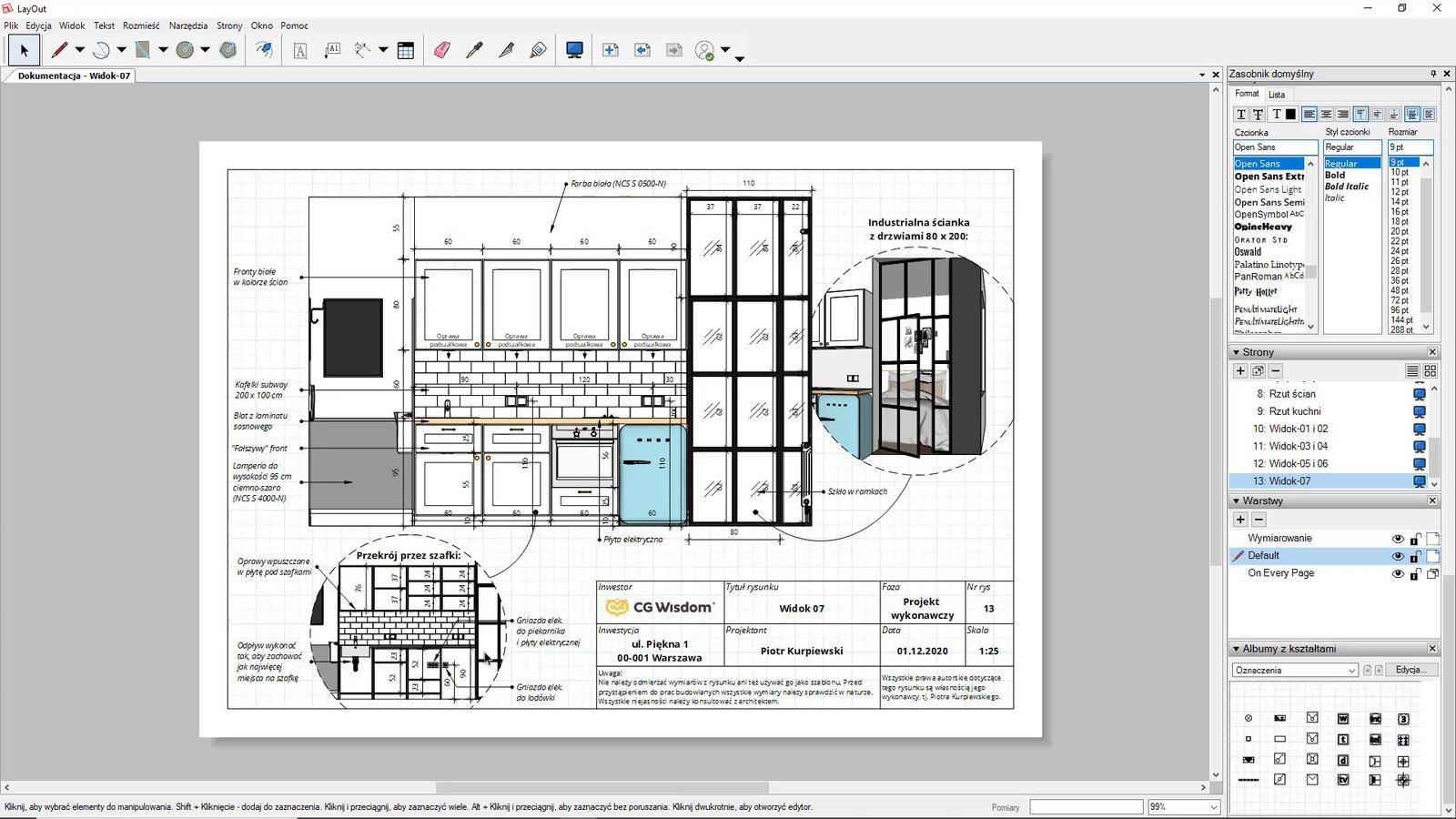
Despite its many advantages, SketchUp also has its clear limitations. The program is as precise as other CAD tools, but it was not designed for creating complex technical documentation. Although SketchUp Pro offers the LayOut module for preparing 2D drawings, it is mainly effective for small-scale projects such as interior designs or minor architecture. If you want to learn more about this tool's capabilities, be sure to read what LayOut is and what it's used for in SketchUp. For large construction projects requiring extensive execution documentation, CAD programs will be far more efficient.
Another issue is handling large projects. SketchUp performs great with small models, but when a project grows to the size of an entire building with full equipment, the program begins to slow down. Model optimization then becomes a necessity – you can learn proven techniques in the article on how to optimize a SketchUp model for rendering performance in V-Ray.
SketchUp is also not a BIM (Building Information Modeling) program. This means that it does not have a database of building elements. We cannot automatically generate material takeoffs, cost estimates, or work schedules. Everything must be created manually or with the help of external plugins, which significantly extends the design process.
Expert's opinionPiotr KurpiewskiArchitekt, Grafik, Wykładowca PJATK w Warszawie
SketchUp is the ideal tool for architects and interior designers who value speed and intuitiveness. It allows you to instantly transform ideas into 3D visualizations, greatly improving client communication at the conceptual stage. Thanks to the rich 3D Warehouse library and support for rendering plugins like V-Ray, we can create professional presentations in a short time. It’s a program that combines ease of use with the real needs of the design industry.
The lack of advanced engineering tools is another limitation. SketchUp does not offer functions for structural analysis, thermal calculations, or acoustic simulations. For projects requiring these types of analyses, additional software is necessary.
The program also has limited capabilities in terms of team collaboration. Although there are cloud solutions, working on the same project by multiple people simultaneously is much less seamless than with dedicated BIM platforms.
When Is SketchUp the Best Choice?
SketchUp excels at conceptual design. If you need to quickly visualize an idea, test various layout options, or create an attractive presentation for a client – it’s the perfect program. Its intuitiveness lets you focus on creativity instead of technicalities.
The program is also a great choice for interior designers. The ability to quickly create visualizations of apartments, houses, or commercial spaces, combined with the rich library of furniture and accessories, makes it the go-to tool in this field.
SketchUp also works well for small architectural projects – single-family homes, pavilions, small service buildings. In such cases, its capabilities are sufficient, and the ease of use significantly speeds up the workflow.
For freelancers and small design studios, SketchUp can be an optimal solution. Lower license costs, a shorter learning curve, and sufficient features for completing most jobs make the program very cost-effective.
When Is It Better to Reach for Advanced CAD Tools?
If you are working on large construction projects, programs like Revit or Archicad will be a much better choice. Their capabilities for managing complex structures, automatically generating documentation, and coordinating between disciplines are incomparably greater.
When a project requires detailed technical documentation, there is no better solution than dedicated CAD software. AutoCAD or Archicad offer precise tools for creating construction drawings, cross-sections, and technical details that comply with all standards. If you are wondering whether to choose Revit or Archicad – check out our guide comparing both programs.
For projects requiring BIM technology, the choice is obvious. Only programs like Revit or Archicad offer full BIM functionality – from the database of elements to automatic schedules and integration with other industry tools. You can learn more about this technology in the article BIM – what it is and why it is revolutionizing the construction industry.
For engineering projects requiring structural calculations, thermal modernization analyses, or CFD simulations, specialized software is essential. SketchUp simply was not created for these kinds of tasks.
VIEW ONLINE COURSES - REVIT FROM THE BASICS
Can You Combine SketchUp with CAD Programs?
Many design offices adopt a hybrid approach, leveraging the strengths of different programs. SketchUp can be used for quick concept creation and 3D visualizations, while detailed technical documentation is produced in AutoCAD or Revit.
There is a possibility of importing and exporting files between programs. SketchUp can open DWG files from AutoCAD, allowing the use of ready-made 2D drawings for 3D modeling. Conversely, SketchUp models can be exported to formats compatible with other software.
However, this approach requires good work organization and a clear division of responsibilities within the team. Each program should be used for what it does best, minimizing the need to convert data between formats.

How to Develop Skills in SketchUp?
If you have decided to learn SketchUp, it’s worth starting with solid fundamentals. Knowing the basic tools isn’t enough – the key to efficient work is understanding the program’s philosophy and learning best modeling practices.
It’s also worthwhile to learn how to work with rendering add-ons such as V-Ray. The ability to create photorealistic visualizations significantly increases the value of projects and makes them more persuasive to clients. On the CGWisdom platform, you’ll find a comprehensive selection of online SketchUp courses that will guide you through every stage – from basics to advanced visualization techniques.
Don’t forget to get familiar with LayOut – the 2D documentation tool provided with SketchUp Pro. Although it doesn’t match the capabilities of AutoCAD, it can be sufficient for simpler projects.
Summary – Choose Wisely
SketchUp is an excellent tool for rapid conceptual modeling, visualization, and interior design. Its simplicity, speed, and affordable price make it ideal for many applications. However, you must keep its limitations in mind – the lack of BIM functionality, lower precision, and issues with large projects can be a hurdle in professional architectural work.
The key to success is a conscious choice of tools tailored to the nature of the projects. For small-scale projects, concepts, and visualizations, SketchUp is an excellent choice. For large buildings, complex documentation, or teamwork, it’s worth investing in CAD or BIM software.
The best results often come from combining different tools, leveraging the strengths of each.Author

Przeczytaj o programie Sketchup na naszym blogu
-
![Profile Builder 4 or Magic Molding? Comparison of Ornamentation Plugins in SketchUp]()
Profile Builder 4 or Magic Molding? Comparison of Ornamentation Plugins in SketchUp
How does Profile Builder 4 differ from Magic Molding? Scope, pricing, profile libraries, and learning curve. Find out which plugin fits your projects. -
![The Best Free SketchUp Plugins for Interior Designers in 2026!]()
The Best Free SketchUp Plugins for Interior Designers in 2026!
Which SketchUp plugins are really worth having? Discover 7 free extensions for interior designers and find out which ones have just stopped being free! -
![English wainscoting in SketchUp - how to design wall panels step by step]()
English wainscoting in SketchUp - how to design wall panels step by step
How to design English wainscoting in SketchUp? Learn the rules for panel division, wainscot proportions, and speed up your work with the Magic Molding plugin. -
![Reversed Faces in SketchUp – why are blue faces showing and how to fix them?]()
Reversed Faces in SketchUp – why are blue faces showing and how to fix them?
Blue faces in SketchUp are flipped faces. Learn where they come from, how to quickly locate and fix them before they mess up your render or model export.




Want to learn Sketchup? Check out our free online course!